Docker & Containerization
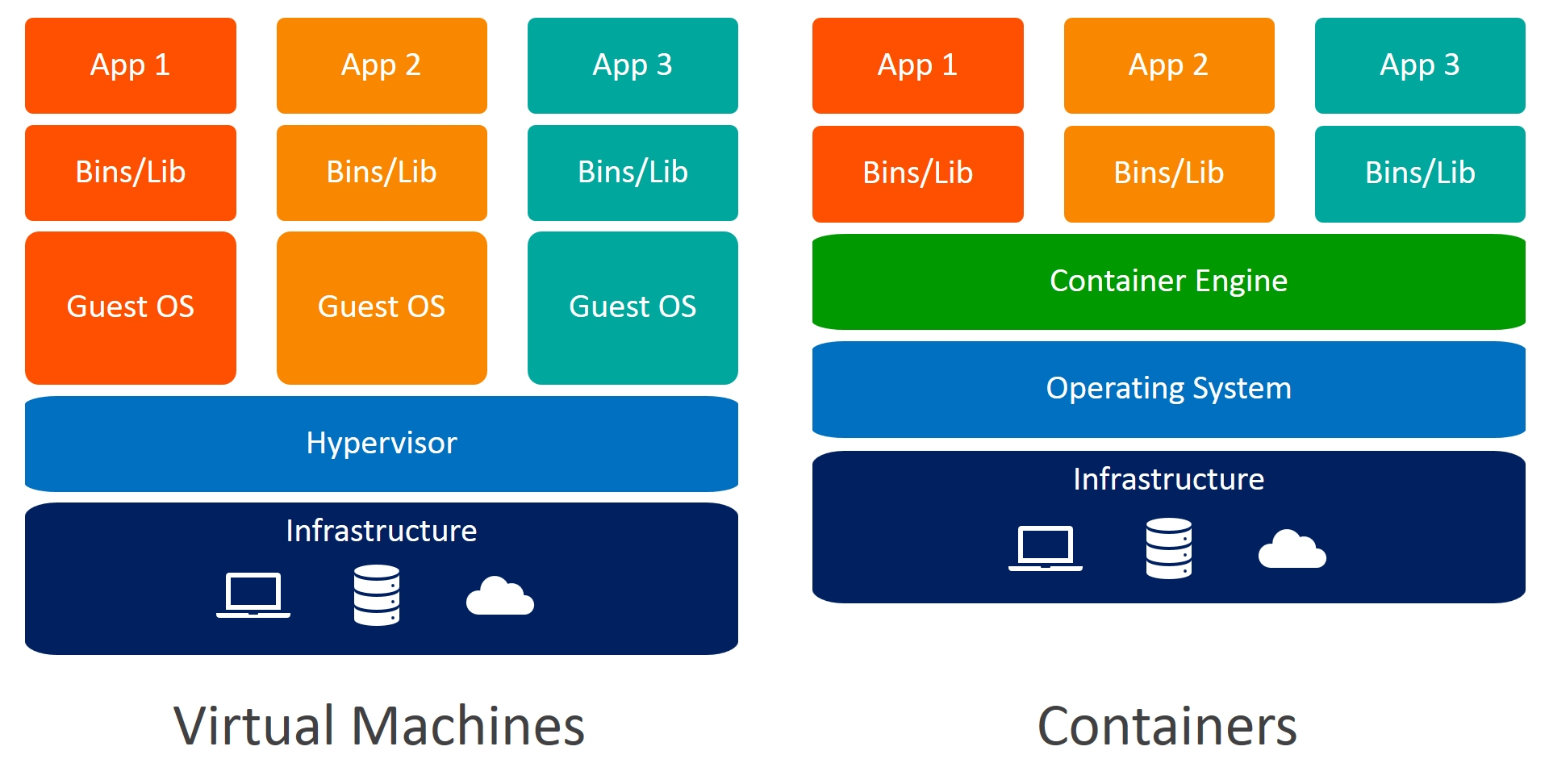
Articles
- Medium - Powerful Docker Alternatives in 2024
- AquaSec - Container Engines: How They Work and Top 7 Options 🌟 (Recommended)
- Blackvoid - Synology, Docker and open source tech blog
- Medium - Deep Dive into Docker Containers | Architecture and Features
- Docker - Alternative container runtimes 🌟 (Recommended)
- Cloudraft - Most Popular Container Runtimes
- Medium - 11 Open-Source SaaS Killer — Selfhost With Docker
- Medium - 11 Open-Source SaaS Killer — Selfhost With Docker -2
- Medium - 11 Open-Source SaaS Killer — Selfhost With Docker -3
- Dev.to - Comparison of Alpine, Slim, Stretch, Buster, Jessie, and Bullseye Linux Distributions 🌟 (Recommended)
- Wiz.io - Open-source Container Security Tools 🌟 (Recommended)
Awesome Container Image
- amazon/aws-cli: Universal Command Line Interface for Amazon Web Services
- docker-android: Android in docker solution with noVNC supported and video recording
- docker: Docker in Docker!
- windows: Windows inside a Docker container.
- traefik/whoami: For testing and view the request of your ingress, web-server, e.g: token, cookie, or something to validation 🌟 (Recommended)
- praqma/network-multitool: Include
curl,telnet,iperf3,web server(Simple Level) 🌟 (Recommended) - wbitt/network-multitool: Include multiple tools, also
tcpdumportcptraceroute(Immediately Level) - nicolaka/netshoot: Wide range tools with superb like
iptable,tshark, … (Complex Level) - xeusnguyen/application: Todo application for testing, can use it with database MySQL. Explore code at GitHub and Compose
- xeusnguyen/nginx-1.23.4: Nginx support various tools and package with ModSecurity, LuaScript and DDoS Prevention. Explore code at GitHub, Configuration and Compose
Awesome Repositories
- Amazon ECR Public Gallery: Public Elastic Container Registry (ECR) hosted by AWS 🌟 (Recommended)
- awesome-compose : Awesome Docker Compose samples 🌟 (Recommended)
- Awesome Docker Compose Examples: Discover and explore selfhosted FOSS projects 🌟 (Recommended)
- awesome-docker : 🐳 A curated list of Docker resources and projects 🌟 (Recommended)
- awesome-stacks: Deploy 120+ open-source web apps with one Docker command.
- bitnami-containers : Bitnami container images
- DockerHub: Public Container Registry 🌟 (Recommended)
- Google Artifact Registry Distroless: Distroless Image Registry hosted by Google Cloud
- LinuxServer.io: General information, and best practices, pertaining to running Docker containers. 🌟 (Recommended)
- Microsoft Artifact Registry: Official Microsoft artifacts such as container images
Development & Implementation
- Ivan Velichko - Implementing Container Runtime Shim: runc 🌟 (Recommended)
- KodeKloud - 3 Best Ways to Run Docker in Docker Container
General & Documentation
- Docker Documentation: Official Docker Documentation
- Podman Documentation: Official Podman Documentation
- Rootless Containers: Rootless containers refers to the ability for an unprivileged user to create, run and otherwise manage containers.
- Youtube NetworkChuck - Docker Tutorials Series: Learn how to use Docker with Network Chuck 🌟 (Recommended)
Organizations
- AliyunContainerService: Aliyun (Alibaba Cloud) Container Service
- Bitnami: Organization belong of VMWare to contributing docker image.
- Collabnix: A Community of 8800+ DevOps Engineers for Learning Containerization
- Containers : Open Repository for Container Tools
- Docker: Docker helps developers bring their ideas to life by conquering the complexity of app development.
- LinuxServer.io: Building and maintaining community images
Tips for configuration & troubleshoot
- Medium - Accessing the host’s localhost from inside a Docker container 🌟 (Recommended)
- Medium - Docker Commands You Never Heard Of!
- Medium - 13 Docker Cost Optimizations You Should Know 🌟 (Recommended)
- Medium - Docker Beginner to Expert Tutorial
- Medium - 11 Ways to Troubleshoot Docker Faster 🌟 (Recommended)
Containerization Registries and Tools
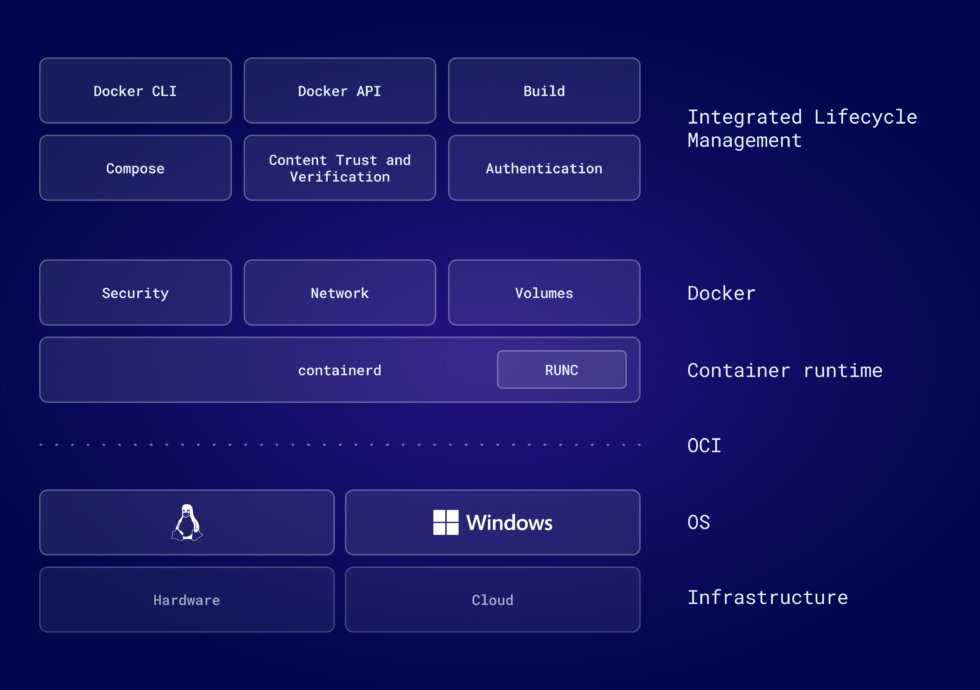
CNI (Container Network Interface)
- cni: The Container Network Interface - networking for Linux containers. Website 🌟 (Recommended)
- calico: a single platform for networking, network security, and observability for any Kubernetes distribution in the cloud, on-premises, or at the edge. 🌟 (Recommended)
- cilium : an open source, cloud native solution for providing, securing, and observing network connectivity between workloads, fueled by the revolutionary Kernel technology eBPF 🌟 (Recommended)
- flannel : A network fabric for containers, designed for Kubernetes 🌟 (Recommended)
Container Inspector & Debugging
- crane: A tool for interacting with remote images and registries 🌟 (Recommended)
- dive : A tool for exploring each layer in a docker image 🌟 (Recommended)
- skopeo: Work with remote images registries - retrieving information, images, signing content
- cdebug: a swiss army knife of container debugging
CRI (Container Runtime Interface)
- containerd : An open and reliable container runtime. Getting started 🌟 (Recommended)
- cri-o: Open Container Initiative-based implementation of Kubernetes Container Runtime Interface 🌟 (Recommended)
- cri-dockerd: dockerd as a compliant Container Runtime Interface for Kubernetes (Mirantis OpenSource)
- cri-tools : CLI and validation tools for Kubelet Container Runtime Interface (CRI). User guide
- cri-api: Container Runtime Interface (CRI) – a plugin interface which enables kubelet to use a wide variety of container runtimes.
Deployment
- docker-rollout: Zero Downtime Deployment for Docker Compose
- watchtower: A process for automating Docker container base image updates. 🌟 (Recommended)
Linter
- hadolint: Dockerfile linter, validate inline bash, written in Haskell 🌟 (Recommended)
OCI (Open Container Initiative)
OCI (Open Container Initiative)
The OCI currently contains three specifications: the Runtime Specification (runtime-spec), the Image Specification (image-spec) and the Distribution Specification (distribution-spec). The Runtime Specification outlines how to run a “filesystem bundle” that is unpacked on disk. At a high-level an OCI implementation would download an OCI Image then unpack that image into an OCI Runtime filesystem bundle. At this point the OCI Runtime Bundle would be run by an OCI Runtime.
Official Website: Open Container Initiative
- buildah: A tool that facilitates building OCI images.
- kaniko: Build Container Images In Kubernetes 🌟 (Recommended)
- podman: A tool for managing OCI containers and pods.
- runc : CLI tool for spawning and running containers according to the OCI specification 🌟 (Recommended)
Security
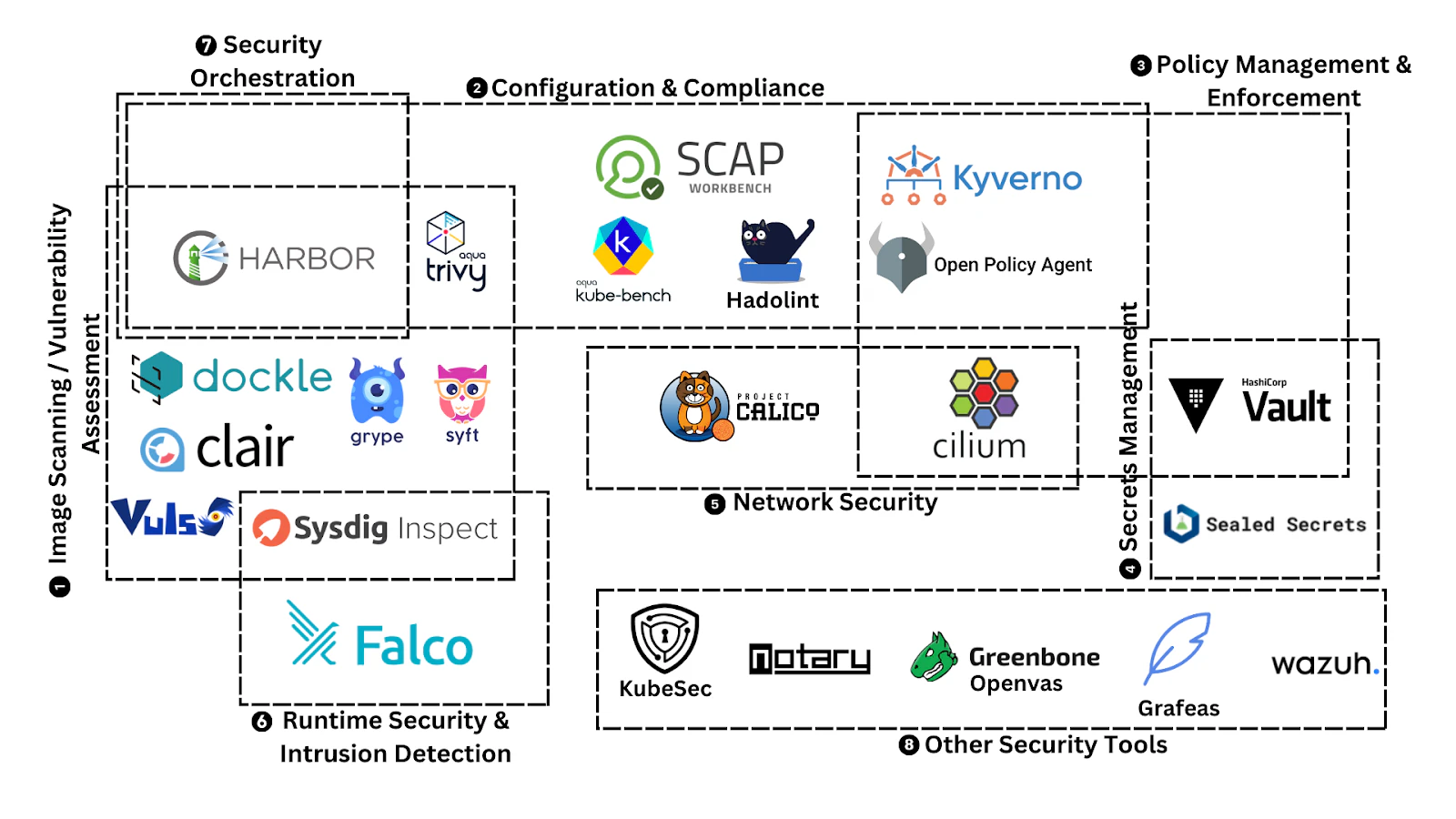
- trivy: Find vulnerabilities, misconfigurations, secrets, SBOM in containers, Kubernetes, code repositories, clouds and more 🌟 (Recommended)
- clair: Vulnerability Static Analysis for Containers
Awesome Dockerfile
NextJS
# Frontend Build Stage
FROM node:22.9.0-alpine AS frontend-build

WORKDIR /app

# Add .env for project
ARG NEXT_PUBLIC_API_ENDPOINT
RUN echo "NEXT_PUBLIC_API_ENDPOINT=$NEXT_PUBLIC_API_ENDPOINT" > .env

# Copy package files & Install dependencies
COPY package.json yarn.lock* package-lock.json* pnpm-lock.yaml* .npmrc* ./
RUN \
  if [ -f yarn.lock ]; then yarn --frozen-lockfile; \
  elif [ -f package-lock.json ]; then npm ci; \
  elif [ -f pnpm-lock.yaml ]; then corepack enable pnpm && pnpm i; \
  else echo "Lockfile not found." && exit 1; \
  fi

# Copy the rest of the frontend code
COPY . .

# Build the Next.js application
RUN yarn build

# Final Stage
FROM node:22.9.0-alpine AS runner

WORKDIR /app

# Copy built frontend
COPY --from=frontend-build /app/.next /app/.next
COPY --from=frontend-build /app/public /app/public
COPY --from=frontend-build /app/node_modules /app/node_modules
COPY --from=frontend-build /app/next-env.d.ts /app/
COPY next.config.ts postcss.config.mjs package.json /app/

# Set environment variables
ENV NODE_ENV=production

# Expose ports for the frontend and backend
EXPOSE 3000

# run application
CMD node_modules/.bin/next start -p 3000
Case Studies
Docker in Docker (DinD) Network Issues
This case study addresses a long-standing point of curiosity: the underlying networking issues encountered with Docker-in-Docker (DinD) configurations within GitHub Actions or Gitea runners. These issues frequently manifest as unreliable pipelines, specifically:
- Hanging Workflows: The pipeline hangs indefinitely during the downloading or setting up of GitHub Actions tasks.
- Failed Transfers:
curl,wget, or package manager commands timeout or stall halfway through a download inside the pipeline.
The primary culprit behind this behavior is an MTU mismatch. The Maximum Transmission Unit (MTU) defines the largest data packet size (in bytes) that a network-connected device or interface will accept without fragmenting it.
According to networking standards, common default MTU values include:
| Network Type | Standard MTU Size |
|---|---|
| Ethernet (Standard) | 1500 Bytes |
| Wireless Networks (Wi-Fi) | 1500 Bytes |
| PPPoE (Broadband DSL) | 1492 Bytes |
| IPv6 (Minimum Requirement) | 1280 Bytes |
By default, Docker creates virtual networks (such as the docker0 interface or custom user-defined bridge networks) and assigns them a standard MTU of 1500 bytes.
The issue arises when the underlying infrastructure—such as the host machine’s physical network card, an intermediate router, a corporate VPN tunnel (like WireGuard or OpenVPN), or a cloud provider’s overlay network—utilizes a lower MTU (e.g., 1450 or 1420 bytes) to accommodate encapsulation overhead.
When a DinD runner inside the pipeline attempts to send or receive a full 1500-byte packet, the intermediate network drops or truncates the oversized packet. Because path MTU discovery (PMTUD) is frequently blocked by firewalls discarding ICMP packets, the pipeline cannot renegotiate a smaller packet size, causing the connection to hang indefinitely.
After research and find out several reason why community talk about MTU Mismatch and here what thing need to configure
- GItea Issue - Allow to configure dind options such as MTU
- Gitea Issue - Allow configuring Network Interface MTU for Actions-Containers
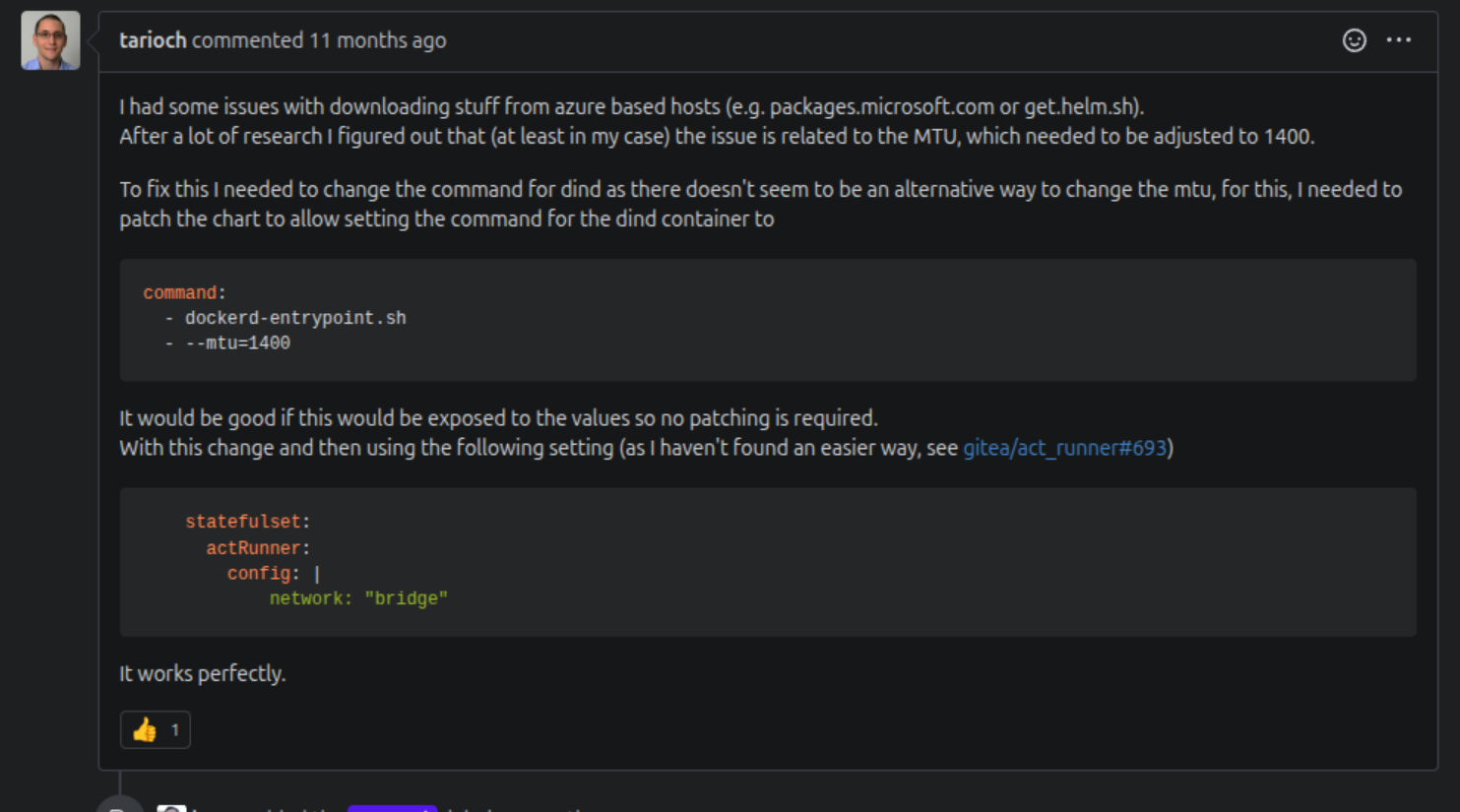
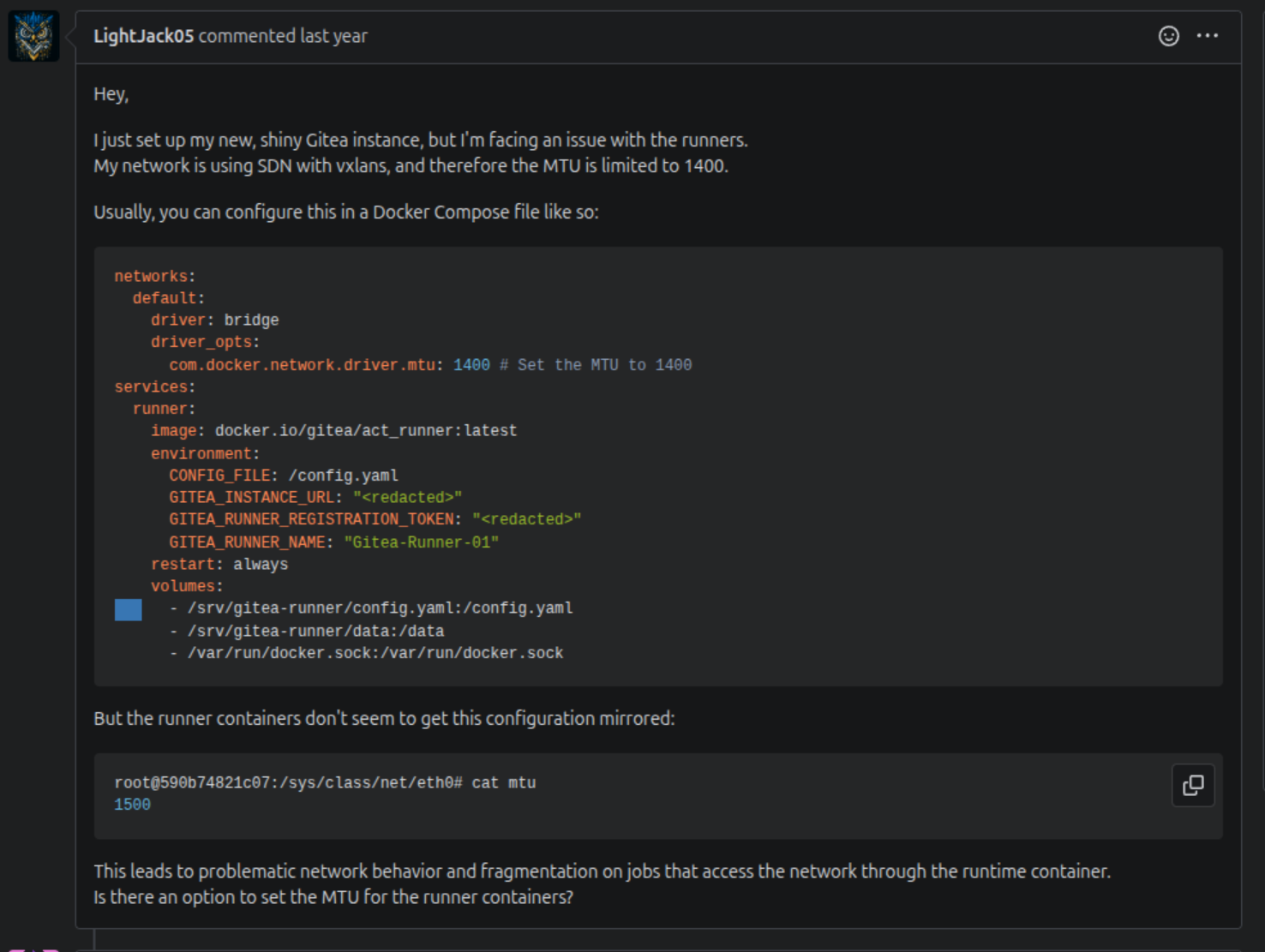
For my situation, I hit this error when I try to download package from GitHub Repository in my Kubernetes Cluster, why because
- Kubernetes use CNI (Like Calico, Flannel, Cilium) to create overlay network. They wrap the packet in their own tunnel (VXLAN, GENEVE, or Wireguard), it drops the Pod’s interface MTU down to 1450 or 1410 bytes to leave room for the headers.
- The DinD container launches inside that Pod network. It fires up its own virtual Docker bridge interface (
docker0). - The runner with DinD will not create network interface with lower than MTU setting, but it binds for default bridge MTU 1500
- When I download the Action Task, like
setup-goit will stuck for a while because they try pull massive packet.tar.gzfor Golang using 1500-byte chunk. CNI overlay cannot route and drop that large packets, so it hangs for a while and look weird
Back a bit fo how GItHub Actions or Gitea Actions use DinD for running the task
[ Gitea Runner Pod ]
+-------------------------+               +--------------------------+
|    "runner" Container   |               |     "dind" Container     |
|                         |               |                          |
|  Executes workflow      |               |  Runs real Docker engine |
|  Sends commands to ---> | /var/run/     |  (Configured with        |
|  docker.sock            | docker.sock   |   --mtu=1400)            |
|                         |  (Shared Vol) |                          |
+-------------------------+ +--------------------------+- The DinD Startup: The
dindcontainer boots up, reads your new--mtu=1400flag, and creates a live Docker daemon inside the Pod. It generates a UNIX socket (docker.sock) inside a shared volume. - The Init Container / Wait Step: Sometimes an init container or internal wait script ensures that
docker.sockis fully available and healthy before the runner starts up. - The Workflow Execution: When your Gitea runner receives the
setup-gojob, it doesn’t run Docker commands natively. It talks across that shareddocker.sockto thedindcontainer. - The Safe Payload: The
dindcontainer spins up a brand-new internal container to do the heavy lifting for your action. Because you successfully injected--mtu=1400into thedinddaemon, that inner container inherits the safer, smaller packet size.
So that why you can try the first stuff when configure DinD with network issue is drop MTU for a bit from 1500 --> 1400 or 1450, especially with Kubernetes with CNI, the ideal MTU is around 1450 for formula
Now you can configure this Arg with DinD docker image
docker run -it --privileged docker:29.5.2-dind --help
Certificate request self-signature ok
subject=CN=docker:dind server
/certs/server/cert.pem: OK
Certificate request self-signature ok
subject=CN=docker:dind client
/certs/client/cert.pem: OK
cat: can't open '/proc/net/ip6_tables_names': No such file or directory
cat: can't open '/proc/net/arp_tables_names': No such file or directory
iptables v1.8.11 (nf_tables)

Usage:	dockerd [OPTIONS]

A self-sufficient runtime for containers.

Options:
      --add-runtime runtime                   Register an additional OCI compatible runtime (default [])
      --allow-direct-routing                  Allow remote access to published ports on container IP addresses
      --authorization-plugin list             Authorization plugins to load
      --bip string                            IPv4 address for the default bridge
      --bip6 string                           IPv6 address for the default bridge
  -b, --bridge string                         Attach containers to a network bridge
      --bridge-accept-fwmark string           In bridge networks, accept packets with this firewall mark/mask
      --cdi-spec-dir list                     CDI specification directories to use
      --cgroup-parent string                  Set parent cgroup for all containers
      --config-file string                    Daemon configuration file (default "/etc/docker/daemon.json")
      --containerd string                     containerd grpc address
      --containerd-namespace string           Containerd namespace to use (default "moby")
      --containerd-plugins-namespace string   Containerd namespace to use for plugins (default "plugins.moby")
      --cpu-rt-period int                     Limit the CPU real-time period in microseconds for the parent cgroup for all containers (not supported with cgroups v2)
      --cpu-rt-runtime int                    Limit the CPU real-time runtime in microseconds for the parent cgroup for all containers (not supported with cgroups v2)
      --cri-containerd                        start containerd with cri
      --data-root string                      Root directory of persistent Docker state (default "/var/lib/docker")
  -D, --debug                                 Enable debug mode
      --default-address-pool pool-options     Default address pools for node specific local networks
      --default-cgroupns-mode string          Default mode for containers cgroup namespace ("host" | "private") (default "private")
      --default-gateway ip                    Default gateway IPv4 address for the default bridge network
      --default-gateway-v6 ip                 Default gateway IPv6 address for the default bridge network
      --default-ipc-mode string               Default mode for containers ipc ("shareable" | "private") (default "private")
      --default-network-opt mapmap            Default network options (default map[])
      --default-runtime string                Default OCI runtime for containers (default "runc")
      --default-shm-size bytes                Default shm size for containers (default 64MiB)
      --default-ulimit ulimit                 Default ulimits for containers (default [])
      --dns list                              DNS server to use
      --dns-opt list                          DNS options to use
      --dns-search list                       DNS search domains to use
      --exec-opt list                         Runtime execution options
      --exec-root string                      Root directory for execution state files (default "/var/run/docker")
      --experimental                          Enable experimental features
      --feature map                           Enable feature in the daemon (default map[])
      --firewall-backend string               Firewall backend to use, iptables or nftables
      --fixed-cidr string                     IPv4 subnet for the default bridge network
      --fixed-cidr-v6 string                  IPv6 subnet for the default bridge network
  -G, --group string                          Group for the unix socket (default "docker")
      --help                                  Print usage
  -H, --host list                             Daemon socket(s) to connect to
      --host-gateway-ip list                  IP addresses that the special 'host-gateway' string in --add-host resolves to. Defaults to the IP addresses of the default bridge
      --http-proxy string                     HTTP proxy URL to use for outgoing traffic
      --https-proxy string                    HTTPS proxy URL to use for outgoing traffic
      --icc                                   Enable inter-container communication for the default bridge network (default true)
      --init                                  Run an init in the container to forward signals and reap processes
      --init-path string                      Path to the docker-init binary
      --insecure-registry list                Enable insecure registry communication
      --ip ip                                 Host IP for port publishing from the default bridge network (default 0.0.0.0)
      --ip-forward                            Enable IP forwarding in system configuration (default true)
      --ip-forward-no-drop                    Do not set the filter-FORWARD policy to DROP when enabling IP forwarding
      --ip-masq                               Enable IP masquerading for the default bridge network (default true)
      --ip6tables                             Enable addition of ip6tables rules (default true)
      --iptables                              Enable addition of iptables rules (default true)
      --ipv6                                  Enable IPv6 networking for the default bridge network
      --label list                            Set key=value labels to the daemon
      --live-restore                          Enable live restore of docker when containers are still running
      --log-driver string                     Default driver for container logs (default "json-file")
      --log-format string                     Set the logging format ("text"|"json") (default "text")
  -l, --log-level string                      Set the logging level ("debug"|"info"|"warn"|"error"|"fatal") (default "info")
      --log-opt map                           Default log driver options for containers (default map[])
      --max-concurrent-downloads int          Set the max concurrent downloads (default 3)
      --max-concurrent-uploads int            Set the max concurrent uploads (default 5)
      --max-download-attempts int             Set the max download attempts for each pull (default 5)
      --metrics-addr string                   Set default address and port to serve the metrics api on
      --mtu int                               Set the MTU for the default "bridge" network (default 1500)
      --network-control-plane-mtu int         Network Control plane MTU (default 1500)
      --no-new-privileges                     Set no-new-privileges by default for new containers
      --no-proxy string                       Comma-separated list of hosts or IP addresses for which the proxy is skipped
      --node-generic-resource list            Advertise user-defined resource
      --nri-opts nri-opts                     Node Resource Interface configuration (default enable=false)
  -p, --pidfile string                        Path to use for daemon PID file (default "/var/run/docker.pid")
      --raw-logs                              Full timestamps without ANSI coloring
      --registry-mirror list                  Preferred Docker registry mirror
      --rootless                              Enable rootless mode; typically used with RootlessKit
      --seccomp-profile string                Path to seccomp profile. Set to "unconfined" to disable the default seccomp profile (default "builtin")
      --selinux-enabled                       Enable selinux support
      --shutdown-timeout int                  Set the default shutdown timeout (default 15)
  -s, --storage-driver string                 Storage driver to use
      --storage-opt list                      Storage driver options
      --swarm-default-advertise-addr string   Set default address or interface for swarm advertised address
      --tls                                   Use TLS; implied by --tlsverify
      --tlscacert string                      Trust certs signed only by this CA (default "/root/.docker/ca.pem")
      --tlscert string                        Path to TLS certificate file (default "/root/.docker/cert.pem")
      --tlskey string                         Path to TLS key file (default "/root/.docker/key.pem")
      --tlsverify                             Use TLS and verify the remote
      --userland-proxy                        Use userland proxy for loopback traffic (default true)
      --userland-proxy-path string            Path to the userland proxy binary (default "/usr/local/bin/docker-proxy")
      --userns-remap string                   User/Group setting for user namespaces
      --validate                              Validate daemon configuration and exit
  -v, --version                               Print version information and quit
Now configure Dind with MTU 1400
dind:
  rootless: false
  uid: ""
  registry: "docker.io"
  repository: docker
  tag: 29.5.2-dind
  digest: ""
  pullPolicy: IfNotPresent
  fullOverride: ""
  extraVolumeMounts: []

  # If the container keeps crashing in your environment, you might have to add the `DOCKER_IPTABLES_LEGACY` environment variable.
  # See https://github.com/docker-library/docker/issues/463#issuecomment-1881909456
  extraEnvs:
	[]
	#  - name: "DOCKER_IPTABLES_LEGACY"
	#    value: "1"

  # Option to add extra arguments/commands to the container/pod:
  # [#22](https://gitea.com/gitea/helm-actions/issues/22) [k8s docs](https://kubernetes.io/docs/tasks/inject-data-application/define-command-argument-container/)
  extraArgs:
	- --mtu=1400
	- --ipv6=false
So next reason is using IPv6, because of some network reason, IPv6 can be blocked for downloading the large packet. To prevent the issue come from the machine with dual-stack network and prefer to use IPv6, you can try to force itself into IPv4 for downloading
  extraArgs:
	- --mtu=1400
	- --ipv6=false
After applied, you can validate again the download package, that can be resolved. But if not, there are one more things you should be checked. It’s about Driver or Network Interface setup for Runner.
Before going directly issue, you can explore more about Networking of Docker and Driver
- PacketSwitch - Docker Networking (Bridge, Host and None Drivers)
- iximiuz - How Container Networking Works: Building a Bridge Network From Scratch
- GitHub - Basic Network Namespace
- Hacktrick - Network Namespace
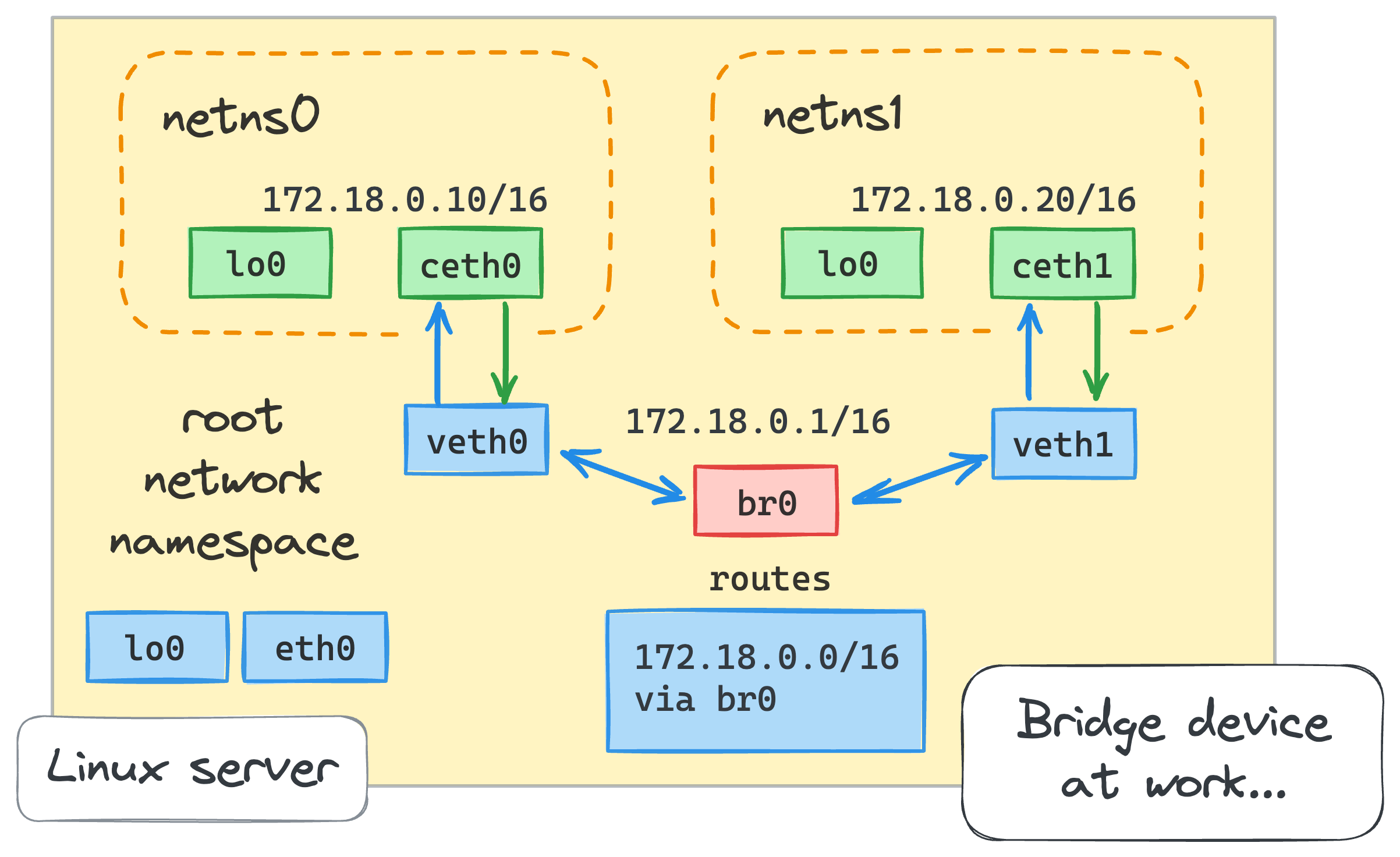
Because the default value of any Runner setup (GitHub/GItea) will set network is "", it mean
container:
  # Specifies the network to which the container will connect.
  # Could be host, bridge or the name of a custom network.
  # If it's empty, runner will create a network automatically.
  # Deprecated: `network_mode` is still accepted for old configs; use `network` instead.
  network: ""
  # network_create_options only apply when `network` is left empty and the runner
  # auto-creates a per-job network that does not already exist. They have no effect
  # when a custom `network` name is set, because that network is used as-is and never
  # created by the runner. Omit the entire block to use Docker's defaults.
  network_create_options:
    enable_ipv4: true  # Omit to use Docker's default (IPv4 enabled). Set false to disable IPv4.
    enable_ipv6: false # Omit to use Docker's default (IPv6 disabled). Enabling it requires dockerd started with --ipv6.
  # Whether to use privileged mode or not when launching task containers (privileged mode is required for Docker-in-Docker).
  privileged: false
  # Any other options to be used when the container is started (e.g., --add-host=my.gitea.url:host-gateway).
  options:
  # The parent directory of a job's working directory.
  # NOTE: There is no need to add the first '/' of the path as runner will add it automatically.
  # If the path starts with '/', the '/' will be trimmed.
  # For example, if the parent directory is /path/to/my/dir, workdir_parent should be path/to/my/dir
  # If it's empty, /workspace will be used.
  # Purely numeric subdirectories under this path are reserved for task workspaces and may be removed by idle cleanup.
  workdir_parent:
  # Volumes (including bind mounts) can be mounted to containers. Glob syntax is supported, see https://github.com/gobwas/glob
  # You can specify multiple volumes. If the sequence is empty, no volumes can be mounted.
  # For example, if you only allow containers to mount the `data` volume and all the json files in `/src`, you should change the config to:
  # valid_volumes:
  #   - data
  #   - /src/*.json
  # If you want to allow any volume, please use the following configuration:
  # valid_volumes:
  #   - '**'
  valid_volumes: []
  # Overrides the docker client host with the specified one.
  # If it's empty, runner will find an available docker host automatically.
  # If it's "-", runner will find an available docker host automatically, but the docker host won't be mounted to the job containers and service containers.
  # If it's not empty or "-", the specified docker host will be used. An error will be returned if it doesn't work.
  docker_host: ""
  # Pull docker image(s) even if already present
  force_pull: true
  # Rebuild docker image(s) even if already present
  force_rebuild: false
  # Always require a reachable docker daemon, even if not required by runner
  require_docker: false
  # Timeout to wait for the docker daemon to be reachable, if docker is required by require_docker or runner
  docker_timeout: 0s
  # Bind the workspace to the host filesystem instead of using Docker volumes.
  # This is required for Docker-in-Docker (DinD) setups when jobs use docker compose
  # with bind mounts (e.g., ".:/app"), as volume-based workspaces are not accessible
  # from the DinD daemon's filesystem. When enabled, ensure the workspace parent
  # directory is also mounted into the runner container and listed in valid_volumes.
  bind_workdir: false
As you can see, it will automatically create the network, and if you don’t setup any specific MTU or network interface, that will lead you mismatch MTU > 1450, so that package to large and that can be dropped
[ GitHub Packages ]
       │  (Sends raw 1500-byte packets / TLS certs)
       ▼
[ K3s Host Node ] ──► [ Flannel CNI Overlay ] (MTU: 1450)
                               │
                               ▼
                    [ DinD Pod Runtime ] ──► [ Ephemeral Job Bridge ] (MTU: 1500)
                                                  │
                                                  ❌ packets > 1450 dropped here!
When fine-tuning network configurations to resolve this issue, many engineers fall into a trap. Even if you explicitly configure your host’s Docker daemon (dockerd) with a safer value (such as mtu: 1400 in /etc/docker/daemon.json), containerized CI runners—like the Gitea act_runner or GitHub Actions Runner Controller (ARC)—frequently bypass this configuration.
By default, if the runner configuration sets the network mode to empty (network: ""), the runner invokes the Docker API to spin up an ephemeral, dynamically named network (e.g., act-network-xxxs) for each job execution. The problem? The Docker API ignores the dockerd configuration defaults when creating new user-defined bridge networks. It hardcodes the standard default of 1500 MTU. When the CNI or the host network attempts to forward these 1500-byte packets through an encapsulation layer configured for 1400 bytes, the packets are dropped silently.
To prevent this, you can alter the runner configuration to attach jobs directly to the pre-existing default bridge network instead of generating an ephemeral network per job.
When you bind containerized jobs directly to the default bridge network, the container copies the exact MTU configuration defined within the host’s Docker daemon at startup. This bypasses the creation of a new network entirely and preserves your targeted mtu=1400 setting throughout the execution of the pipeline.
Choosing how to route your runner’s network interface involves balancing security, isolation, and networking reliability:
| Strategy | Security Sandboxing | Eliminates GitHub TLS Hangs? | Prevents Port Collisions? | Production Readiness |
|---|---|---|---|---|
network: "" (Default Empty) | Yes | ❌ No (Falls into the 1500 MTU black hole) | Yes | ❌ Experimental/Unstable on K3s |
network: "host" | ❌ No (Exposes Pod Network) | Yes (Bypasses overlay network) | ❌ No (Concurrent jobs will crash) | ⚠️ MVP Shortcut Only |
network: "bridge" + MTU 1400 | Yes | Yes (Safe packet fragmentation) | Yes (Each job gets its own port space) | Gold Standard |
Explore more about DinD and Networking Issue
- OneUpTime - How to Identify MTU Mismatch Issues on Network Interfaces
- GitHub Issue - Setting a MTU for dind is difficult
- Blog - Fixing DIND Builds That Stall When Using Gitlab and Kubernetes
- Medium - Fix Docker in docker network issue in Kubernetes
- Medium - Fix for Docker Inside Docker Networking issue on Kubernetes