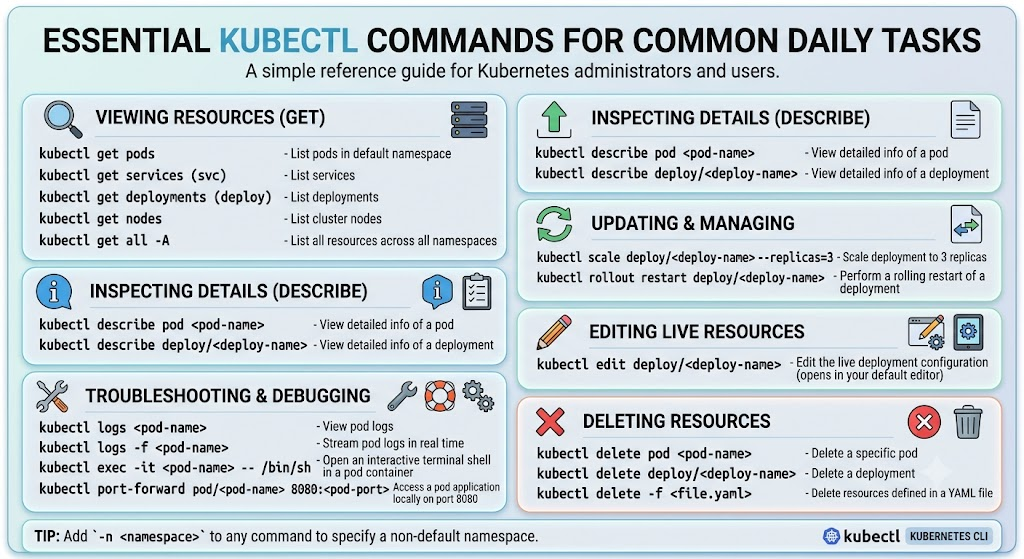
Info
Small script and take a note to interact between
kubectland your kubernetes cluster.
You can explore command with kubectl in some place, including
A couple of aliases for kubectl profile
export KUBE_EDITOR="nano" # Kube edit will use nano for default editor
alias k="kubectl"
alias kgp="kubectl get pods"
alias kn="kubectl config set-context --current --namespace"
alias kaf="kubectl apply -f "
alias kr="kubectl run --dry-run=client -o yaml "
alias krcp="k resource-capacity -p --util"
alias krca="k resource-capacity -a"
alias kgsecret="k get secret -o go-template='{{range \$k,\$v := .data}}{{\"### \"}}{{\$k}}{{\"\n\"}}{{\$v|base64decode}}{{\"\n\n\"}}{{end}}'"
To directly use any profile not including in kubeconfig, you can use this with environment vars like this
export KUBECONFIG=/path/to/profileNote
In the circumstance, you want merge this external configuration to
kubeconfig, you can use kconfig to help you reduce the manual step by automatically install into the default at~/.kube/configor double-check StackOverFlow - How to merge kubectl config file with ~/.kube/config? for more approaching
Setup the toolkit via krew which pretty useful for debug, troubleshoot and have boost performance when you work with kubectl
kubectl krew install resource-capacity
kubectl krew install node-shell
kubectl krew install view-allocations
Combination
Force terminate the stuck namespace
NS=`kubectl get ns |grep Terminating | awk 'NR==1 {print $1}'` && kubectl get namespace "$NS" -o json | tr -d "\n" | sed "s/\"finalizers\": \[[^]]\+\]/\"finalizers\": []/" | kubectl replace --raw /api/v1/namespaces/$NS/finalize -f - Config Command
Check currently config context
kubectl config view --minifyCreate Command
Create the generic secrets from file
For example binary file with auto convert to base64 format
kubectl create secret generic accounts-identityserver-certificate --from-file=certificate.pfx --dry-run=client -o yaml > certificate_sec.yaml Create the ingress with multiple rule
For example, I want to build the ingress with two rule, one for health-check path which configure for platform team, and also domain for user-traffic routing
kubectl create ingress <name-ingress> \
--rule=/health=<service>:<port> \ # First rule (Exact)
--rule=<domain>/\*=<service>:<port> \ # Second rule (Prefix)
--class nginx --dry-run=client --output yaml > ingress.yaml
Create jobs from cronjobs template
kubectl create job <name-jobs> --from=cronjob/[cronjob_name]Debug Command
Debug your node via kubectl
kubectl debug node/my-node -it --image=<img>Delete command
Delete all component inside cluster
# For example: Delete all pvc in namespace default
kubectl delete pvc --all
Delete pods with not on Running state
k delete pods -n <name-space> --field-selector=status.phase!=RunningDelete pods stuck in Terminatting state
kubectl delete pod <PODNAME> --grace-period=0 --force --namespace <NAMESPACE>Delete pod in state not finalizers
Article: Medium - Kubernetes Pods That Refused to Die: The Haunting of Our Cluster
In some situation, delete command won’t let you kill your pod, reason can be like
- Block deletion until a controller does cleanup (e.g., storage detachment)
- Your controller add a finalizer for handling this action
- Finalizer can’ remove and lead to crash, and your application never delete
To solve this mess, you can workaround with finalizer of your pod
kubectl get pods xxx -o json | jq '.metadata.finalizers'If it does exist, it means you should shut it down
kubectl patch pod xxx --type json \
--patch='[{"op": "remove", "path": "/metadata/finalizers"}]'
Now you can remove your custom-controller.
Tip
From author, you can apply a
webhookinto your cluster to prevent finalizers add into your pods
# ValidatingWebhookConfiguration to block bad finalizers
apiVersion: admissionregistration.k8s.io/v1
kind: ValidatingWebhookConfiguration
metadata:
name: block-cursed-finalizers
webhooks:
- name: finalizer-police.example.com
rules:
- operations: ["CREATE", "UPDATE"]
apiGroups: [""]
apiVersions: ["v1"]
resources: ["pods"]
External command
Check the resource of workload v1
Download via krew, find out the step at krew installing and extension at github
kubectl krew install resource-capacity# Extension: https://github.com/robscott/kube-capacity
# Check the available resources
kubectl resource-capacity -a
# Check detail resource utilize of all workload
kubectl resource-capacity -p --utilCheck the resource of workload, able to view GPU
Download new extension from krew at github
kubectl krew install view-allocations# Extension: https://github.com/davidB/kubectl-view-allocations
# Show GPU allocation
k view-allocation -r gpu
# Check available resource of all node
k view-allocation -g resource
# Check resource depend on group namespace
k view-allocation -g namespace
# View as csv for analysis
k view-allocations -o csvView relationship between resources
Download new extension from krew at github
kubectl krew install tree# Extension: https://github.com/ahmetb/kubectl-tree
# View relationship of deployment
k tree deployment <name-deploymen>
# You can view the resource with API. e.g: longhorn share manager
k tree sharemanagers.longhorn.io testSpawn node-shell for debug node
Down new extension from krew at github
kubectl krew install node-shell# Extension: https://github.com/kvaps/kubectl-node-shell
# Get standard bash shell
kubectl node-shell <node>
# Use custom image for pod
kubectl node-shell <node> --image <image>
# Execute custom command
kubectl node-shell <node> -- echo 123
# Use stdin
cat /etc/passwd | kubectl node-shell <node> -- sh -c 'cat > /tmp/passwd'
# Run oneliner script
kubectl node-shell <node> -- sh -c 'cat /tmp/passwd; rm -f /tmp/passwd'Get Command
Base64 decode of secret with no more 3th party
# Use go-template
kubectl get secrets -n <namespace> <secret> \
-o go-template='{{range $k,$v := .data}}{{"### "}}{{$k}}{{"\n"}}{{$v|base64decode}}{{"\n\n"}}{{end}}'

# Use json
kubectl get secret -n <namespace> <secret> -o jsonpath='{.data.*}' | base64 -d
Get events with filter depend creationTimestamp
kubectl get events -n <namespace> --sort-by=.metadata.creationTimestampGet taint of node
kubectl get nodes -o='custom-columns=NodeName:.metadata.name,TaintKey:.spec.taints[*].key,TaintValue:.spec.taints[*].value,TaintEffect:.spec.taints[*].effect'List All Container Images Running in a Cluster
If you want to double-check more about this topic, you can read more at Kubernetes - List All Container Images Running in a Cluster
BTW, I prefer to list all container image, include init and runtime container for any pods in all namespaces with command with count number of image used in system
kubectl get pods --all-namespaces -o jsonpath="{.items[*].spec['initContainers', 'containers'][*].image}" |\
tr -s '[[:space:]]' '\n' |\
sort |\
uniq -c
Patch Command
Change default storage class for your node
kubectl patch storageclass <sc-specific> -p '{"metadata": {"annotations":{"storageclass.kubernetes.io/is-default-class":"true"}}}'Suspend the Job and Cronjob
If you encounter a bit noise from job/cronjob which not enough condition to execute, so that why if you want to suspend it, you can available to deal with suspend parameter via patch command. Read more at Kubernetes - Introducing Suspended Jobs
# Suspend the job
kubectl patch job/myjob --type=strategic --patch '{"spec":{"suspend":true}}'

# Resuming the job
kubectl patch job/myjob --type=strategic --patch '{"spec":{"suspend":false}}'
You can available to do it with cronjob also with command
kubectl patch cronjob/mycronjob --type=strategic --patch '{"spec":{"suspend":true}}'Rollout Command
Read more about rollout at: How do you rollback deployments in Kubernetes?
Roll out the previous deployment
# Check history of version
# View history tree of your application
kubectl rollout history deployment <deployment-name> -n <namespace>
# View detail once of history of your revision
kubectl rollout history deployment <deployment-name> \
-n <namespace> --revision <revision_number>

# Rollout to version
# Rollout your application to 0 (last revision). Default
kubectl rollout undo deployment <deployment-name> -n <namespace>
# Rollout your application to specific revision
kubectl rollout undo deployment <deployment-name> \
-n <namespace> --to-revision <revision_number>
Scale Command
Scale down the statefulset application
# Use scale option
kubectl scale --replicas=0 sts <sts name>

# Or we can use patch or edit option
kubectl patch statefulsets <stateful-set-name> -p '{"spec":{"replicas":<new-replicas>}}'
Note
You need to consider when apply scaling down can not working because “cannot scale down a StatefulSet when any of the stateful Pods it manages is unhealthy. Scaling down only takes place after those stateful Pods become running and ready.” . Read more in: Scale a StatefulSet
Explain Comamand
Check the full requirement of CRD or API Resources
For double-check the template configuration for CRD and API Resources, e.g: pod, endpoint or cert-manager, honestly to say, documentation of them will great prototype for following, but sometime, you don’t have more information about the documentation, that how explain become useful or you can use with doc.crds.dev
# common, Get the documentation of the resource and its fields
kubectl explain <api-resources>
# e.g:
kubectl explain pods

# advantage, Get all the fields in the resource
kubectl explain pods --recursive

# more specific, if you have multiple-version of your resources
kubectl explain deployments --api-version=apps/v1