Python3, Pip and Common usage
Install Python3 and Pip
When you work in Ubuntu or any Linux Distribution, you can usually see the python3 installed by default inside your kernel, because many tools and services in Linux are built and operate by python3, especially networking with netplan
For that reason, you need to careful upgrade or reinstall any version of Python3 because it can cause some disturb for us. In the situation, if you want to install or update couple alternative version in Python3 at linux via apt (NOTE: I don’t recommend download via source, because it can encounter lots of trouble about library), who is a great friend when you work with debian distro, especially Ubuntu. You can double-check these articles to find the best way you can for installing Python Package in couple of Linux Distros
- StackOverFlow - What is the best way to install Python packages?
- Blog - Installing Python 3 on Linux
- Bitlaunch - How to safely install Python and Python3 on Ubuntu
If you still want to download and build pyhon3 from source, you will need these resources
Otherwise, you can choose to use apt via PPA (Personal Package Archive) Repositories which provide a lot of python3 package pre-built and easy to install with PPA Deadsnake for besting distribution Python3 package in Ubuntu (Great for 22.04 and 24.04 version)
First, you need add the ppa:deaksnake into your apt repositories
sudo add-apt-repository ppa:deadsnakes/ppa
sudo apt update
After that, you are available to see the different version of Python with not only version of your host. Trying search them with apt search
sudo apt search python3Now you can available to choose which version you want to install, it’s usually force you to download the latest version, if you need any customize lower or higher, you need wait them to compile other, or you need consider to use annaconda with creating venv with customize version
sudo apt install python3.12 python3.12-venv -yAfter install, you can verify which version you installed, for example
# Install python3.12
python3.12 --version

# Install python3.11
python3.11 --version
To finishing install, for usually install python package, we usually use pip and by default when install from ppa:deadsnake won’t install pip, and you need install individual. The best way follow the documentation of pip at Documentation - Pip Installation is using ensurepip or get-pip.py
With the package download by ppa, it’s seem not have ensurepip and the great way to install pip will use via get-pip.py from https://bootstrap.pypa.io/get-pip.py with python command
# Install python3.12
curl -sSfL https://bootstrap.pypa.io/get-pip.py | python3.12

# Install python3.11
curl -sSfL https://bootstrap.pypa.io/get-pip.py | python3.11
Warning
Don’t use any command
python3orpythonbecause it will use the default version of your host and it won’t install any version for specific version of your
Tip
For easily work on multiple version
pythonin your host, you can consider to useupdate-alternativesbut for recommending,venvor virtual environment is the best idea to switch between multiple versions by multiple python profiles. Go and check the guideline below for creating your ownpython3-venv
Create virtual environment with venv
With Python3 from version 3.12, it require venv or use --break-system-packages for global environment. But in some situation, you need find out to conda or venv to make your environment become more convenience to install external package
To setup venv, Read more in official documentation venv — Creation of virtual environments
First of all, create new environment with command
python3 -m venv /path/to/new/venvActive the environment
source /path/to/new/venv/bin/activeWhen you finish and want to comeback to global environment, in the venv shell, you can use command
deactivateBreak system for installing with pip
With Python3 from version 3.12, there isn’t gonna easy for us to install package, so if you want to force install with python3-pip, you can add the optional --break-system-packages after the pip command
pip3 install numpy --break-system-packagesWith read from file, we can do same way
pip3 install -r requirements.txt --break-system-packagesSpecific PyTorch version
In some situations, your environment have higher version CUDA or driver of NVIDIA compare with Torch, you can use this version to bypass and migrate your torch to compatible version with your graphic card. Read more at Reddit - RTX 5090 Training Issues - PyTorch Doesn’t Support Blackwell Architecture Yet?
pip install -U torch torchvision torchaudio --index-url https://download.pytorch.org/whl/cu128General
Articles
- InventiveHQ - Private Python Package Repositories: PyPI Alternatives for Enterprise
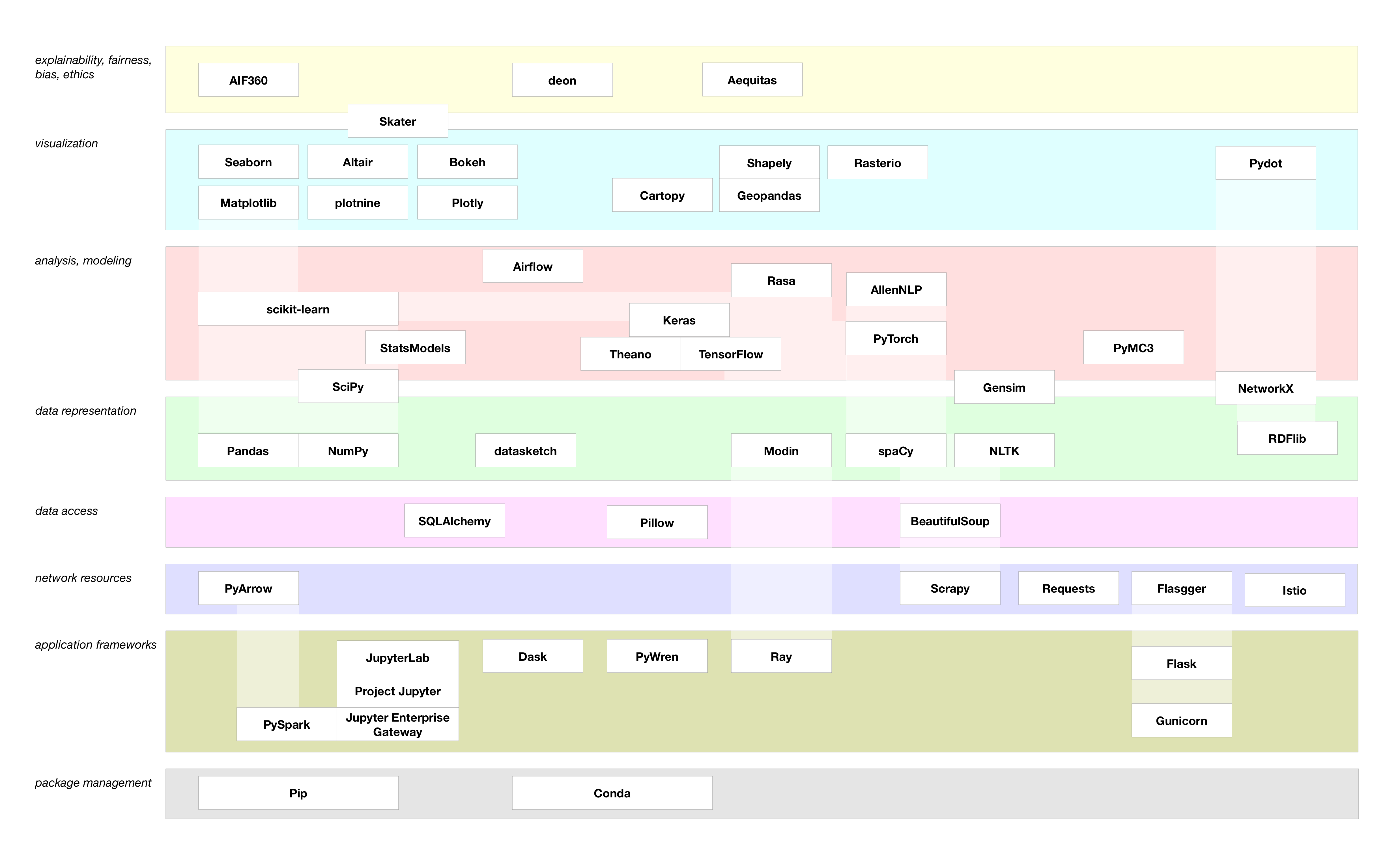
- IBM - A landscape diagram for Python data
Awesome Repositories
- awesome-python : An opinionated list of awesome Python frameworks, libraries, software and resources.
- best-of-python: 🏆 A ranked list of awesome Python open-source libraries and tools. Updated weekly.
- TheAlgorithms Python: All Algorithms implemented in Python
Library & Package
- pypi: Find, install and publish Python packages with the Python Package Index 🌟 (Recommended)
- pypiserver: Minimal PyPI server for uploading & downloading packages with pip/easy_install
- devpi: Python PyPi staging server and packaging, testing, release tool
Organizations
Package Management
- pip: the package installer for Python. 🌟 (Recommended)
- poetry: Python packaging and dependency management made easy 🌟 (Recommended)
- uv: An extremely fast Python package and project manager, written in Rust