
Quote
Hello everyone! It has been a while since my last technical release. I took a few weeks off to celebrate the Tet Holiday in my country, set up the workspace for my new job, and most importantly, begin the journey of running my own business alongside a close friend.
Admittedly, this transition required a long break, and while new blogs are on the horizon, it may take me about a month to fully complete them. During this time, I’ve been reinvesting in my foundations, particularly in Networking. My goal is to bridge the gap between Cloud and On-premises architectures, which will be vital for my new business ventures.
Let’s delve into today’s article and see what we’ve got!
What’s the problem of mine ?
The story is pretty insane, but i’m always curious about network fundamental from starting journey as DevOps Engineer. I believe we are living the internet world and networking become the backbone, the most important thing for whole industry operate. You lost internet and you will become useless, or honestly say we won’t catch up anything in AI-Driven revolution.
With that thought, I assume the idea why not if I try to refine my knowledge and find couple lack of networking stuff, that I don’t have or already have but forgot in past.
Info
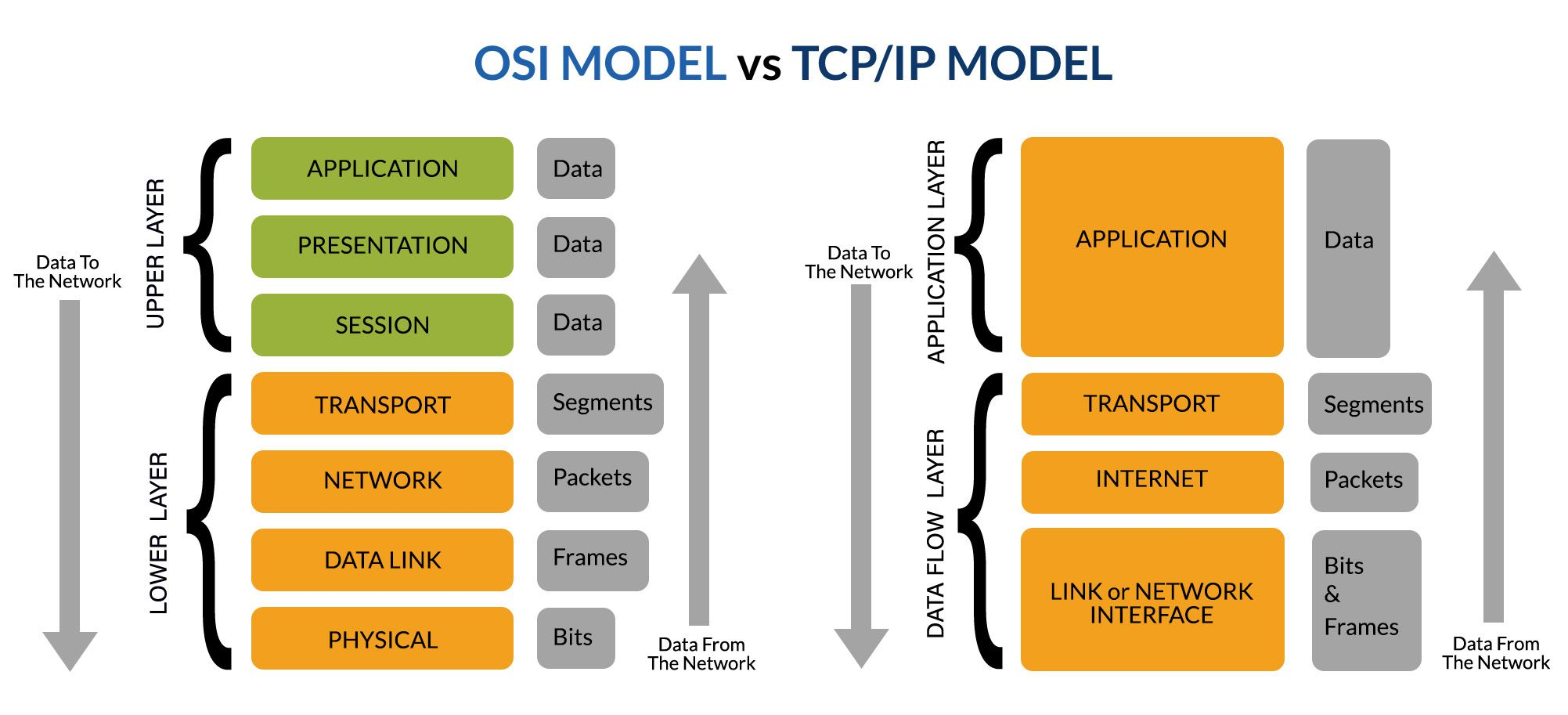
Because the modern networking stack laid on OSI Models and I can’t run it back from scratch, so I hope you spent a bit time for research about OSI Models and layer of it, or modernize with TCP/IP Models, it’s truly useful for any one to learn about Networking, especially it’s fundamental of whole modern technology nowadays
On this articles, I want to focus on
- Learning the methodology for Routing Networking, and Which protocols are handle that action?
- Learning VPN and more solution for ensure data transition
- Learning about modern network tech-stack for routing, peering
Network Terminologies
| Term | Full Name | Simple Definition | Think of it like… |
|---|---|---|---|
| IP Address | Internet Protocol Address | A unique string of numbers that identifies a device on a network. | Your digital home mailing address. |
| Router | — | A device that connects different networks and directs data traffic between them. | A traffic controller at a busy intersection. |
| Switch | — | A device that connects devices within a single network (like your office or home). | A power strip that lets multiple devices talk to each other. |
| Gateway | — | A “doorway” that connects a local network to the broader internet. | The security gate at the entrance of a neighborhood. |
| DNS | Domain Name System | A service that translates human-readable URLs (https://www.google.com/search?q=google.com) into IP addresses. | The “Contacts” app on your phone. |
| DHCP | Dynamic Host Configuration Protocol | A system that automatically assigns IP addresses to devices when they join a network. | A hotel clerk handing out room keys as guests check in. |
| MAC Address | Media Access Control | A permanent, physical ID number burned into a device’s network hardware. | A car’s VIN (Vehicle Identification Number). |
| Firewall | — | A security system that monitors and controls incoming and outgoing network traffic. | A bouncer at a club checking the guest list. |
| LAN | Local Area Network | A network that covers a small geographic area, like a home, office, or building. | A private conversation in a single room. |
| WAN | Wide Area Network | A large network that connects smaller networks over long distances (the Internet is the biggest WAN). | A global postal system connecting different cities. |
| VPN | Virtual Private Network | A secure, encrypted “tunnel” created over a public network. | A tinted-window limo driving through a public street. |
| Bandwidth | — | The maximum amount of data that can be transmitted over a connection in a given time. | The number of lanes on a highway. |
| Subnet | Subnetwork | A smaller, logical subdivision of an IP network. | Dividing a large office floor into specific “Departments” (HR, IT, Sales). |
| Subnet Mask | — | A number that defines which part of an IP address is the “network” and which is the “host” (device). | A filter that hides the “House Number” so you can only see the “Street Name.” |
| CIDR | Classless Inter-Domain Routing | A flexible way to group IP addresses (e.g., /24) to replace the old, rigid “Class A, B, C” system. | Custom-sized shipping boxes instead of just Small, Medium, or Large. |
| VLSM | Variable Length Subnet Masking | A technique that allows subnets to be different sizes within the same network. | Giving a team of 50 a large room and a team of 2 a small closet, rather than giving both the same size room. |
| Default Gateway | — | The IP address of the router that a device uses to send data outside its own subnet. | The “Exit” sign in a room that leads to the main hallway. |
| NAT | Network Address Translation | A process that allows an entire private network to use a single public IP address to access the internet. | A company having one main phone number with many internal extensions. |
| Unicast | — | Sending data from one specific sender to one specific receiver. | A private text message between two people. |
Broadcast (255.255.255.255) | — | Sending data from one sender to everyone on the same local network (subnet). | A person using a megaphone in a crowded room. |
Multicast (224.0.0.0 to 239.255.255.255) | — | Sending data from one sender to a specific group of interested receivers. | A “WhatsApp Group” or a subscription-based newsletter. |
| Anycast | — | Sending data to the “closest” receiver in a group of potential destinations. | Calling 911—you don’t care which operator answers, just the one nearest to you. |
Routing, Methodology and Protocol
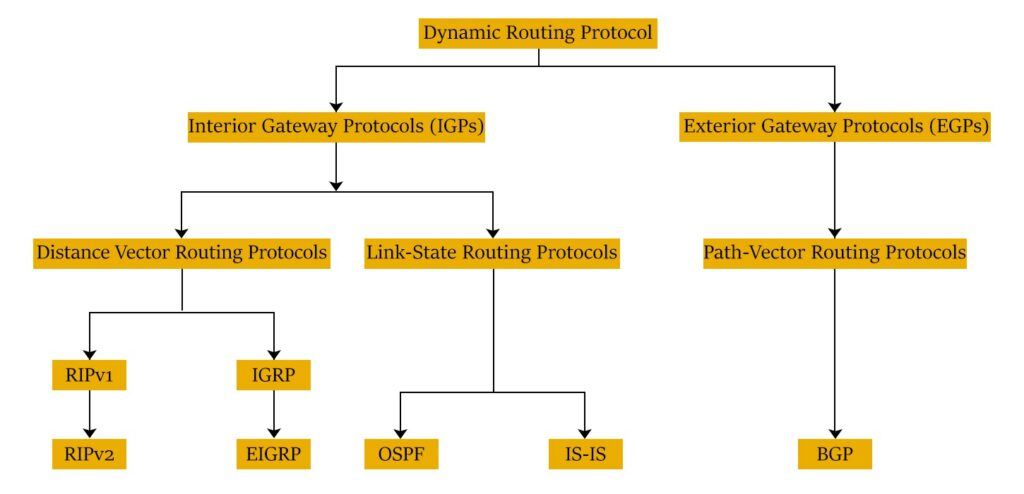
Following the Geeksforgeek about Network Routing, Network Routing is process of selecting the best path for data to travel across one or more networks. They will have role to ensure packet ship right destination in network
Routing
You have couple of physical devices for take that role, it’s called Router, connecting two or more package-switched networks or sub-networks, with couple of enchant characteristics, including
- Works at layer 3 of OSI Models
- Forwards data packets between networks
- Selects the best route for data transfer
There are couple of routing strategies and each of them serve for different purposes, including
- Static Routing: Configured Manually by network administrator and have full ability to control them. Suite for Small
- Dynamic Routing: An automatic options following path for routing using algorithm. Suite for large and modern network
- Default Routing: It’s the simplest option with routing to predefined gateway when no specific route is available. Default Route: 0.0.0.0/0
Let’s talk a bit about how to deliver the packet in network via routing methodology. It can operated to 4-5 steps, including
- Communicate Start: Start Communication
- Data Packets: Broken to Small Packet
- Routing Table: Find the Shortest Path in Routing Table (Database)
- Hopping: Packets travel through multiple routers (hops) to reach destination. NOTE: If Packet meet the limit hops, this one will be droped and retransmitted again.
- Destination: Reach to destination, reassembled, and check for errors.
To distinguish, you must understand the big different between device in these layers (L2 and L3), including: Modems (L1), Switch (L2), and Routers (L3). It’s handling the network packet in the OSI Model, but deeply they have different meaning. Read more at Routers vs. other network communication enablers
Methodology
Now, we will move to technique and protocol in this layer, it’s truly interesting and we have more one option for selecting when route network dynamically. Let’s take walkthrough
First of all, we will find couple of information about techniques or routing metrics enable network communication
- Distant vector routing (DVR): It’s dynamic routing algorithm worked based on exchange of routing information between router and neighbor. DVR use Bellman Ford Algorithm to find the shortest path. DVR use fixed length sub-net, so that’s not suitable for scaling.
- Link state routing (LSR): It’s same dynamic routing algorithm with DVR, but the LSR use Dijkstra’s Algorithm to calculate the shortest path. The LSR will be good for scaling because it use Variable Length Subnet Mask (VLSM)
- Interior Gateway Protocol (IGP): a type of routing protocol for routers within an autonomous network (e.g: Corporate LAN) exchange routing information within routers in the constituent sub networks.
- Exterior Gateway Protocol (EGP): Help routers from different autonomous network, (e.g: networks with different control centers) exchange routing information within themselves.
- Classful and classless Routing: Classful routing won’t define subnet mask as part of its routing table, require frequent routing. On the other hand, the classless routing adds the variable length subnet mask to its routing subnet, requires less frequent updates.
Protocol
After overview technique and methodology, we will see what protocol able to operate that technique in networking, that including
Routing Information Protocol (RIP)
Read more about Routing Information Protocol (RIP)
RIP is one of popular protocol used in infra-domain network that rely on DVR. RIP is having two version and each of them used for different requirements
- RIPv1: It’s a classful routing protocol that routes network communication based on the hop count. When use RIPv1, routers updates their routing table by broadcasting their data
- RIPv2: It’s a classless routing protocol that offer advanced capabilities, such as security enhancement. When use RIPv2, Router updates their routing table by multi-cast their data
RIPv1 and RIPv2 can used across WANs and LANs, the limited capabilities is the challenge of network admin with less 15 hops. To tackle problem, CIsco is introducing two protocol Interior Gateway Routing Protocol (IGRP) and Enhanced Interior Gateway Routing Protocol (EIGRP)
- Interior Gateway Routing Protocol (IGRP): Rely DVR and classful routing protocol that works on the foundations of RIP. IGRP can support 100 hop counts and configured to 255 hop counts. It can automatically update routing information, but encounter slow data convergence and higher bandwidth consumption.
- Enhanced Interior Gateway Routing Protocol (EIGRP): Rely DVR and This is a classless routing protocol that work of foundations of RIP. It’s upgrading version RIP and IGRP for faster data convergence
Open Shortest Path First (OSPF)
Read more about Open Shortest Path First (OSPF)
OSPF is a classless LSR routing protocol commonly used within autonomous network. It operates by selecting and forwarding the IP packet through the shortest network path to reach the packet’s destination. OSPF does this by first building multiple databases on the network’s topology with information from the link state advertisements by other routers in the network.
OSPF offers various authentication capabilities for enhancing security, that why it’s use popular in large network, and enterprise network
Exterior Gateway Protocol (EGP)
Read more about Exterior Gateway Protocol (EGP)
EGP simply focuses on reachability and communication between autonomous systems. Its routing table includes information such as the list of recognized routers, routing costs, and the addresses of all the nearby routers.
EGP nowadays replaced by BGP, because of limited capability to handle tree-like topologies and its inability to support multipath routing
Border Gateway Protocol (BGP)
Read more about Border Gateway Protocol (BGP)
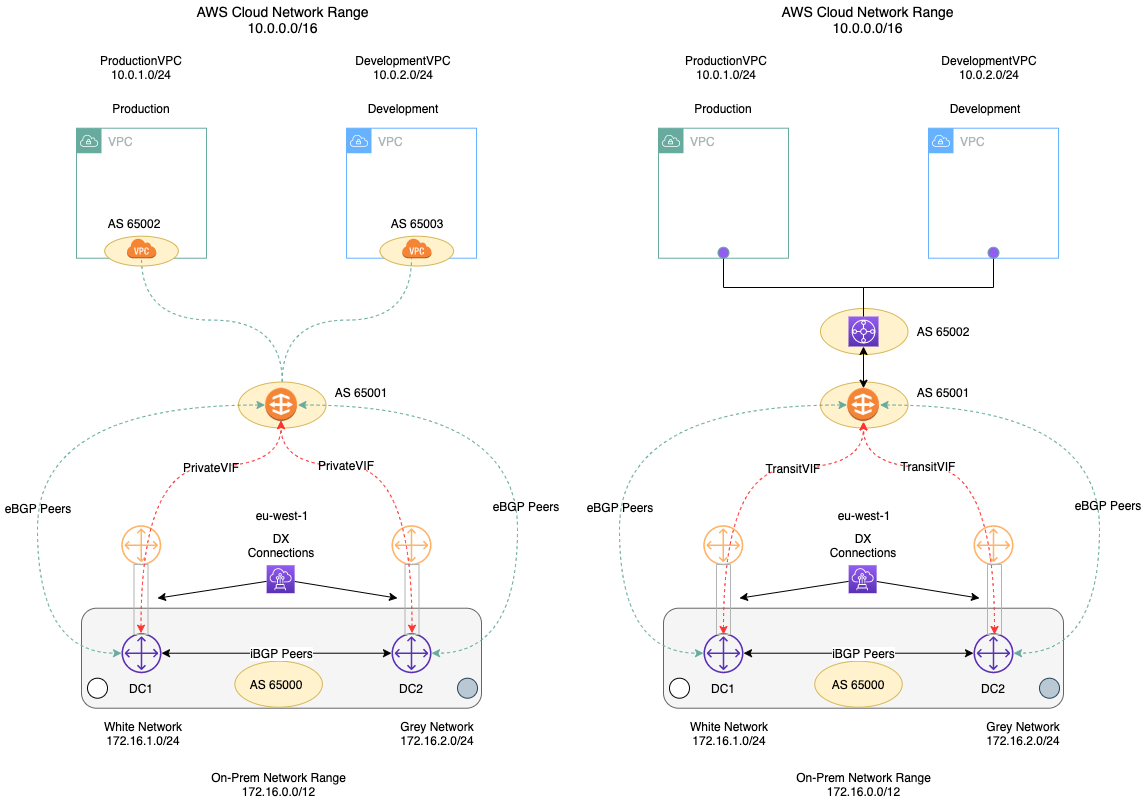
BGP is the latest and popular used routing protocol in the networking world. It’s built on the foundations of EGP and is classiffied as a distance path vector protocol (Rely DVR). It has two various
- Internal BGP (iBGP): enables network communication between routers within an autonomous system. It does not interact with devices outside the autonomous network.
- External BGP (eBGP): enables network communication between different autonomous systems i.e., inter-domain network routing.
BGP works by choosing the best path for the packet to reach its destination. By default, the shortest path is selected as the best path.
Network Admins can configuration choose best path, base on the different metrics. It’s support several stuff to define the networking needs for discovery, update, security, …
Learning about BGP Networking
- Microsoft - Border Gateway Protocol (BGP)
- AWS - What is BGP (Border Gateway Protocol)?
- Catchpoint - A BGP Guide for the non-Network Engineer
- Linkedin Blogs - What is BGP? Let’s Understand with John & Mike’s Delivery Business!
- Cloudns - Understanding BGP: A Comprehensive Guide for Beginners
- HainguyenIT - TÓM GỌN NHỮNG PHẦN BGP HAY DÙNG NHẤT (Vietnamese)
- Youtube - BGP Deep Dive
- GitHub - peering-manager: BGP sessions management tool
Intermediate System-to-Intermediate System (IS-IS)
Read more about Intermediate System-to-Intermediate System (IS-IS)
IS-IS is classified as a link state, interior gateway, classless routing protocol. Unlike other commonly used routing protocols, IS-IS is not based on the IP addresses and instead on an OSI layer 3 protocol called Connectionless Network Service (CLNS).
IS-IS works by grouping routers into different areas. Network routing within an area using IS-IS is called level 1 routing, and routing between areas is called level 2 routing.
Success
Now, we are kinda imagining the couple of popular routing methods in networking. So next, we will discover about VPN, one of the popular method to setup private network, secure the data packet transition and using widely in enterprise.
If you want to learn more about Networking and Routing, you can double-check these articles below
- ManageEngine - Network routing: A complete guide to network routing techniques and protocols 🌟 (Recommended)
- AWS - What is Routing?
- Youtube - Deep Dives by Kevin Wallace Training, LLC
VPN and Protocol
What is the VPN ?
According to Cloudflare’s documentation on VPNs, a VPN (Virtual Private Network) is an internet security service that enables users to access the web by connecting through a private network. A VPN encrypts data communication to protect users from potential cyberattacks and allows them to securely access services hosted within a private infrastructure.
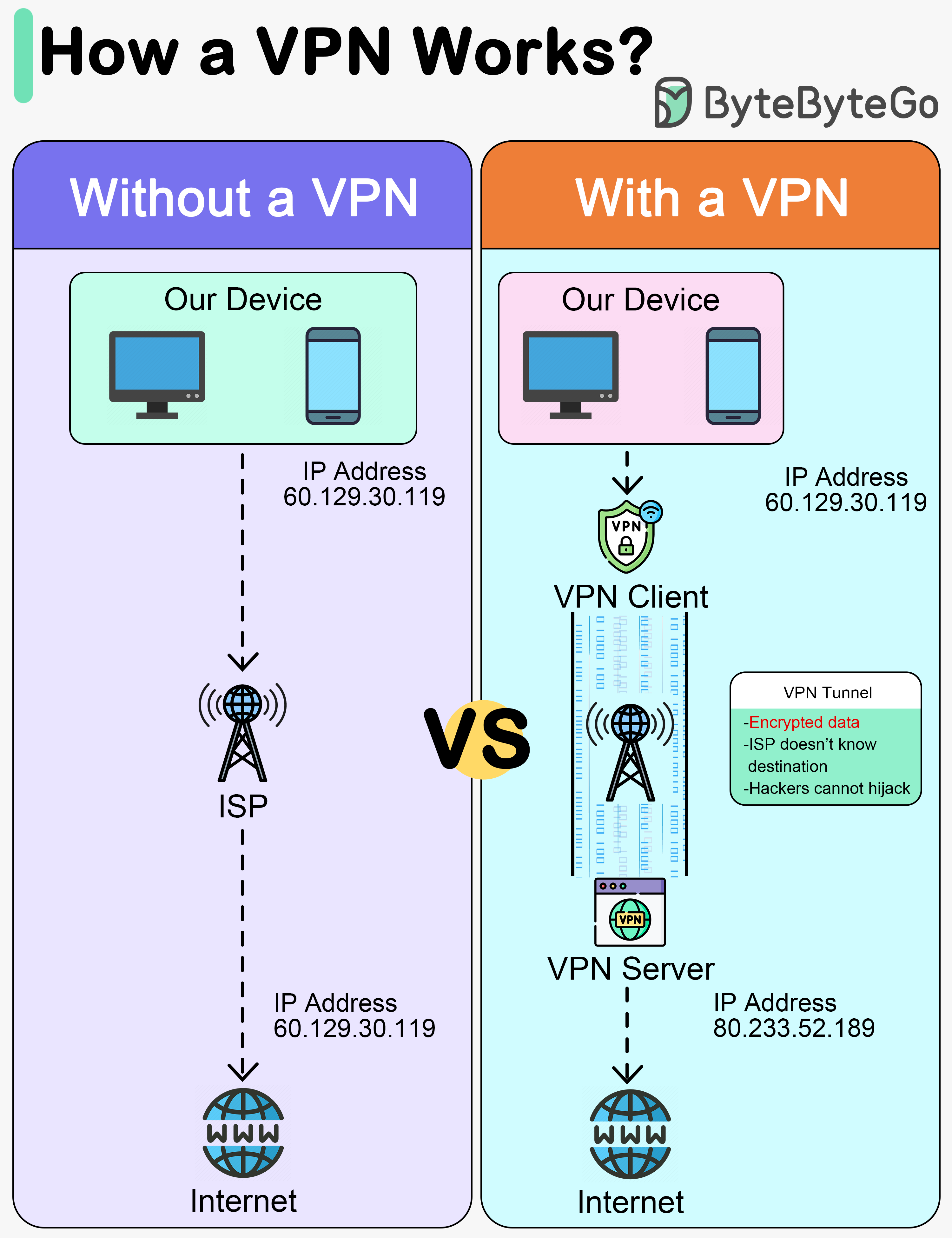
A VPN operates by encrypting and decrypting data through the ISP via these four primary steps:
- Encrypted Handshake: The VPN Client initiates a connection to the ISP using an encrypted protocol.
- ISP Routing: The ISP routes the traffic from the VPN Client to the VPN Server, maintaining the encrypted state of the data.
- Decryption and Forwarding: The VPN Server decrypts the data received from the user’s device and forwards the request to the destination web server over the internet.
- Secure Tunneling: The VPN Server then encrypts the response from the internet and sends it back to the client through what is known as a VPN Tunnel.
Info
VPN Tunnel between Client and Server passes through the ISP, and they won’t see the user’s activity.
But also VPN is existing couple of bottleneck issues, and they will lead to performance affected when get the connection through VPN, e.g: VPN Server hit to limit and it takes crash system because of poor resources. That why, you need to know VPN limits and try to find the balance to ensure the performance, and also the architecture behind take couple points to help you resolve problems.
BTW, you can choose couple of different ways to approach private connection instead VPN, such as
- Zero Trust Network Access (ZTNA) - Essentially brokered access to applications and data on the network. Users and devices are challenged and confirmed before access is granted. Read more at Cloudflare - What is Zero Trust Network Access (ZTNA)?
- Secure Access Service Edge (SASE) - A cloud-based architecture that converges network connectivity and comprehensive security functions into a single, unified service platform. Read more at Cloudflare - What is SASE?
- Software-defined wide area networking (SD-WAN) - a flexible approach to offering network connectivity across multiple locations. It relies on software-defined networking (SDN) concepts to manage the network.
To explore more, please these articles for more information
- CSO - 9 VPN alternatives for securing remote network access
- Paloalto - VPN Alternatives for Remote Access
VPN Protocol
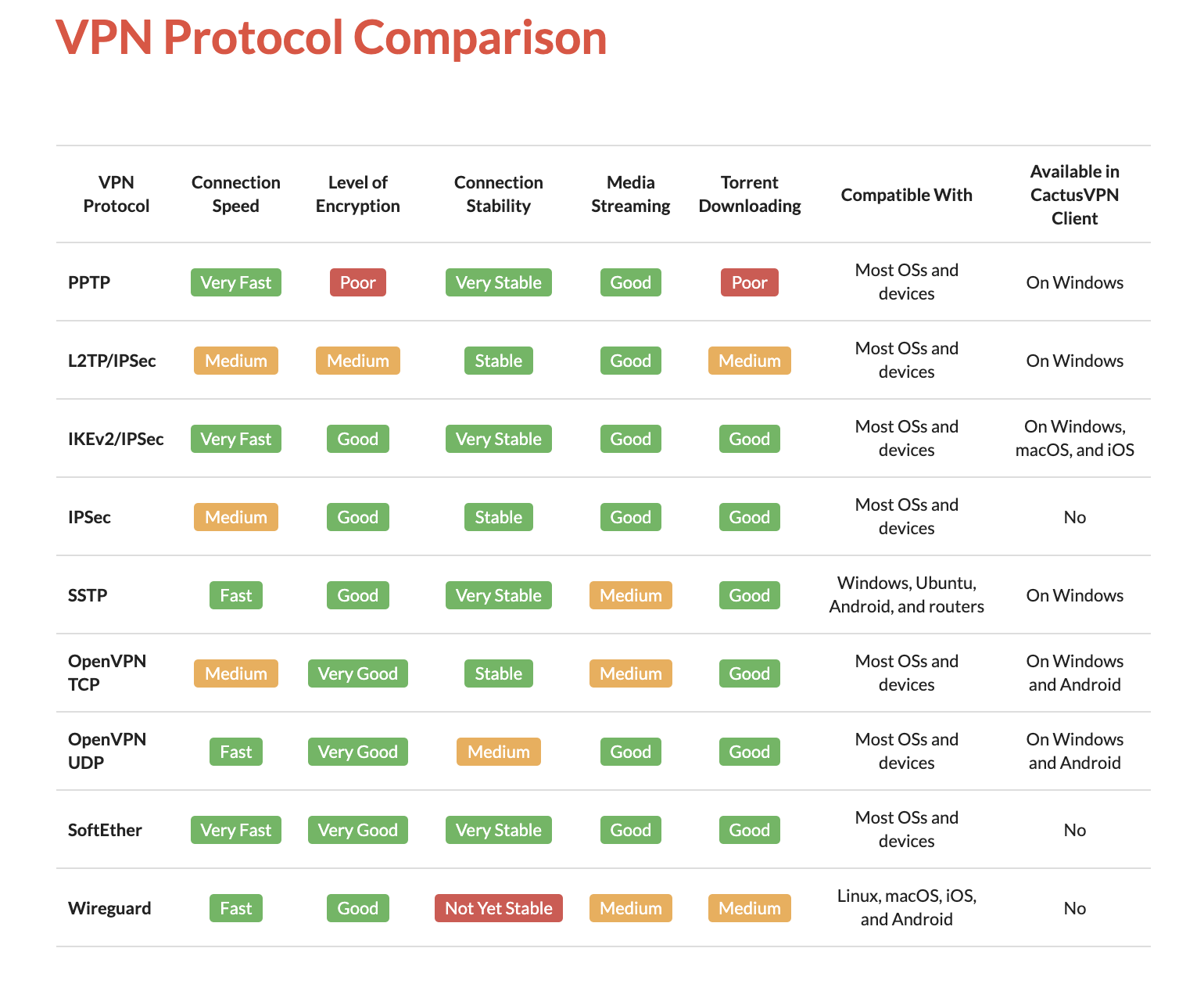
VPN appeared for a long time ago, and during the evolving of its, VPN is introducing many protocols for different purpose, different setup and also it’s creating the value for the next protocol generation appear, approach and develop.
You can follow the Wikipedia or couple articles below to understanding various protocols and what they produced for what purpose
- Wikipedia - Virtual private network
- Paloalto - What Are the Different Types of VPN Protocols?
- IVPN - Comparison of VPN protocols
I won’t share whole of stuff about VPN Protocol, so I only focus on the popular protocol most of us listening and using
- IPSec (Internet Protocol Security) - 1996 is a set of protocols that support secure communication over Internet Protocol (IP) through authentication and encryption. IPSec is implemented in the formation f secure tunnel, especially for VPNs and also adopted and combined by L2TP and IKEv2
- OpenVPN - 2001 is a robust, popular protocol adopted widely in the enterprise environment with strong encryption and configurability. This protocol work by creating P2P or S2S connection and use custom security protocols that utilize SSL/TLS for key exchange. This one can run over either TCP or UDP for different purpose.
- Wireguard - 2015 is a extremely fast VPN protocol with different implementation in cryptography and algorithm, utilizes the Curve25519 protocol for key exchange and ChaCha20-Poly1305 for encryption and message authentication, but also includes the ability to pre-share a symmetric key between the client and server
From my perspective, OpenVPN and WireGuard have established themselves as the modern industry standards for VPNs. Both protocols offer high-performance connectivity and robust security for data communication. Depending on your specific requirements, these two should be at the top of your list when considering a VPN implementation. I will outline several straightforward yet effective ways to set them up below.
However, your choice of protocol should be driven by your specific VPN architecture and use case. Whether you are implementing Site-to-Site (S2S), Point-to-Site (P2S), or Point-to-Point (P2P) connectivity, different options may be more suitable. For instance, if you are configuring hardware routers, IPSec with L2TP or IKEv2 might be more appropriate for those specific data communication requirements. This leads us to our next section: Type of VPN Setup.
Type of VPN Setup
There are couple of use-case when we use VPN, so that’s why you can setup your VPN Server following multiple ways, and here are popular options
- Point to Site (P2S) / Remote Access VPN: One of popular option to setup VPN and use widely in daily with architecture Client and Server connection. A P2S connection is established by starting it from the client computer.
- Site to Site (S2S) VPN: This is complex option to connect between two or more networks, such as a corporate network and branch office network. Organizations use site-to-site VPNs to leverage an internet connection for private traffic as an alternative to private MPLS circuits.
- Peer to Peer / Point to Point (P2P) VPN: This typical different between both of above, but it’s leveraging the peer to peer network with supportive VPN behind for ensure the security.
We will continuous for delve deeper into peering concept on next part of session, but we typically have more than one option to choose to setup VPN, especially for individual purpose or business, that will become the factor for most of your decision.
To explore more about VPN Setup, I recommend these articles for researching purpose
- Azure - About Point-to-Site VPN
- Azure - About Point-to-Site VPN routing
- Azure - VPN Gateway topology and design
- Paloalto - What Are the Different Types of VPN?
- Azure - About BGP and VPN Gateway
VPN Self-hosting
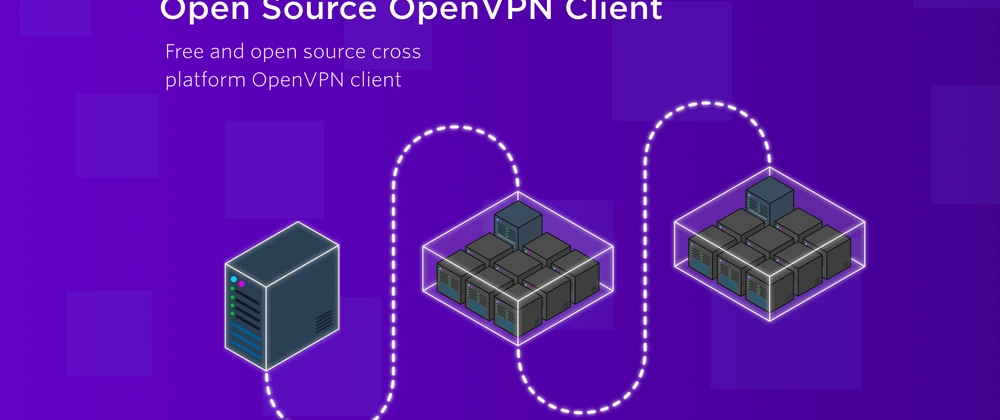
For self-hosting VPN for yourself, you have ton of options for doing that stuff, but for me I’m truly believe and no doubt when I operate OpenVPN or Pritunl for VPN following architecture - Server & Client. You can double-check these GitHub scripts or documentations to knowing about architecture and learn how to host them in specific machine
- openvpn-install.sh: Setting up
openvpnfor your host (Author: Nyr) - wireguard-install.sh: Setting up
wireguardvpnfor your host (Author: Nyr) - Pritunl - Install Pritunl Server: Setup the pritunl server for providing both OpenVPN and Wireguard VPN
OpenVPN
I’m using openvpn for a long time, and with script above, you need only few minutes to starting the OpenVPN for yourself. To ensure, you need to know about to open port 1194 with NAT (On-Premises), firewall configuration (Clouds) or both to gain access from client to server. Now trigger only the command below to operate openvpn server
wget https://git.io/vpn -O openvpn-install.sh && bash openvpn-install.shThis openvpn script is pretty simple and only work on CLI only, if you choose the web version, you can take a look the official documentation of OpenVPN to get one. Read more at OpenVPN - Access Server Installation (NOTE: This version is not totally free, so for fully experience and features, you need the license to active them)
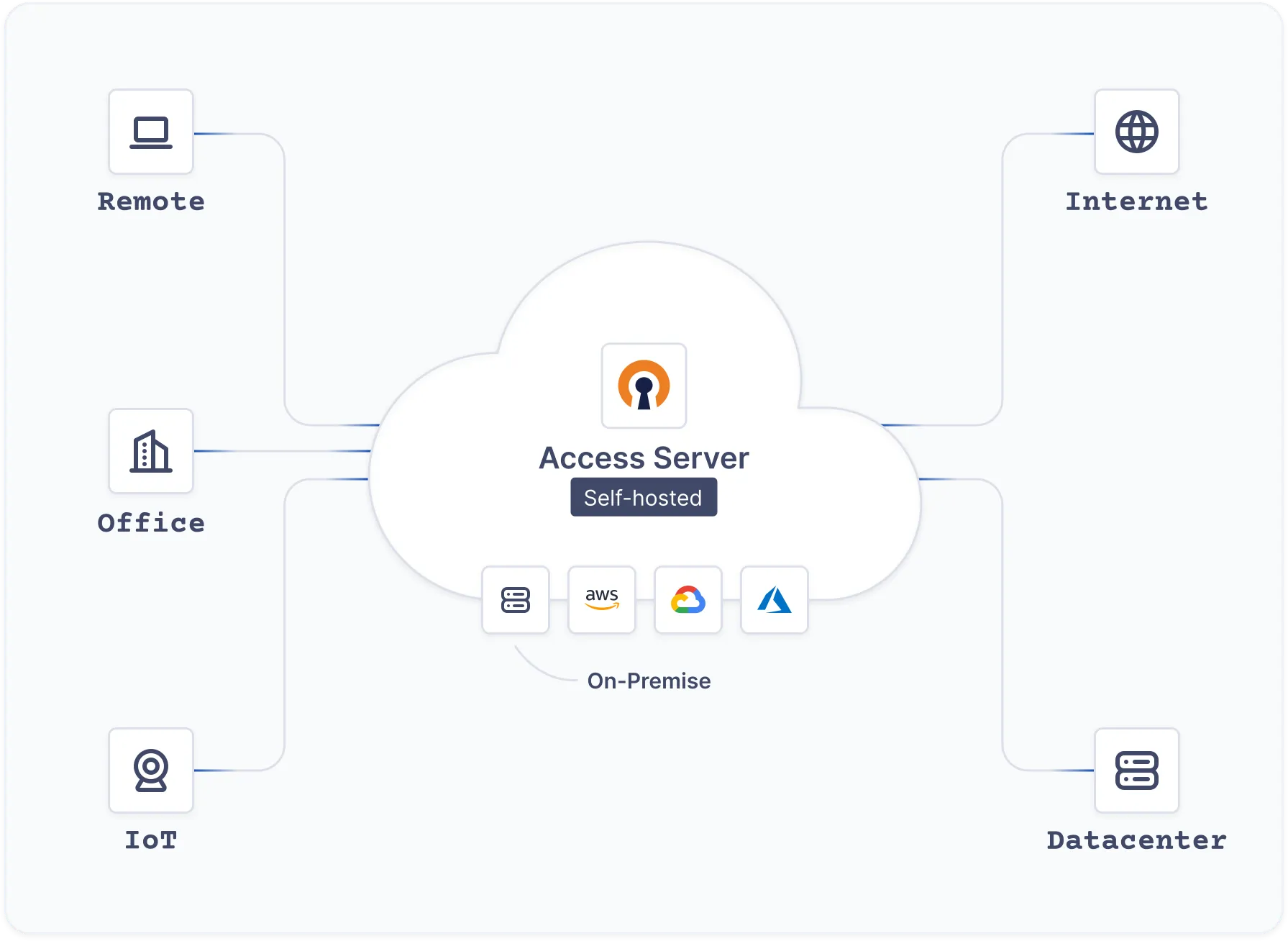
To use and connect to OpenVPN, you have few options to connected to openvpn as client
- Use OpenVPN Client - UI Version which compatible with Windows, MacOS, Android and IOS
- Use OpenVPN CLI - CLI Version which use for MacOS, Linux, and more
In my situation, I use Ubuntu and OpenVPN look standard for Ubuntu machine, and GNOME can help me import and connect to OpenVPN Server. It requires you to install couple of command for GNOME with network manager
sudo apt install -y openvpn \
	network-manager-openvpn network-manager-openvpn-gnome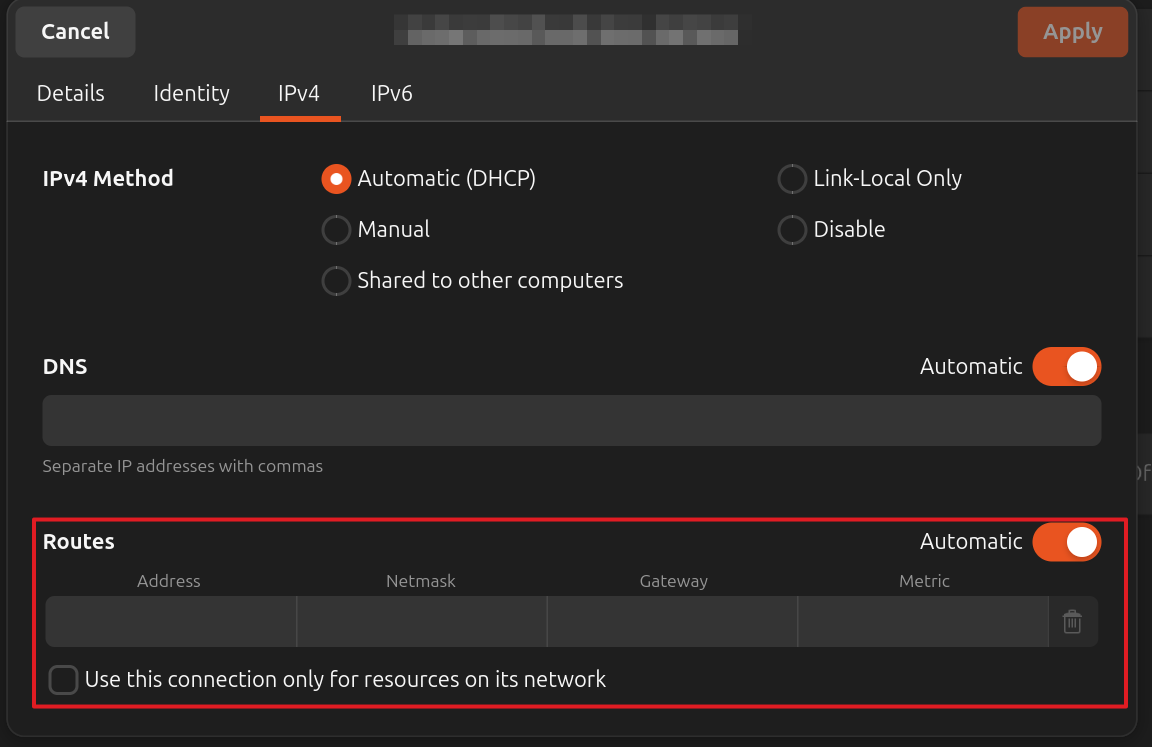
Wireguard
For wireguard, I don’t have much experience to use this kind VPN, but generally, it’s very fast, modern and secure because the crypto algorithm implemented. If you find best configuration for wireguard, that will increase lot of performance and experience.
For self-hosted, I recommend you to use script above with simple for optimizing lot of time to host WG Server on specific machine
wget https://git.io/wireguard -O wireguard-install.sh && bash wireguard-install.shWith Client, I see few options for you to choosing for connecting to WG Server
- Wireguard CLI - Support widely for most operate system. See more at Wireguard - Installation
- wg-easy - The easiest way to run WireGuard VPN + Web-based Admin UI
- wireguard-ui - Support WebUI for wireguard management
Same as OpenVPN, Ubuntu also support Wireguard Client for connecting with GNOME. So few free to install wireguard tools, e.g: wg and GNOME tools with network manager for connecting from v1.16.0+. Explore more at
Pritunl
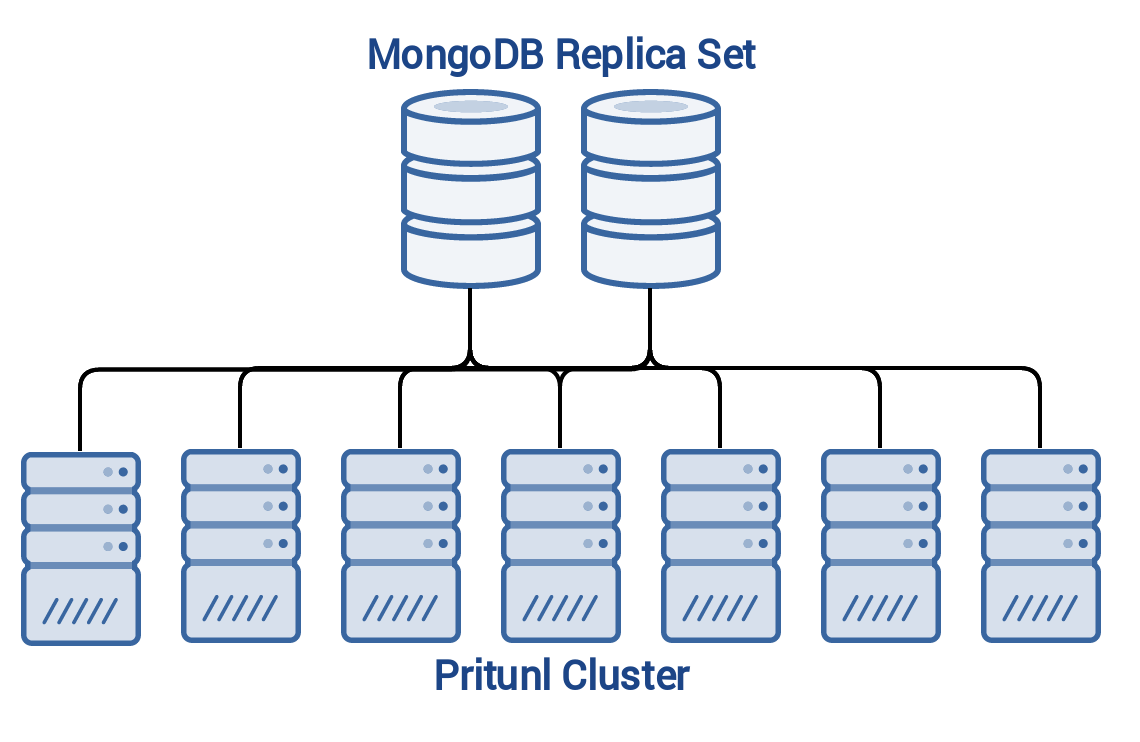
If you are searching for professional, enterprise-grade VPN solutions, consider the following requirements:
- Built for Enterprise: High-availability and distributed architecture.
- Web UI for Management: Centralized dashboard for profile and VPN management.
- Multi-Protocol Support: Compatibility with
OpenVPN,WireGuard, andIPsec.
Pritunl - Enterprise Distributed OpenVPN, WireGuard and IPsec Server is an excellent option that meets these criteria 100%.
Pritunl is engineered for high-availability environments with no single point of failure. Consequently, its architecture involves setting up a Pritunl Cluster integrated with a MongoDB Cluster for persistent data storage. While this infrastructure may appear complex, it is essential for ensuring system resilience and stability. You can explore the details further at Pritunl - Infrastructure.
While I haven’t delved into the deep technical complexities of Pritunl yet—as its full configuration is quite extensive—it remains a premier choice for those needing a robust, scalable VPN. You can find more in-depth information at Pritunl VPN - Documentation. I plan to dedicate a future session specifically to researching and documenting the advanced operations of Pritunl.
Now let’s run the simple Pritunl cluster with this script
# Add keyring to Ubuntu find MongoDB Repository
sudo tee /etc/apt/sources.list.d/mongodb-org.list << EOF
deb [ signed-by=/usr/share/keyrings/mongodb-server-8.0.gpg ] https://repo.mongodb.org/apt/ubuntu noble/mongodb-org/8.0 multiverse
EOF

# Add keyring to Ubuntu find OpenVPN Repository
sudo tee /etc/apt/sources.list.d/openvpn.list << EOF
deb [ signed-by=/usr/share/keyrings/openvpn-repo.gpg ] https://build.openvpn.net/debian/openvpn/stable noble main
EOF

# Add keyring to Ubuntu find Pritunl Repository
sudo tee /etc/apt/sources.list.d/pritunl.list << EOF
deb [ signed-by=/usr/share/keyrings/pritunl.gpg ] https://repo.pritunl.com/stable/apt noble main
EOF

# Get the requirement packages for validate the pgp key
sudo apt --assume-yes install gnupg

# Validate the pgp key
curl -fsSL https://www.mongodb.org/static/pgp/server-8.0.asc | sudo gpg -o /usr/share/keyrings/mongodb-server-8.0.gpg --dearmor --yes
curl -fsSL https://swupdate.openvpn.net/repos/repo-public.gpg | sudo gpg -o /usr/share/keyrings/openvpn-repo.gpg --dearmor --yes
curl -fsSL https://raw.githubusercontent.com/pritunl/pgp/master/pritunl_repo_pub.asc | sudo gpg -o /usr/share/keyrings/pritunl.gpg --dearmor --yes

# Update and install requirement for turn on MongoDB and Pritunl
sudo apt update
sudo apt --assume-yes install pritunl openvpn mongodb-org wireguard wireguard-tools

# Disable Firewall UFW to prevent blocking in your host
sudo ufw disable

# Enable and Start the Pritunl and Mongo Cluster
sudo systemctl start pritunl mongod
sudo systemctl enable pritunl mongod
If you want to explore more configuration about MongoDB and Pritunl, I recommend you to double-check these location for specific configuration.
- Edit at
/etc/mongod.confor read more at MongoDB - Self-Managed Configuration File Options - Edit at
/etc/pritunl.confor discovery more at GitHub - Pritunl Configuration
By default, your Pritunl Web will run on port 80 and first connect, it won’t serve the HTTPS with Let’s Encrypt.
First of all, Pritunl will ask you to provide setup-key and MongoDB URI if you don’t set up them in configuration. You need to provide both of them before you hit to authenticate part
# Get setup-key
sudo pritunl setup-key
To get the password for first time, you can use command below, and it’s able to change it in Web Dashboard after that.
sudo pritunl default-password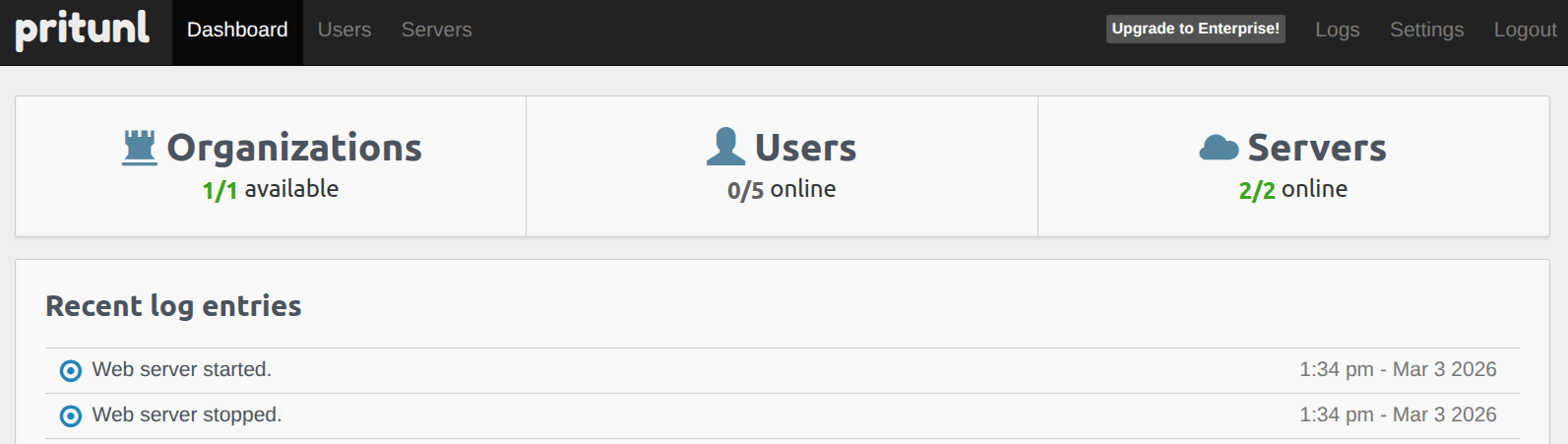
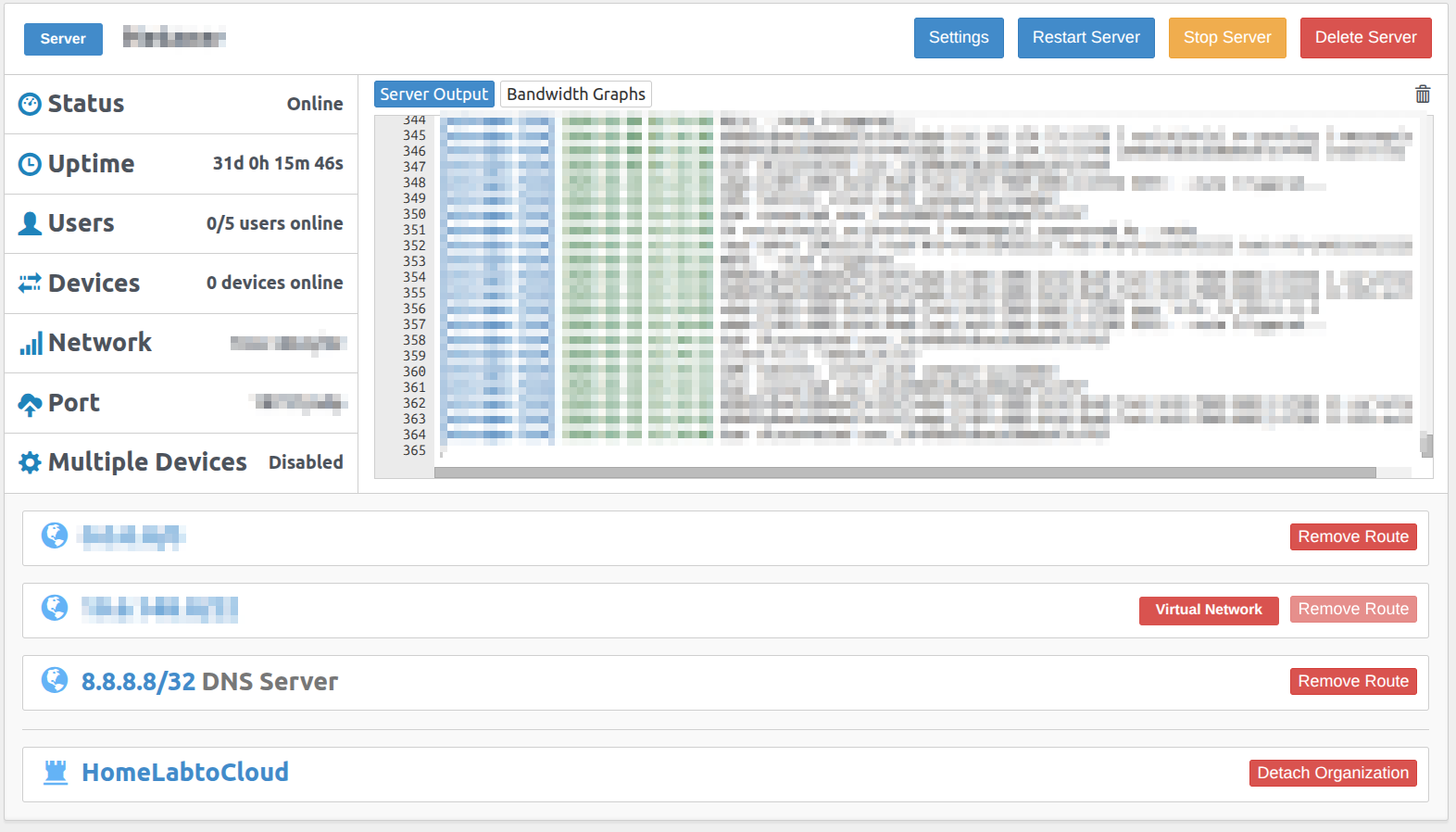
Pritunl will organize your VPN following the User, Server and Organization Structure. Therefore, you must define each of them to define successful VPN Server by Pritunl.
- Server will pertain of Organization
- User will pertain of Organization
Note
If you want to deploy a WireGuard server alongside your existing setup, you can enable it within the Settings configuration. Please ensure you provide a unique network range and port for the WireGuard server, as these must be distinct from those used by the OpenVPN server.
Info
This configuration establishes a strict relationship between the servers and the organization. Once the server is active, all members within that Organization will have the necessary permissions to connect to either the OpenVPN or WireGuard servers associated with it.
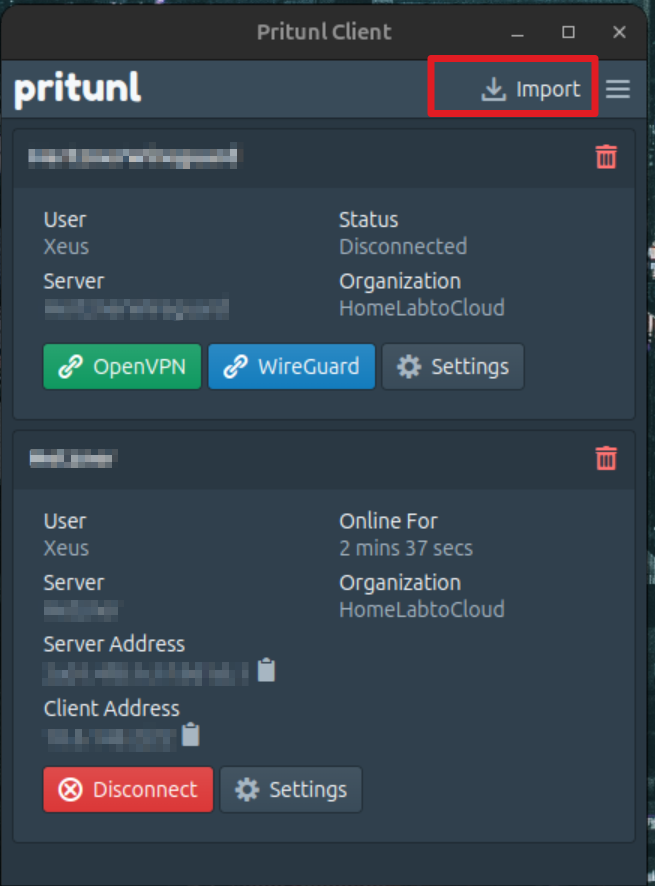
Because Pritunl prioritizes high security, it offers several flexible connection methods. You can use temporary profiles via the Pritunl Client (available for both CLI and UI) or integrate directly with GNOME for connectivity. For more details on command-line usage, refer to the Pritunl Client Commands documentation.
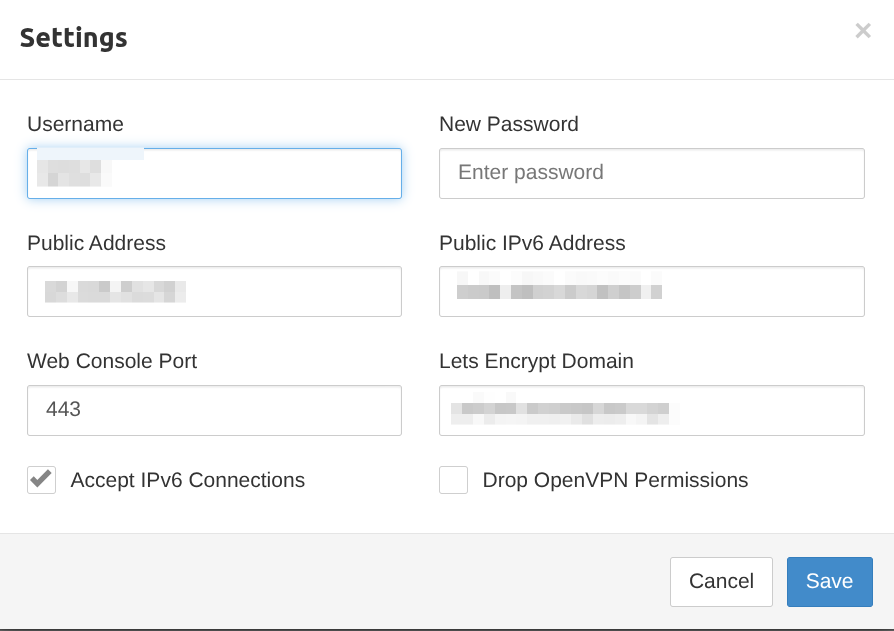
Let’s Encrypt Integration: Pritunl simplifies the process of securing your management interface with HTTPS. By integrating Let’s Encrypt, the platform automatically handles SSL certificate issuance and renewal to ensure your web console is always accessed over a secure connection. To enable this, you must define a valid domain name for your endpoint and ensure your DNS records point correctly to the server’s public IP address. Once configured, Pritunl manages the certificate lifecycle autonomously.
Info
To configure the domain endpoint for your Pritunl server, navigate to the Settings menu within the Pritunl Web UI. Locate the domain field, enter your fully qualified domain name (FQDN), and save the changes to trigger the Let’s Encrypt automated setup.
Warning
Remembering opening port for allowing connection to Server, by configuring your Firewall, NAT Port or ACL.
Network Peering
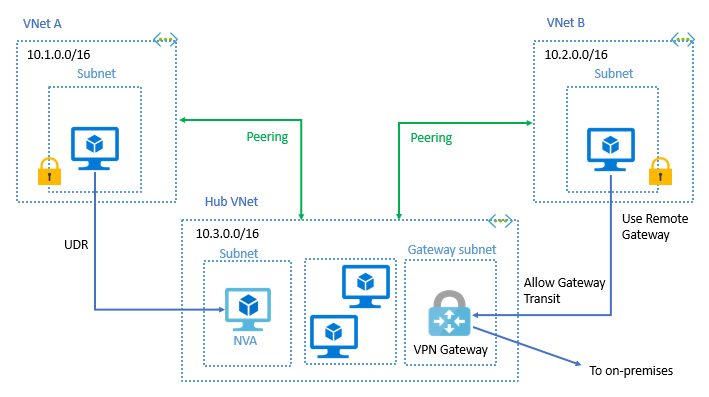
Peering is one of interesting concept to discovery and it’s totally powerful and bring back value for your setup. Let’s take a look for the concept
Following Cloudflare about Peering, Peering is a connection between two networks that allow to send traffic to destination with the other network connected to. Peering usually see on the autonomous network, e.g: ISP or Large organization managed thousands of IP Address.
Peering relies on use Border Gateway Protocol (BGP), which protocol allow networks to communicate with other networks, announcing which blocks of IP address they control. Peering takes place through Physical Interconnection, which divide into two types
- Peering - Two networks exchange traffic between their users freely, and for mutual benefit.
- Transit – One network pays another network for access to the Internet.
The two methods used are public peering at locations called Internet exchanges points (IxPs) and private peering through private network interconnections
- Public Peering: Accomplished across a Layer 2 access technology, generally called a shared fabric. At these locations, multiple carriers interconnect with one or more other carriers across a single physical port.
- Private Peering: The direct interconnection between only two networks, across a Layer 1 or 2 medium that offers dedicated capacity that is not shared by any other parties
Explore more about Network Peering and History, and also about modern peering configuration below
- Wikipedia - Peering
- Youtube - Configuring BGP for remote peering By DE-CIX
- Azure - Configure VPN gateway transit for virtual network peering
- InternetSociety - All About Peering: What It Is, How It’s Done, and Why We Need It
- CatchPoint - BGP Peering
Conclusion

I’ve finally finished this article! I decided to shift my focus from Lab-based tutorials to Concept-driven deep dives, which has been a completely different but rewarding experience. It has forced me to relearn the intricacies of Networking from the ground up.
I hope you found this shift valuable. If you want to build something critical and resilient, starting from the absolute basics is both challenging and incredibly rewarding. Strengthening your networking knowledge is the best way to “kick off” any major project for the future.
As I mentioned, my approach to technology this year will be a bit different. I am currently building my own Internal Developer Platform (IDP), pouring all my energy and ideas into it. This is why I’ve gone back to the basics—to learn, build, and eventually share something fun and useful with the community.
Until next time, stay healthy, stay curious, and keep learning. Cheers! 🍻