Quote
Yo! Long time no see since my last post. I hope you guys are all doing well! Sorry for the silence, I’ve had tons of stuff to handle lately, mostly focused on enhancing the W’xOps IDP, especially after figuring out what needed my top priority: W’xOps Core. Today, while testing, applying, and implementing several AuthN and AuthZ features inside a Kubernetes cluster, I wanted to share a few notes on what you can leverage to secure your Kubernetes cluster from a Platform Engineer or Cluster-Admin perspective. Let’s delve deeper into it!
AuthN, AuthZ and Admission in Kubernetes, Interesting but Insane
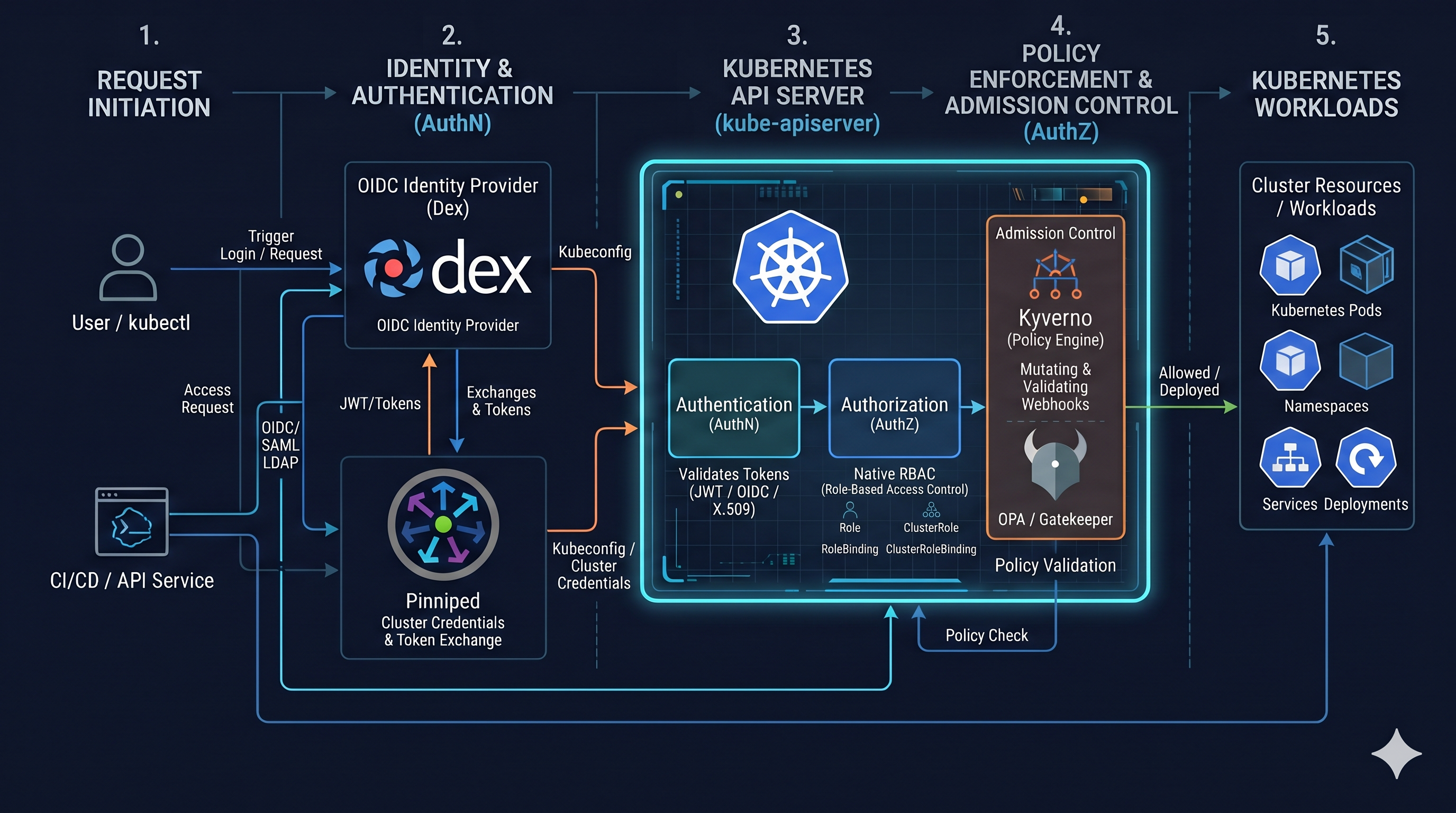
The security and system weakness are always the stuff that everyone look forward and interest, espeically Kubernetes. We can’t go far for success without the backbone not good enough, that always correct for any system, and Kubernetes take them as the base for build their system more reliable, and security as possible. From Kubernetes v1.34.x, The version I am working on now, to latest v1.37.x, I think Kubernetes already introduce a lot of concepts to let you access to Kubernetes Cluster as protected, including
Authentication (AuthN)
First of all, we will talk a walkthrough into Authentication (AuthN) in Kubernetes. But before hitting to my perspective, you can visit these links to explore more
- Kubernetes - Authenticaticating
- Kubernetes - Authenticating with Bootstrap Tokens
- CNCF - Kubernetes RBAC 101: Authentication
- Goteleport - A Simple Overview of Authentication Methods for Kubernetes Clusters
- Tremolo - Kubernetes Authentication - Comparing Solutions
- Traemolo GitHub - kubernetes-authentication
- OpenUnison - Deploying The Authentication Portal
- kube-oidc-proxy - Multi Cluster OIDC Authentication
- Blog (Case Studies) - Using Pinniped for authentication against Talos-based Kubernetes clusters
- Research Gate - Security Hardening and Compliance Assessment of Kubernetes Control Plane and Workloads
As you can see, there are pretty much solutions here, and each of them being introduced to tackle several demands, I don’t want to tell which one is the best, because it depends on your expectation, so let’s explore each of them from simple to complex, and understand why you should choose, or not it for your Kubernetes Cluster.
Bootstrap Token
What is the bootstrap tokens ?
Bootstrap tokens are a simple bearer token that is meant to be used when creating new clusters or joining new nodes to an existing cluster. It was built to support kubeadm, but can be used in other contexts for users that wish to start clusters without
kubeadm. It is also built to work, via RBAC policy, with the kubelet TLS Bootstrapping system.
This feature is becoming stable at Kubernetes v1.18, and for my usage and entire time to worked with Kubernetes, I don’t see this feature more, both managed and self-hosted Kubernetes Cluster. Because that one mostly built for kubeadm with flag API server configuration to run this feature
--enable-bootstrap-token-auth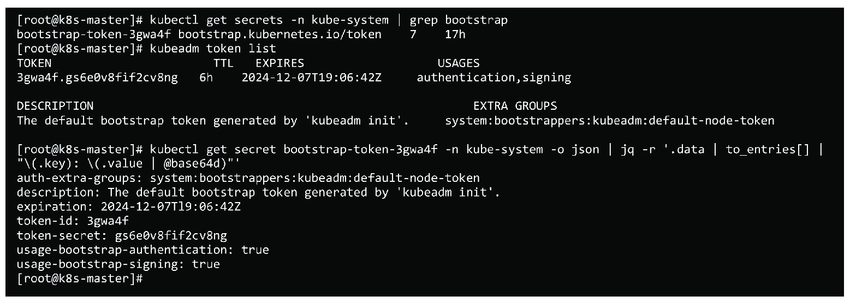
Bootstrap Tokens are defined with a specific type (bootstrap.kubernetes.io/token) of secrets that lives in the kube-system namespace. These Secrets are then read by the Bootstrap Authenticator in the API Server. Itself have format abcdef.0123456789abcdef. More formally, they must match the regular expression [a-z0-9]{6}\.[a-z0-9]{16}.
Explore more at
- Kubernetes - kubeadm token
- Blog - Understanding kubeadm Bootstrap Tokens (through Node Bootstrapping)
X509 Client Certificates
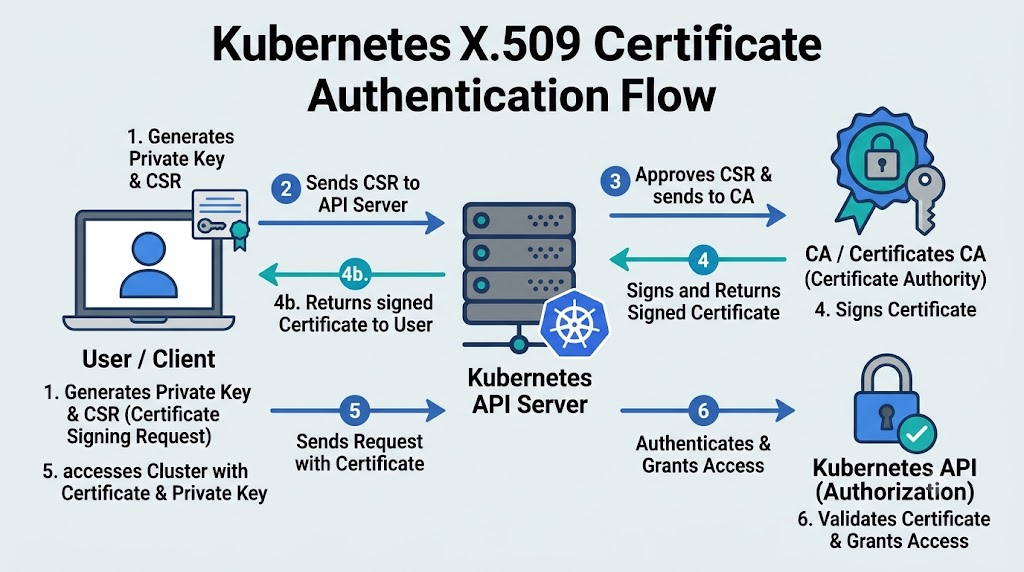
What is X509 Client Certificates ?
Kubernetes supports client authentication using X509 Client certificates signed by a trusted cluster Certificate Authority (CA), coupled with authorization mechanisms (such as RBAC) to determine whether a user is permitted to perform specific operations on a resource.
This method is widely adopted and used by many Kubernetes distributions (e.g., RKE2, K3s) for cluster-admin configuration during cluster bootstrapping. X.509 Client Certificates provide a highly secure method for accessing the Kubernetes API through mutual TLS (mTLS) validation, enforcing continuous authentication until a certificate expires and is rejected by the cluster CA.
Because managing certificate expiration schedules is challenging and revoking issued client certificates is complex, a compromised certificate poses a significant security risk to your cluster. Consequently, certificate management requires extreme care: when generating or updating the cluster CA, you must properly handle CA rotation and certificate re-issuance across all existing control plane and cluster components.
Explore more method to requested signed certificate with CertificateSigningRequest in Kubernetes at
- Kubernetes - TLS
- Kubernetes - Certificates and Certificate Signing Requests
- Kubernetes - Issue a Certificate for a Kubernetes API Client Using a CertificateSigningRequest
- CNCF - Kubernetes RBAC 101: Authentication#Internal Signed Certificates
- Kubernetes - Generate Certificates Manually
- K3s - Certificate
- RKE2 - Certificate Management
e.g: You can generate certificate for specfic user in RKE2 by these step below with openssl
- Generate 2048-bit RSA private key
openssl genrsa -out developer.key 2048- Create Certificate Signing Request
Info
It is important to set the CN and O attributes of the CSR. CN is the name of the user, and O is the group that this user will belong to. You can refer to RBAC for standard groups.
openssl req -new -key developer.key -out developer.csr -subj "/CN=developer/O=dev-group"- Create the CSR with certificate above
cat <<EOF | kubectl apply -f -
apiVersion: certificates.k8s.io/v1
kind: CertificateSigningRequest
metadata:
  name: developer
spec:
  # This is an encoded CSR. Change this to the base64-encoded contents of myuser.csr
  request: $(cat developer.csr | base64 | tr -d "\n")
  signerName: kubernetes.io/kube-apiserver-client
  expirationSeconds: 86400  # one day
  usages:
  - client auth
EOF- Approve the certificate request and retrieve the certificate
kubectl certificate approve developer
kubectl get csr developer -o jsonpath='{.status.certificate}'| base64 -d > developer.crt- Generate the credential with certificate and key to
~/.kube/configfile
Info
if you want to set the built config to another file, you can use
--kubeconfig=new-pathto build it, or that will merge into default~/.kube/config
# Add the user identity into kubeconfig
# if not `--embed-certs` that with absolute path
kubectl config set-credentials rke2-developer --client-key developer.key --client-certificate developer.crt --embed-certs=true

# set cluster with server-cert when you init the cluster
# rke2: /var/lib/rancher/rke2/server/tls/server-ca.crt
kubectl config set-cluster rke2-cluster \
 --certificate-authority=/var/lib/rancher/rke2/server/tls/server-ca.crt \
 --server=https://<RKE2_SERVER_IP>:6443 \
 --embed-certs=true

# set-context into kubeconfig
kubectl config set-context rke2-developer --cluster=rke2-cluster --user=rke2-developer

# use the context with kubeconfig
kubectl config use-context rke2-developer

# auth whoami to see who you are
kubectl auth whoami
Service Account Token
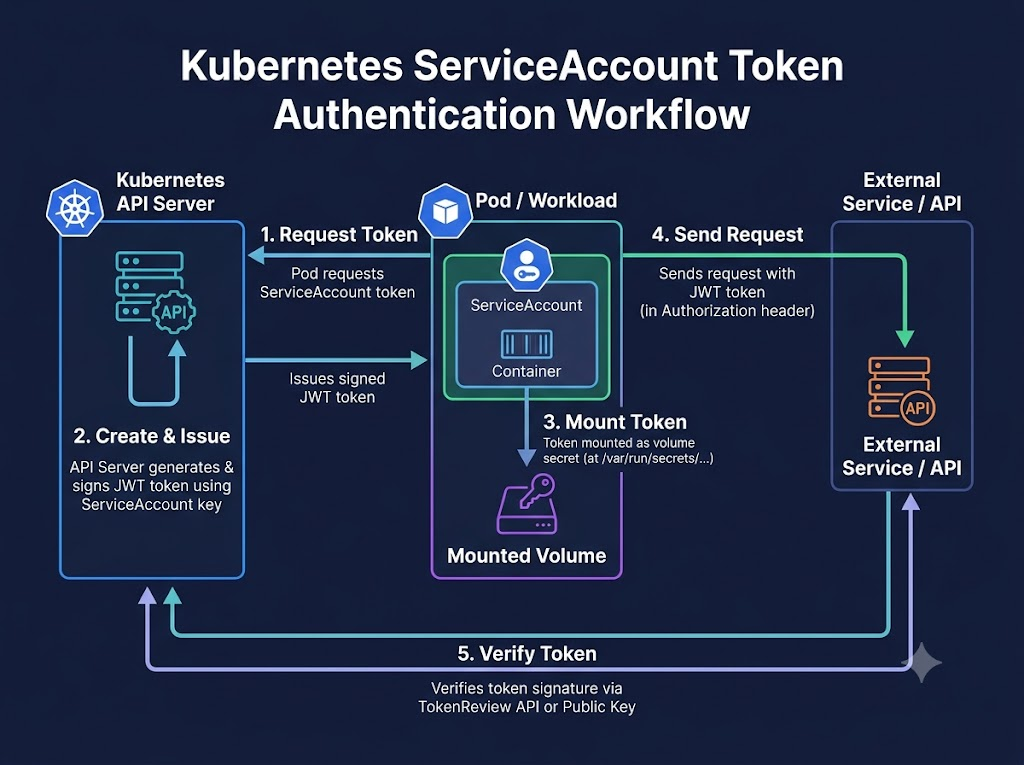
What is Service Account Token ?
A service account is an automatically enabled authenticator that uses signed bearer tokens to verify requests.
ServiceAccounts are usually created automatically by the API server and are associated with pods running in the cluster through the
ServiceAccountAdmission Controller. Bearer tokens are mounted into pods at well-known locations, and allow in-cluster clients to authenticate to the API server. ServiceAccounts may be explicitly associated with Pods using theserviceAccountNamefield within thespecof a Pod.
This authentication method is used lots in Kubernetes, especially gain permission for pod to workaround with another resources in Kubernetes. This JWT token was signed by Kubernetes Certificate Authority and contains information about the service account such as Kubernetes Namespace, Service Account Name, and Service Account ID. BTW, you can use it outside the cluster to get the authentication with Kubernetes API, with command kubectl create token, explore more at Kubernetes - Bound service account tokens
# create token valid in 1 days
kubectl create token <service-account-name> --duration=86400s --output json | jq -r '.status.token'
With this token, you can build the kubeconfig for your authentication to Kubernetes Cluster
- Set cluster via
HTTPinsteadHTTPSfor excepting you out of problems about authority by CA
kubectl config set-cluster name-cluster --server="http://host-api:port" --insecure-skip-tls-verify=true- Set the credential as the token you created
kubectl config set-credentials token-cred --token="$TOKEN"- Build the context to use it in cluster
kubectl config set-context token-cred-auth --cluster=name-cluster --user=token-cred --namespace=namespace-sa-worked - Set the context and use it like what we did before
kubectl config use-context token-cred-authAuthenticating Proxy
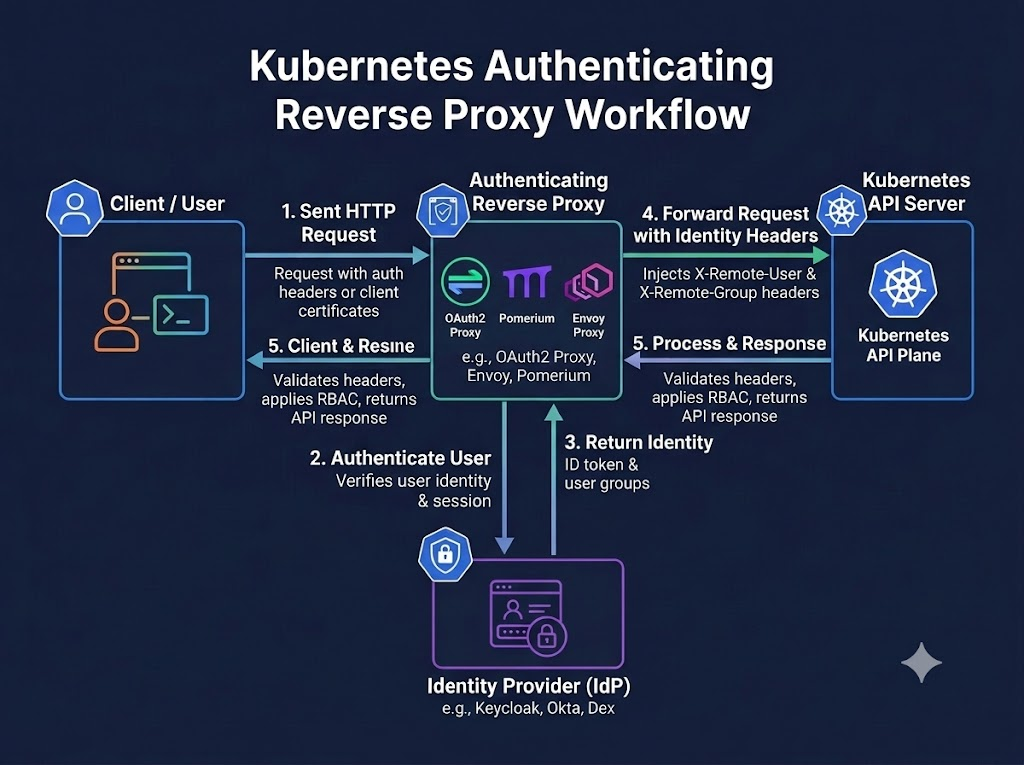
These three way above is the standard way of Kubernetes, but instead, Kubernetes support various external integration, and Authentication Proxy is one of them
What is the Authentication Proxy ?
The API server can be configured to identify users from request header values, such as
X-Remote-User. It is designed for use in combination with an authenticating proxy that sets these headers.In this mode, the API receives requests from an intermediate proxy that manages authentication and sends the details associated with the user — including the username or RBAC group — via HTTP headers.
Risky
If you have a certificate authority (CA) that is also used in a different context, do not trust that certificate authority to identify authenticating proxy clients, unless you understand the risks and the mechanisms to protect that CA’s usage.
Since the Kubernetes API server has no way to validate the content of the headers, the only way to secure the platform against header spoofing attacks is to ensure their provenance. To prevent header spoofing attacks, the authenticating proxy must present a valid X.509 client certificate to the API server for validation against the configured CA.
With this method, I got the experience when I use Rancher as the Proxy to control and generate the authentication for Kubernetes API instead the directly one, explore more if you want to find the solution
- Youtube (SUSE) - Rancher’s authentication and authorization (RBAC) for Kubernetes clusters
- Rancher - Authentication
- Medium - Rancher Architecture Overview
Webhook Token
What is the webhook token ?
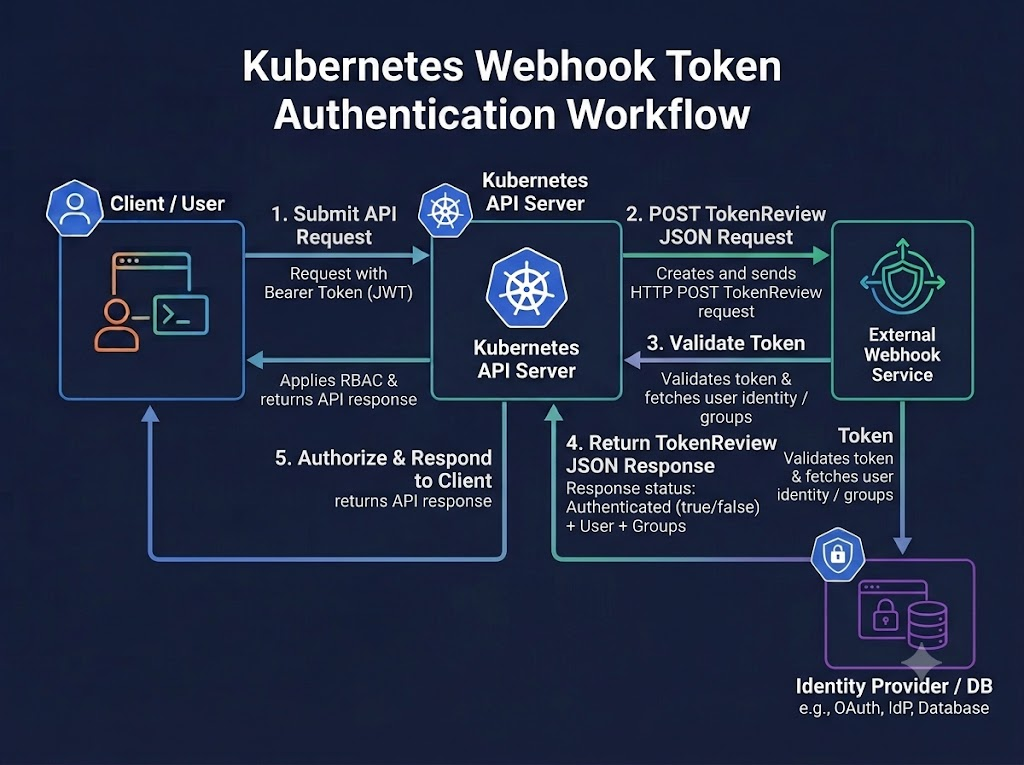
Kubernetes webhook authentication is a mechanism to make an HTTP callout for verifying bearer tokens.
This Webhook Token is confuring via KubeAPI server option, including
--authentication-token-webhook-config-filea configuration file describing how to access the remote webhook service.--authentication-token-webhook-cache-ttlhow long to cache authentication decisions. Defaults to two minutes.--authentication-token-webhook-versiondetermines whether to useauthentication.k8s.io/v1beta1orauthentication.k8s.io/v1TokenReviewobjects to send/receive information from the webhook. Defaults tov1beta1.
When a client attempts to authenticate with the API server using a bearer token, the authentication webhook POSTs a JSON-serialized TokenReview object containing the token to the remote service.
{
  "apiVersion": "authentication.k8s.io/v1",
  "kind": "TokenReview",
  "spec": {
    # Opaque bearer token sent to the API server
    "token": "014fbff9a07c...",

    # Optional list of the audience identifiers for the server the token was presented to.
    # Audience-aware token authenticators (for example, OIDC token authenticators)
    # should verify the token was intended for at least one of the audiences in this list,
    # and return the intersection of this list and the valid audiences for the token in the response status.
    # This ensures the token is valid to authenticate to the server it was presented to.
    # If no audiences are provided, the token should be validated to authenticate to the Kubernetes API server.
    "audiences": ["https://myserver.example.com", "https://myserver.internal.example.com"]
  }
The remote service is expected to fill the status field of the request to indicate the success of the login. The response body’s spec field is ignored and may be omitted. The remote service must return a response using the same TokenReview API version that it received. A successful validation of the bearer token would return:
{
  "apiVersion": "authentication.k8s.io/v1",
  "kind": "TokenReview",
  "status": {
    "authenticated": true,
    "user": {
      # Required
      "username": "janedoe@example.com",
      # Optional
      "uid": "42",
      # Optional group memberships
      "groups": ["developers", "qa"],
      # Optional additional information provided by the authenticator.
      # This should not contain confidential data, as it can be recorded in logs
      # or API objects, and is made available to admission webhooks.
      "extra": {
        "extrafield1": [
          "extravalue1",
          "extravalue2"
        ]
      }
    },
    # Optional list audience-aware token authenticators can return,
    # containing the audiences from the `spec.audiences` list for which the provided token was valid.
    # If this is omitted, the token is considered to be valid to authenticate to the Kubernetes API server.
    "audiences": ["https://myserver.example.com"]
  }
}
Or unsuccessful
{
  "apiVersion": "authentication.k8s.io/v1",
  "kind": "TokenReview",
  "status": {
    "authenticated": false,
    # Optionally include details about why authentication failed.
    # If no error is provided, the API will return a generic Unauthorized message.
    # The error field is ignored when authenticated=true.
    "error": "Credentials are expired"
  }
}
Explore more at
- vCluster - Configure webhook token authentication
- GitHub - Guard: 🔑 Kubernetes Authentication & Authorization WebHook Server
- GitHub - OpenStack with Keystone Auth via Webhook
JWT and OIDC (OpenID Connect) Authentication
What is JWT and OIDC Authentication ?
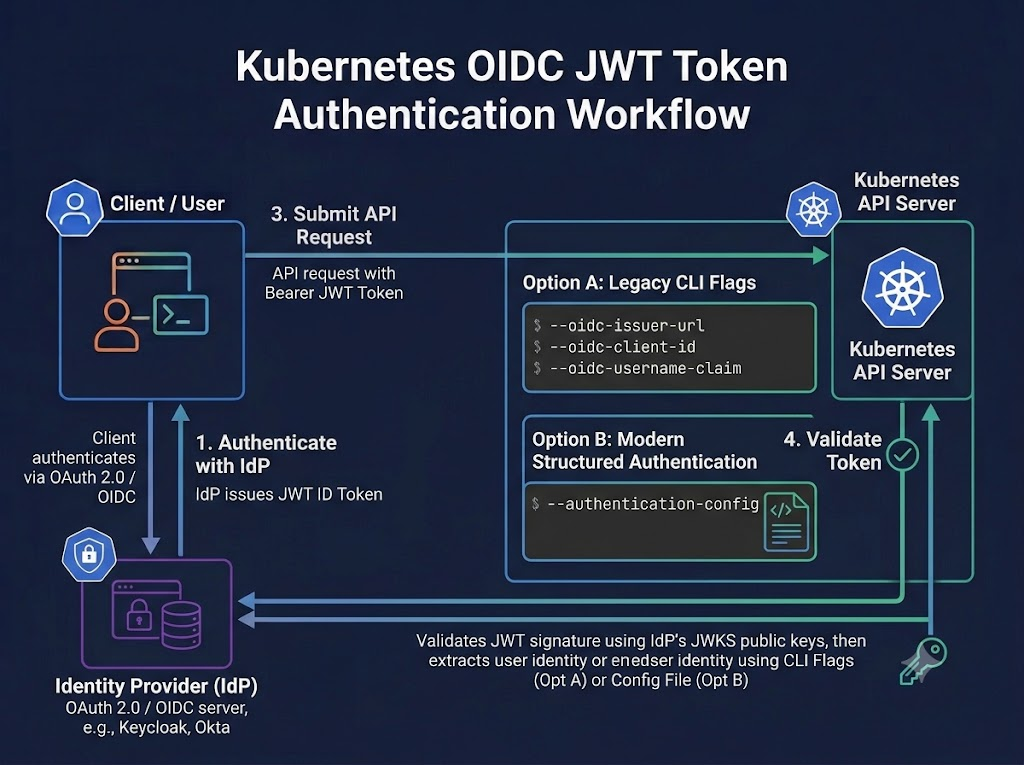
Kubernetes has native support for JWT and for OpenID Connect (OIDC). The authenticator attempts to parse a raw ID token, verify it’s been signed by the configured issuer. For externally issued tokens, the public key to verify the signature is discovered from the issuer’s public endpoint using OIDC discovery.
What is OIDC (OpenID Connect) ?
OpenID Connect (OIDC) is an extension of the OAuth 2.0 authentication standard. The main change in the protocol compared to OAuth2 is an additional field returned with the access token called the ID Token. This token contains various information about the user; namely the email, user ID, groups, etc. The ID Token is encoded as a JSON Web Token (JWT) and signed by a third party with their private key. While the private key is private, the public key is available at a well-known URI —
/.well-known/openid-configuration— and is used to validate the token.
To identify the user, the authenticator use id_token from the OAuth2 token response as a bearer token with this workflow, that same as the illustrator
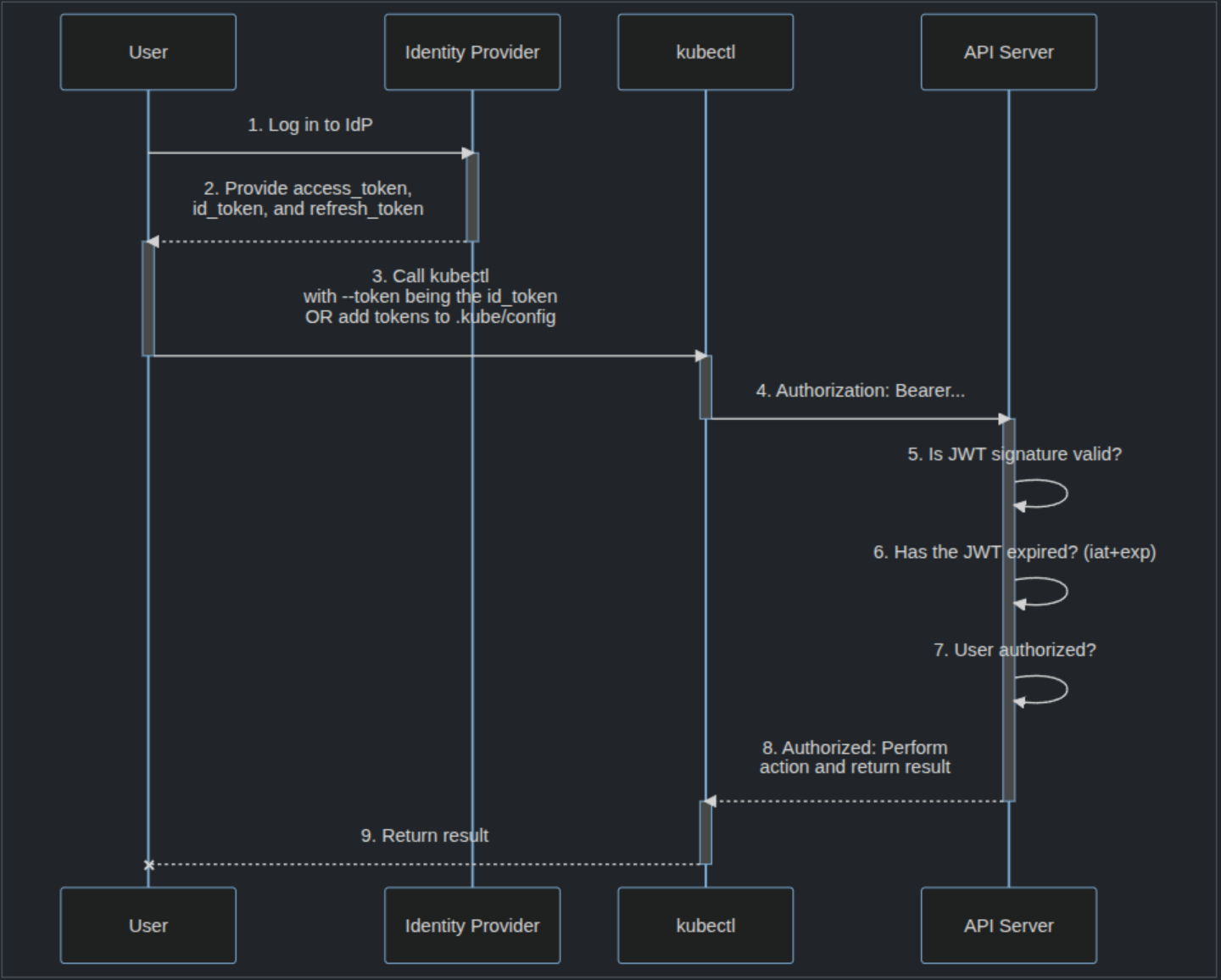
With this model, you usually face off with couple of challenges and annoys, e.g
- There is no browser to trigger the authentication process, that why you need the integration help you the hand, and authenticate to identity provider first to get response token back
- The
id_tokencan’t be revoked, so that will be short-lived, so it can make you look annoy when login again when token become expired (Careful configuration) - To authenticate to the Kubernetes dashboard, you must use the
kubectl proxycommand or a reverse proxy that injects theid_token.
Following this concept, you can discover lots of opensource, and cloud native support this mechanism, e.g:
- Kubernetes Authentication Through Dex
- gangway: An application that can be used to easily enable authentication flows via OIDC for a kubernetes cluster.
- Kubelogin: kubectl plugin for Kubernetes OpenID Connect authentication (kubectl oidc-login)
- dex-k8s-authenticator: A Kubernetes Dex Client Authenticator
Impersonate Proxy
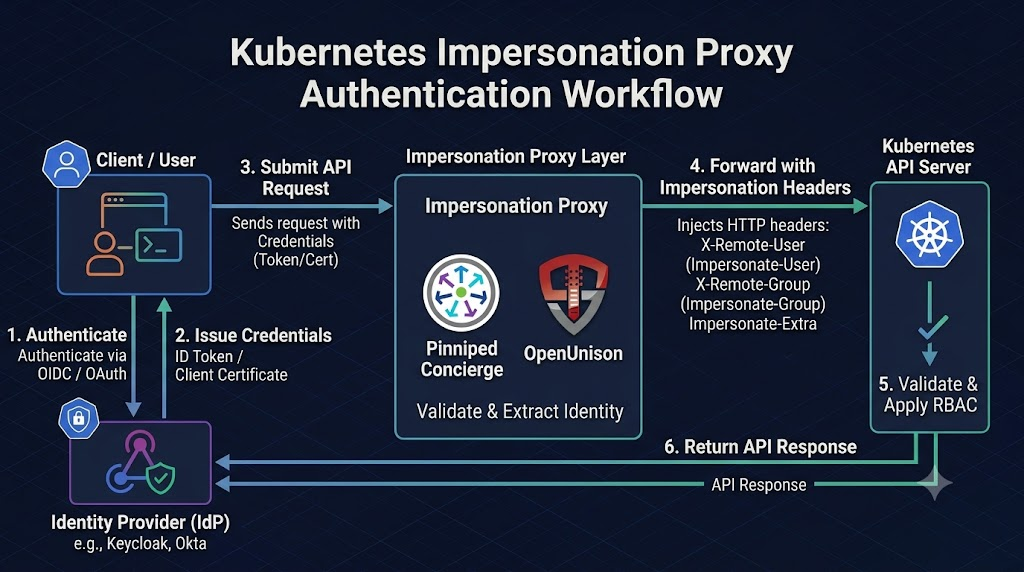
The last one in my knowledge, and I think that truly useful compare with standard OIDC solution for let you interact with Kubernetes API Sever without touching into their default configuration. In couple of large clusters or enterprise situations, Impersonate Proxy is quite optimization and highly recommended solution for getting involved. With Impersonate mechanism supported by Kubernetes let us switch to specific user and get the Authorization to get connect to API Server.
What is User Impersonate ?
User impersonation is a method of allowing authenticated users to act as another user, group, or service account through HTTP headers. A user can act as another user through impersonation headers. These let requests manually override the user info a request authenticates as.
Impersonation requests first authenticate as the requesting user, then switch to the impersonated user info.
- A user makes an API call with their credentials and impersonation headers.
- API server authenticates the user.
- API server ensures the authenticated users have impersonation privileges.
- Request user info is replaced with impersonation values.
- Request is evaluated, authorization acts on impersonated user info.
The following HTTP headers can be used to performing an impersonation request:
Impersonate-User: The username to act as.Impersonate-Uid: A unique identifier that represents the user being impersonated. Optional. Requires “Impersonate-User”. Kubernetes does not impose any format requirements on this string.Impersonate-Group: A group name to act as. Can be provided multiple times to set multiple groups. Optional. Requires “Impersonate-User”.Impersonate-Extra-( extra name ): A dynamic header used to associate extra fields with the user. Optional. Requires “Impersonate-User”. In order to be preserved consistently,( extra name )must be lower-case, and any characters which aren’t legal in HTTP header labels MUST be utf8 and percent-encoded.
Impersonate-User: jane.doe@example.com
Impersonate-Uid: 06f6ce97-e2c5-4ab8-7ba5-7654dd08d52b
Impersonate-Extra-dn: cn=jane,ou=engineers,dc=example,dc=com
Impersonate-Extra-acme.com%2Fproject: some-project
Impersonate-Extra-scopes: view
Impersonate-Extra-scopes: development
For my perspective, and experience, I think Impersonate Proxy is one of enterprise solution, that shoule be widely adopt to leverage their concept to flexible in authentication, except the boundaries by Managed Cluster with their own IAM Cloud model, if you want to keep same concept to login to various clusters in your system. You can find to several solution below
- Pinniped: Batteries-included for Kubernetes authentication with architecture Supervisor (Hub) and **Concierge (Spoke)
- OpenUnison: OpenUnison provides SSO and authentication for your Kubernetes clusters, no matter where they run or how your users need to authenticate.
- teleport: The easiest, and most secure way to access and protect all of your infrastructure.
- kube-oidc-proxy: Reverse proxy to authenticate to managed Kubernetes API servers via OIDC.
With W’xOps IDP, I’m using this mechanism for the core authentication into multi-cluster model with Identity providers DexiDP with several upstream, e.g: Gitea, Github, …
Authorization (AuthZ)
Once authentication is established, determining granular permissions inside Kubernetes presents the next critical architectural challenge. Several access control paradigms exist to fit distinct operational requirements.
Before diving into details, take a moment to review these foundational authorization and policy resources:
- Kubernetes - Authorization
- Kubernetes - RBAC Authorization
- Kubernetes - Node Authorization
- Kubernetes - Webhook Mode
- Kubernetes - ABAC Authorization
- CNCF - Kubernetes RBAC 101: authorization
- Sailor.sh - The Kubernetes Authorization Chain for the KCSA Exam: Authorization Modes, Node & Webhook Authorizers, SubjectAccessReview, AuthorizationConfiguration & CEL matchConditions
I can’t cover whole of concept Authorization (AuthZ) of Kubernetes, and I just focus on to the RBAC and highlighted usage, e.g: Node, Webhook, and ABAC. But you can use one or enable serveral authorization mode in Kubernetes with --authorization-mode=...,Node,ABAC,
| Authorization Mode | --authorization-mode Flag | Mechanism / How It Works | Primary Use Case | Pros & Cons |
|---|---|---|---|---|
| RBAC (Role-Based Access Control) | RBAC | Matches incoming users/groups against dynamic Role or ClusterRole API objects mapped via RoleBinding or ClusterRoleBinding. | Standard user & service account permission management in production clusters. | Pros: Dynamic, manageable via kubectl, fine-grained control.Cons: Role sprawl if not properly managed. |
| Node | Node | Authorizes API requests specifically originating from kubelet agents based on the resources assigned to their specific node. | Securing kubelet-to-APIServer communication. | Pros: Automated isolation between nodes. Cons: Only applicable to kubelet traffic; usually paired with NodeRestriction admission plugin. |
| ABAC (Attribute-Based Access Control) | ABAC | Evaluates requests against static JSON policy files stored locally on the API server disk based on user, verb, resource, and namespace. | Legacy static permission definitions. | Pros: Simple declarative file format. Cons: Requires API server restarts to update policies; hard to audit/scale. |
| Webhook | Webhook | Serializes request attributes into a SubjectAccessReview object and POSTs it to an external HTTP REST endpoint for an authorization decision. | Integration with external IAM services (e.g., OPA/Gatekeeper, AWS IAM, HashiCorp Vault). | Pros: Highly extensible, centralizes security rules. Cons: Adds network latency and introduces external dependency risk. |
| AlwaysAllow | AlwaysAllow | Approves all incoming API requests without checking permissions. | Local single-node development (e.g., Minikube testing). | Pros: Zero configuration required. Cons: Insecure; bypasses all cluster security. |
| AlwaysDeny | AlwaysDeny | Rejects all incoming API requests regardless of identity or permissions. | Security testing and debugging authorization fallback behavior. | Pros: Useful for verification tests. Cons: Completely locks down the cluster. |
Recommend For Production
In almost situation, I think use should consider use only RBAC and Node in Kubernetes for easier scale, and ensure reliable for Kubernetes Authozation model
RBAC
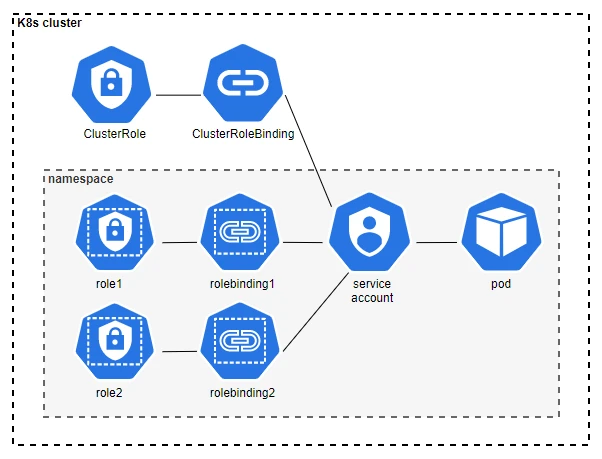
If you work with Kubernetes, RBAC is one of standard AuthZ introduced and use widely in this environment.
RBAC Authorization
Role-based access control (RBAC) is a method of regulating access to computer or network resources based on the roles of individual users within your organization.
RBAC authorization uses the
rbac.authorization.k8s.ioAPI group to drive authorization decisions, allowing you to dynamically configure policies through the Kubernetes API.
As usual, you will see these 4 common resources to define RBAC, including Role, ClusterRole, RoleBinding and ClusterRoleBinding. These 4 show the relationship between each others, and you entirely assigned this AuthZ for your users, groups, or service account to make you can interact with Kubernetes workloads
When you bootstrap the cluster, your certificate is define you authentication into system:masters group with cluster-admin ClusterRole who have highest priviledge inside Kubernetes Cluster, for range use control with ClusterRole or Role scope. Out of them, Kubernetes introduce a lots of default these RBAC to help you control Kubernetes easier, but in sometime that overflow what you actual hit to
- API Discovery Roles: To read API information that is deemed safe to be publicly accessible
- User-facing Roles: These are intended to be user-facing roles. They include super-user roles (
cluster-admin), roles intended to be granted cluster-wide using ClusterRoleBindings, and roles intended to be granted within particular namespaces using RoleBindings (admin,edit,view). - Core Components Roles: To define roles for specific core components in Kubernetes, e.g:
kube-scheduler,kube-controller-manager, … - Other Components Roles: To define roles for utilites components in Kubernetes, e.g:
kube-dns,monitoring,kubelet-api-admin, … - Roles for built-in controllers: Corresponding roles exist for each built-in controller, prefixed with
system:controller:
When I worked with RBAC, you have couple of features, that offer to help you manage these binding more easier with
Aggregated ClusterRoles: You can aggregate several ClusterRoles into one combined ClusterRole. A controller, running as part of the cluster control plane, watches for ClusterRole objects with an aggregationRule set. The aggregationRule defines a label selector that the controller uses to match other ClusterRole objects that should be combined into the rules field of this one.
apiVersion: rbac.authorization.k8s.io/v1
kind: ClusterRole
metadata:
  name: monitoring
aggregationRule:
  clusterRoleSelectors:
  - matchLabels:
      rbac.example.com/aggregate-to-monitoring: "true"
# The control plane automatically fills in the rules
With W’xOps IDP, I try to leverage these concept to ensure the matrix permission can setup, and add enought platform api of W’xOps Core Controller to let each package will come with right permission when the new API Introduced
Other feautes, Referring to special subjects, as the usual, you can setup subject for each role with User, Group, and ServiceAccount. But Authenticator modules provide group information. Groups, like users, are represented as strings, and that string has no format requirements, other than that the prefix system: is reserved.
Warning
The prefix
system:is reserved for Kubernetes system use, so you should ensure that you don’t have users or groups with names that start withsystem:by accident. Other than this special prefix, the RBAC authorization system does not require any format for usernames.
Especially prefix work with ServiceAccount like system:serviceaccount and system:serviceaccounts
# For all service accounts in the <namespace> namespace:
subjects:
- kind: Group
  name: system:serviceaccounts:<namespace>
  apiGroup: rbac.authorization.k8s.io

# For all service accounts in any namespace:
subjects:
- kind: Group
  name: system:serviceaccounts
  apiGroup: rbac.authorization.k8s.io
Others, you can work with authenticated and unauthenticated group user
# authenticated
subjects:
- kind: Group
  name: system:authenticated
  apiGroup: rbac.authorization.k8s.io

# unauthenticated
subjects:
- kind: Group
  name: system:unauthenticated
  apiGroup: rbac.authorization.k8s.io

# for all
subjects:
- kind: Group
  name: system:authenticated
  apiGroup: rbac.authorization.k8s.io
- kind: Group
  name: system:unauthenticated
  apiGroup: rbac.authorization.k8s.io
Info
To build the
system:unauthenticated, as usually, you can skip define user part or not provide token/cert in your kubeconfig. Explore at Kubelet authentication/authorization
apiVersion: v1
kind: Config
clusters:
- name: my-cluster
  cluster:
    server: https://kubernetes-address:6443
    certificate-authority-data: <BASE64_CA_CERT>
contexts:
- name: anonymous-context
  context:
    cluster: my-cluster
    namespace: default
    user: ""
current-context: anonymous-context
users:
- name: ""
  user: {}
Node
Node Authorization
Node authorization is a special-purpose authorization mode that specifically authorizes API requests made by kubelets.
Let’s took it back to Node permission, from v1.8, system:node role is introduced, this role will grant permission for kubelet (node) in group system:nodes, including read access to all secrets, and write access to all pod status objects.
Recommendation from Kubernetes
User should use the Node authorizer and NodeRestriction admission plugin instead of the
system:noderole, and allow granting API access to kubelets based on the Pods scheduled to run on them.
| Feature / Attribute | Before Node Authorization (Pre-v1.7) | With Node Authorization & NodeRestriction (Modern K8s) |
|---|---|---|
| Authorization Mode | Broad RBAC (ClusterRoleBinding to system:nodes) | Specialized Node authorization engine |
| Secret/ConfigMap Scope | Cluster-wide. A node could read any secret anywhere. | Graph-isolated. A node can only read secrets mounted by pods explicitly scheduled to it. |
| Object Modification | Could modify, delete, or fake status updates for any pod. | Bound strictly to pods where .spec.nodeName matches that specific node. |
| Identity Enforcement | Verified the credential belonged to a node. | Enforces that the username matches exactly: system:node:<nodeName>. |
In order to be authorized by the Node authorizer, kubelets must use a credential that identifies them as being in the system:nodes group, with a username of system:node:<nodeName>. This group and user name format match the identity created for each kubelet as part of kubelet TLS bootstrapping.
Explore more advantage and playgroup with Node Authorization
- Kubernetes - Service account token audience restriction
- Blog - Kubernetes Node Security: The Role of Kubelet Authorization 🔐
- Stackoverflow - What’s the story of kubelet’s authorization mechanics and unnecessary ClusterRoleBindings?
ABAC
Beside RBAC & Node, you rarely see ABAC (Attribues-Based Access Control) in Kubernetes
ABAC (Attribute-based access control ) in Kubernetes
Attribute-based access control (ABAC) defines an access control paradigm whereby access rights are granted to users through the use of policies which combine attributes together.
Because ABAC use static file --authorization-policy-file=SOME_FILENAME to define ABAC so it means that hard to let you can scale in big-cluster RBAC and Node can, but ABAC took couple advantage when RBAC can solved, e.g
- User attributes (department, clearance level, location)
- Resource attributes (classification, owner, creation date)
- Action attributes (time of access, previous actions)
- Environmental attributes (device security, network location)
e.g, you can define ABAC as JSON format like this one
{
  "apiVersion": "abac.authorization.kubernetes.io/v1beta1",
  "kind": "Policy",
  "spec": {
    "user": "kubelet",
    "namespace": "*",
    "resource": "events"
  }
}

{
  "apiVersion": "abac.authorization.kubernetes.io/v1beta1",
  "kind": "Policy",
  "spec": {
    "user": "kubelet",
    "namespace": "*",
    "resource": "pods",
    "readonly": true
  }
}
Explore more about ABAC Usage at
- Linkedin - Kubernetes RBAC vs ABAC: A Complete Guide from Fundamentals to Hands-On Implementation
- GitHub - Kubernetes Policy ABAC example
Webhook
Webhook Authorization
When specified, mode Webhook causes Kubernetes to query an outside REST service when determining user privileges.
When faced with an authorization decision, the API Server POSTs a JSON- serialized authorization.k8s.io/v1beta1 SubjectAccessReview object describing the action. This object contains fields describing the user attempting to make the request, and either details about the resource being accessed or requests attributes.
Example Request
{
  "apiVersion": "authorization.k8s.io/v1beta1",
  "kind": "SubjectAccessReview",
  "spec": {
    "resourceAttributes": {
      "namespace": "kittensandponies",
      "verb": "get",
      "group": "unicorn.example.org",
      "resource": "pods"
    },
    "user": "jane",
    "group": [
      "group1",
      "group2"
    ]
  }
}
Response
{
  "apiVersion": "authorization.k8s.io/v1beta1",
  "kind": "SubjectAccessReview",
  "status": {
    "allowed": true
  }
}
In the CloudNative, I think you consider to use Kyeverno as the opensource supported check this request for SubjectAccessReview, but instead you can implement them by yourself with support of SDK from Golang or Rust. Explore more below
- Kubernetes - SubjectAccessReview API documentation
- GitHub - webhook.go implementation
- Kyverno - Check SubjectAccessReview
- OSO - Using Oso Cloud With Kubernetes Authorization Webhooks
- Medium - Kubernetes Beyond RBAC - Make Your Own Authorization via Webhook
- GitHub - authorino: K8s-native AuthN/AuthZ service to protect your APIs.
Admission
Beside standard Role-Based Access Control (RBAC) often lacks the expressiveness needed for highly dynamic or complex policies, alternative models, such as Admission, or Policy-as-Code (PaC) frameworks, should be considered to build a strictly governed Kuberntes Security model.
Before deep diving into Admission, you should read these articles for more information
- Kuberenes - Admission Control in Kubernetes
- Kubernetes - Dynamic Admission Control
- Kubernetes - Manifest-Based Admission Control
- Kubernetes - Validation Admission Policy (VAP)
- KubeBuilder - Admission webhooks
- CHKK - Kubernetes Admission Controllers and Webhooks Deep Dive
- Fairwinds - Kubernetes Policy as Code: The Foundation of Modern Cluster Governance
- Nirmata - Level Up Your Kubernetes Security and Automation with Policy as Code
Admission Control

After AuthN and AuthZ in Kubernetes, you have one more layer (phase) to protect the request to Kubernetes API, before this event write down to etcd, and operate your action request. That’s called Admission Control
Admission Control
An admission controller is a piece of code that intercepts requests to the Kubernetes API server prior to persistence of the resource, but after the request is authenticated and authorized.
Admission controllers apply to requests that create, delete, or modify objects. Admission controllers can also block custom verbs, such as a request to connect to a pod via an API server proxy. Admission controllers do not (and cannot) block requests to read (get, watch or list) objects, because reads bypass the admission control layer.
Admission control mechanisms may be validating, mutating, or both. Mutating controllers may modify the data for the resource being modified; validating controllers may not.
Kubernetes provides a list admission over 20 controllers, but Kubernetes will have 4 special controller to focus on, including
- MutatingAdmissionWebhook
- MutatingAdmissionPolicy
- ValidatingAdmissionWebhook
- ValidatingAdmissionPolicy
Info
These controllers divide your KubeAPI request to two part with two webhook controllers execute the mutating and validating (respectively) admission control webhooks which are configured in the API. MutatingAdmissionPolicy and ValidatingAdmissionPolicy provides a way to embed declarative mutation/validation code within the API, without relying on any external HTTP callouts.
In Addmission Phases, Mutating will execute first and after it will execute Validation. If any of the controllers in either phase reject the request, the entire request is rejected immediately and an error is returned to the end-user.
To enable and disable, you can set the option flag with Kubernetes API Server
# Enable
kube-apiserver --enable-admission-plugins=plugin,want,to,enable

# Disable
kube-apiserver --disable-admission-plugins=plugin,want,to,disable
Mutating Admission Policy (MAP)
Mutating Admission Policy (MAP)
MutatingAdmissionPolicies allow you to change what happens when someone writes a change to the Kubernetes API. This is the native way and implemented by Kubernetes, and worked as the solution alternative for Mutating Policies Webhook without webhook latency.
Mutating admission policies use the Common Expression Language (CEL) to declare mutations to resources. Mutations can be defined either with an apply configuration that is merged using the server side apply merge strategy, or a JSON patch.
There are three resources to build the Policy
MutatingAdmissionPolicy: Describes the abstract logic of a policy- Parameter Resource: Provides information to a
MutatingAdmissionPolicyto make it a concrete statement - A
MutatingAdmissionPolicyBinding: Links the above resources together and provides scoping.
apiVersion: admissionregistration.k8s.io/v1
kind: MutatingAdmissionPolicy
metadata:
  name: "sidecar-policy.example.com"
spec:
  paramKind:
    kind: Sidecar
    apiVersion: mutations.example.com/v1
  matchConstraints:
    resourceRules:
    - apiGroups:   [""]
      apiVersions: ["v1"]
      operations:  ["CREATE"]
      resources:   ["pods"]
  matchConditions:
    - name: does-not-already-have-sidecar
      expression: "!object.spec.initContainers.exists(ic, ic.name == \"mesh-proxy\")"
  failurePolicy: Fail
  reinvocationPolicy: IfNeeded
  mutations:
    - patchType: "ApplyConfiguration"
      applyConfiguration:
        expression: >
          Object{
            spec: Object.spec{
              initContainers: [
                Object.spec.initContainers{
                  name: "mesh-proxy",
                  image: "mesh/proxy:v1.0.0",
                  args: ["proxy", "sidecar"],
                  restartPolicy: "Always"
                }
              ]
            }
          }
Explore more at Mutating Admission Policy (MAP) at Kubernetes API from v1.36
Validation Admission Policy (VAP)
Validation Admission Policy (VAP)
ValidatingAdmissionPolicies allow you validate the interact with Kubernetes API. This one is ultra-fast, and zero-latency to made it as the alternative of Validation Admission Webhooks. Same as MAP, VAP use the Common Expression Language (CEL) to declare validation rules of a Policy.
It also combine by three resources to build policy, same as MAP
ValidatingAdmissionPolicy: Describes the abstract logic of a policy.- Parameter Resource: Provides information to a
ValidatingAdmissionPolicyto make it a concrete statement. - A
ValidatingAdmissionPolicyBinding: Links the above resources together and provides scoping.
apiVersion: admissionregistration.k8s.io/v1
kind: ValidatingAdmissionPolicy
metadata:
  name: "demo-policy.example.com"
spec:
  failurePolicy: Fail
  matchConstraints:
    resourceRules:
    - apiGroups:   ["apps"]
      apiVersions: ["v1"]
      operations:  ["CREATE", "UPDATE"]
      resources:   ["deployments"]
  validations:
    - expression: "object.spec.replicas <= 5"
Explore more at Validation Admission Policy (VAP) at Kubernetes API From v1.30
Policies as Code Engine (The Modern)
From my perspective, I’m not actual notice MAP and VAP of Kubernetes first, but actual Policies as Code Engine already start with me from day 1 to execute Policy Mangement, and Kyverno is the first Policy Engine, that I working with from Lab, and It’s integrate into W’xOps IDP as part of BACK Framework (K = Kyverno - Governance & Policies in Platform).
Policy Management
Base on CNCF - Kubernetes Policy Managment WhitePaper V1, A policy is a set of rules adopted by an organization to help achieve its desired outcomes. Policies can help guide behaviors across wide ranging concerns like costs, security, and productivity.
In Kubernetes, a policy serves as a digital contract between application owners, cluster administrators, and security stakeholders. Kubernetes administrators deploy policies that describe what configurations and behaviors are allowed based on the organization’s security and compliance requirements. The policies are configured to allow, deny, or audit the configurations and behaviours of interest.
Kubernetes has policy constructs as part of its APIs (e.g. a NetworkPolicy), and also allows external policy engines to run as part of the Kubernetes control plane via dynamic admission control capabilities.
Polices as Code
By IBM, Policy as code is a method of expressing rules and constraints—including security, compliance and organizational policies—in machine-readable code that is automatically enforced across IT architectures and DevOps pipelines.
By Hashicorp, Policy as code gives you an automated way to check, in seconds, if your IT and business stakeholders’ requirements are being followed — in every deployment.
By CNCF, The main idea around PaC is to handle configuration and standardization in your environments in an easier and more governed way.
The mechanism typically associated with the term X as Code signifies the transition from a manual process to an automated one.
Things like security and environment manageability become continuously improving while adopting software engineering best practices like source code versioning and rollback capabilities. This will allow you and your company to evaluate every change that has been made and the impacts it has shown.
That reason why there are many tools, and concepts introduced before we got MAP and VAP appear in Kubernetes. By the reconcile loop mechanism with various resource definiton, it enable the capabilities to protect this Kubernetes resource via Webhook.
I don’t actual tell you should choose between PAC Engine (Kyverno, OPA Gatekeeper, …) and VAP, both of them are the good options to work with at Admission Phases, and here reason you can choose one of them
- Use Native VAP / MAP if: You only need validating or mutating rules for Kubernetes objects (e.g., enforcing label constraints, setting default security contexts, blocking root users) and you want maximum performance, zero webhook latency, and no extra pods to manage.
- Use Kyverno if: You need end-to-end governance—including auto-generating resources, verifying image supply chains, scheduling automated cleanups, generating audit reports for existing resources, or running policies in local CI/CD testing pipelines
You can explore more with Admission Policies solutions below, and several articles to deep diving.
| Tool / Feature | Primary Scope | Execution Architecture | Policy Language | Key Capabilities | Best Used For |
|---|---|---|---|---|---|
| VAP (Validating Admission Policy) | K8s API Admission | In-Process inside kube-apiserver | CEL | Validation only (read-only enforcement) | Ultra-fast, zero-latency validation without running external webhooks. |
| MAP (Mutating Admission Policy) | K8s API Admission | In-Process inside kube-apiserver | CEL / Apply Config / JSONPatch | Mutation (injecting labels/annotations, sidecars, default settings) | Native, in-process object modification without webhook latency or network failure risks. |
| Kyverno | K8s API Admission & Lifecycle | Out-of-process Webhook Controller | YAML & CEL | Validation, Mutation, Generation, Deletion, Image Signing | K8s-native teams wanting easy YAML rules, automatic resource generation, and full lifecycle mutation. |
| OPA Gatekeeper | K8s API & Multi-Cloud Policy | Out-of-process Webhook Controller | Rego (and CEL) | Validation, Mutation, Audit Scanning | Organizations enforcing a single unified policy language across K8s, CI/CD, Terraform, and cloud APIs. |
| Kubewarden | K8s API Admission | Out-of-process Webhook using Wasm (WebAssembly) | Polyglot (Go, Rust, Rego, CEL) compiled to Wasm | Validation, Mutation, OCI Registry distribution | Writing policies in compiled traditional languages (Go, Rust) and distributing via container registries. |
| Polaris (Fairwinds) | K8s Workload Best Practices & Hygiene | Hybrid: Webhook + CLI + In-Cluster Dashboard | JSON Schema (Custom checks) | Validation, Mutation (Remediation), CI/CD Linting, Health Score Dashboard | Teams focused on K8s workload health (security, reliability, efficiency) with built-in checks and visual auditing. |
Kubernetes Policy Tool & Ecosystem Resources
- CloudOptimo - Kubernetes Policy Enforcement: VAP vs Kyverno vs Gatekeeper
- CNCF - Why Policy as Code is a Game Changer for Platform Engineers
- Youtube - CNCF On-Demand: Secure your Kubernetes Cluster with Kyverno
- CNCF - Policy-as-Code: Flexible Kubernetes governance with Kyverno
- Youtube (Nirmita) - Kyverno Use Cases
Policy Language & Specification Comparison
- Linkedin - Policy Debate: Rego v. CEL v Cedar
- Blog - Cross-Cloud Policy Orchestration with Rego and CEL
- sph.sh - Cedar vs Rego vs OpenFGA: Policy Language Comparison
- GitHub - CEL Spec
- CEL Playground
- Rego Playground
- GitHub - Cedar Policy
Pre-Built Rule Libraries & Repositories
- GitHub - vap-library
- GitHub - cel-admission-library
- GitHub - regolibrary
- GitHub - kubernetes-cedar-authorizer
ReBAC (The New Wind)
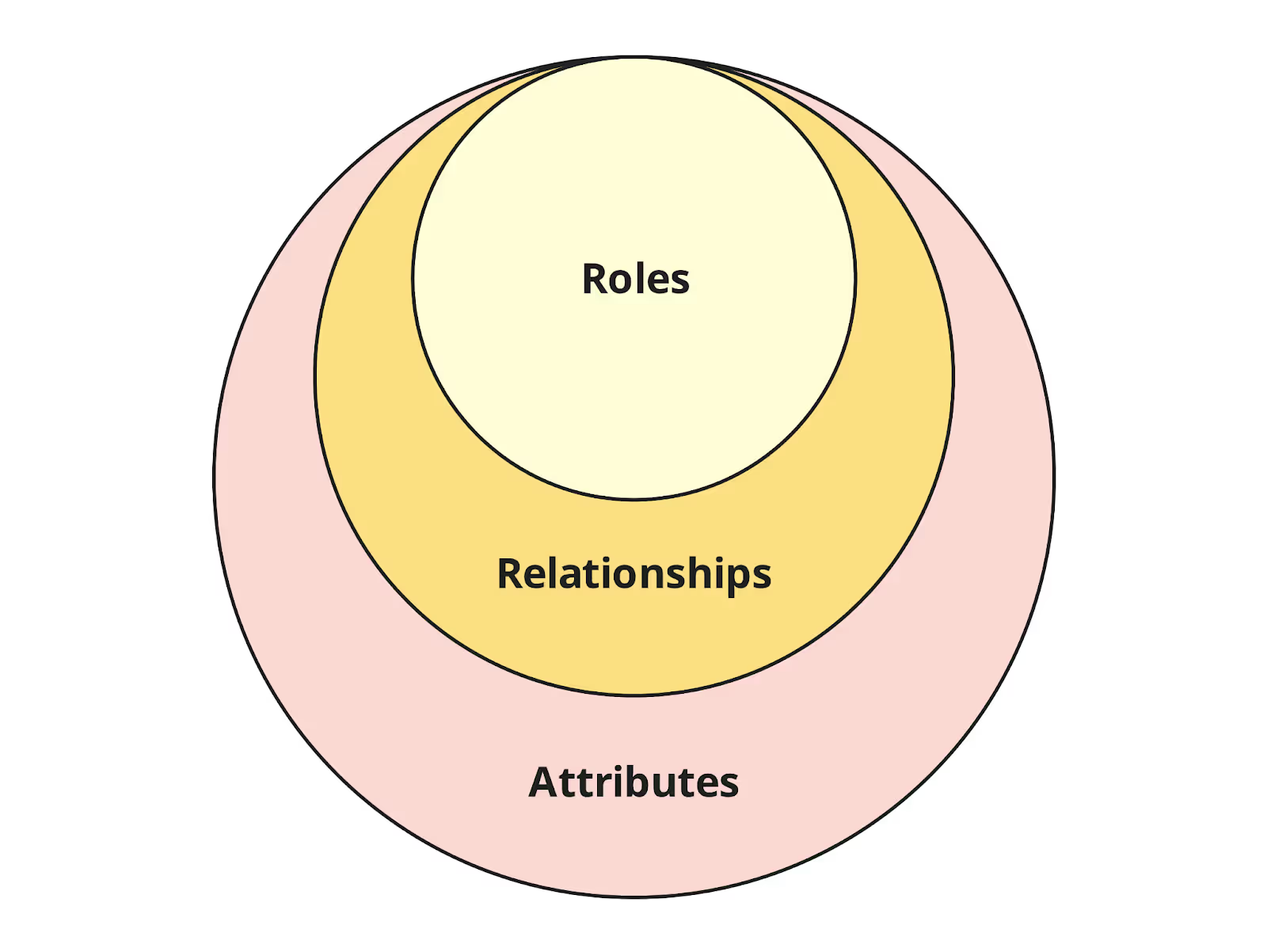
When exploring policy paradigms for authorization, you will encounter a model that isn’t typically highlighted in standard Kubernetes documentation. The final member of the access control trio (alongside RBAC and ABAC) is Relationship-Based Access Control (ReBAC). You might wonder whether ReBAC is applicable to Kubernetes, if anyone has implemented it, or if it is suitable for production environments.
The answer is yes, ReBAC solutions for Kubernetes do exist experiement but rare, and the answer is No for who use this technique for production. While ReBAC is primarily used at the application layer using graph-based relationship mechanisms (such as Google Zanzibar or OpenFGA), several experimental initiatives are pioneering how to integrate ReBAC directly into Kubernetes authorization webhooks.
Before diving into the implementation details, explore the resources below to learn more about ReBAC and its application to Kubernetes authorization models:
- OSOHQ - RBAC vs ABAC vs ReBAC: What is the best access policy paradigm?
- Auth0 - What Is Relationship-based access control (ReBAC)?
- Chapter V: Relationship-Based Access Control (ReBAC)
- Authzed - What are the key components of ReBAC?
- AWS - Graph-powered authorization: Relationship based access control for access management
- Youtube - Implementing Relation-based Access Control for Kubernetes with OpenFGA
- Research - A Comparative Study of Authorisation Mechanisms in Kubernetes-Based Service Platforms
Relationship-Based Access Control (ReBAC)
ReBAC is an authorization model where access is defined by your relationship to the resource, not just your assigned role. A ReBAC system uses subjects, objects, and relationships, where permissions are derived from stored relationship facts checked against a rulebook.
Exploring the kube-rebac-authorizer repository by Lucas Käldström (CNCF Ambassador and contributor to Cedar Policy Language & kubeadm) reveals an intriguing approach: unifying standard Kubernetes RBAC and Node Authorizers into a single, cohesive engine based on Google’s Zanzibar architecture.
To implement Relationship-Based Access Control (ReBAC), the project translates standard Kubernetes RBAC definitions and Node API requests into relation tuples. These tuples construct a directed graph defining relationships between subjects (users, groups, service accounts, nodes) and Kubernetes resources:
- Tuple Mapping: Maps structures such as
clusterrole:<name>#assigneetoresource:<apiGroup>/<resource>through specific verb relations (e.g.,get,list,watch,update,delete). - Engine Evaluation: A controller processes Kubernetes API objects, derives the desired relationship graph tuples, and delegates authorization decisions to ReBAC engines like OpenFGA, Authzed SpiceDB, or Ory Keto.
- Declarative CRDs: Instead of writing imperative authorization webhooks in code, operators can define custom graph-based authorization rules using declarative Kubernetes Custom Resource Definitions (CRDs).
For a deep dive into the underlying architecture and proof-of-concept design, check out Kubernetes + ReBAC = possible?!?.
More than Auth, Kubernetes do more things for secure and reliable
Not only Auth modelization with 3 layers, Kubernetes also provide a lot of mechanism to protect your deployment, especially Resources, Security Context for Pod & Container, and Networking. Before talk a bit about these topics, you can double-check via these links below
- Kubernetes - Security
- Kubernetes - Policies
- Kubernetes - Cloud Native Security and Kubernetes
- Kubernetes - Audit
- Kubenretes - Security Checklist
- Kubernetes - Resource managers
- Kuberntetes - Network Policies
- Kubernetes - Disruption
- Kubernetes - Node-pressure Eviction
- Medium - Kubernetes Security & Access: A Deep Dive
- CNCF - Cloud Native Security Whitepaper V2
Resource Protection
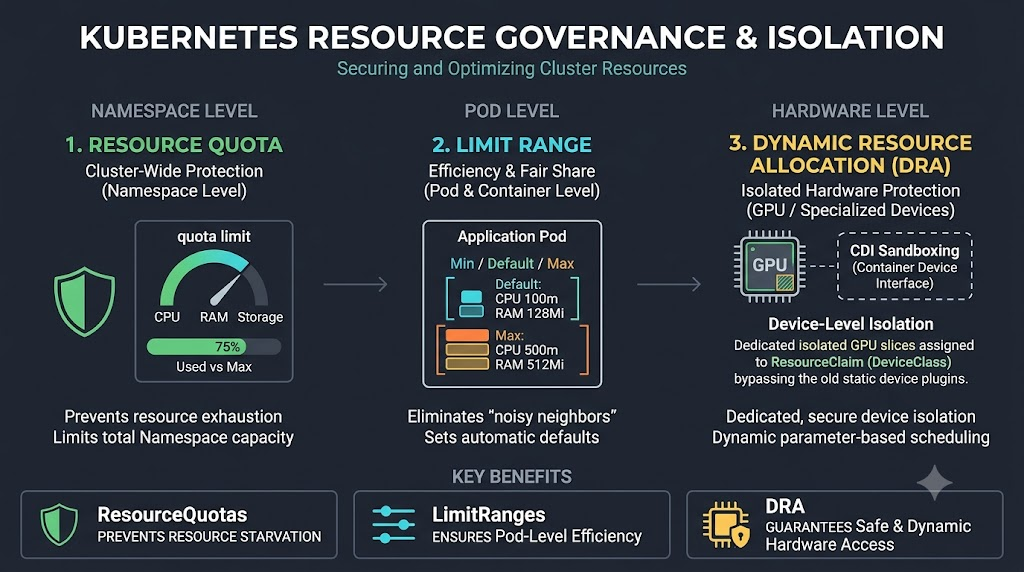
Kubernetes introduces many concepts to let you strictly or isolate the resouces can assign for each namespace, or deployment, including
- Resource Quotas: To fairly allocate shared resources
- Limit Range: To ensure that Pods specify their resource requirements.
- Dynamic Resource Allocation (DRA): a Kubernetes feature that lets you request and share resources among Pods. These resources are often attached devices like hardware accelerators. This feature is alternative for Device Plugin mechanism, define device classes that are available to claim in workloads. Kubernetes allocates matching devices to specific claims and places the corresponding Pods on nodes that can access the allocated devices.
- Quality of Service Classes (QoS): Kubernetes classifies the Pods that you run and allocates each Pod into a specific quality of service (QoS) class. Kubernetes uses that classification to influence how different pods are handled. Kubernetes does this classification based on the resource requests of the Containers in that Pod, along with how those requests relate to resource limits.
TL;DR
Why I conclude DRA in to Resource Manager, because I think DRA introduced the mechanism to protect expensive resource mounted into pods via authorized by
DeviceClassThough neither is a standalone security tool, DRA significantly improves security posture over legacy Device Plugins:
Legacy Device Plugins (Integer-Based): Device Plugins could only count units (
nvidia.com/gpu: 1). Because they couldn’t inspect or request fine-grained hardware properties, cluster operators often had to run privileged container hooks or allow dangerous node-level environment variables (likeACCEPT_NVIDIA_VISIBLE_DEVICES_ENVVAR_WHEN_UNPRIVILEGED) to route workloads.DRA (Structured Parameters & CDI): DRA uses structured device attributes, CEL expression filtering, and Container Device Interface (CDI) specs. It provides:
- Least-Privilege Mounting: Injects only the specific hardware slices or virtual function endpoints authorized by the
DeviceClass.- Multi-Tenant Sharing Controls: Allows admins to define explicit sharing policies (e.g., strict hardware MIG slice vs. shared device claims) via declarative K8s APIs rather than ad-hoc runtime scripts.
- Fine-Grained RBAC: Access to compute accelerators can be governed using standard Kubernetes RBAC on
ResourceClaimandDeviceClassobjects.
Explore more at
- PerfectScale - Hands-on Guide on Kubernetes Resource Quotas & Limit Ranges
- ScaleOps - Kubernetes Dynamic Resource Allocation (DRA): What It Changes for GPU and Hardware Scheduling
- CNCF - Kubernetes Resources Management – QoS, Quota, and LimitRange
Networking Protection
In Kubernetes, There are many several network security measures introduced, such as
- NetworkPolicy: An application-centric construct which allow you to specify how a pod is allowed to communicate with various network “entities” (we use the word “entity” here to avoid overloading the more common terms such as “endpoints” and “services”, which have specific Kubernetes connotations) over the network. To use network policies, you must be using a networking solution which supports NetworkPolicy.
- ServiceMesh: Address this new set of challenges by managing traffic (i.e., communication) between services and adding reliability, observability, and security features uniformly across all services.
- eBPF: a technology that allows small, sandboxed programs or scripts to run in the kernel space of a Linux system without having to change the kernel’s source code or load Linux kernel modules. Explore detail at eBPF Documentation
Explore more at:
- Medium - Securing Kubernetes Layer by Layer: An OSI Approach (Part 1: L2 & L3)
- Medium - Securing Kubernetes Layer by Layer: An OSI Approach (Part 2 : L4)
- Medium - Securing Kubernetes Layer by Layer: An OSI Approach (Part 3: L5 & L6)
- Medium - Securing Kubernetes Layer by Layer: An OSI Approach (Part 4: L7)
Security Context for Pod & Container
Beside Resource and Network, I think Kubernetes provide you a lots of concept, and the things which you usually work with Pod & Container have own the way to protect with various mechanism, including
- Discretionary Access Control: Permission to access an object, like a file, is based on user ID (UID) and group ID (GID).
apiVersion: v1
kind: Pod
metadata:
  name: user-id-demo
spec:
  securityContext:
    runAsNonRoot: true
    runAsUser: 10001
    runAsGroup: 10001
  containers:
    - name: app
image: nginx- Security Enhanced Linux (SELinux): Objects are assigned security labels.
securityContext:
  seLinuxOptions:
level: "s0:c123,c456"- Running as privileged or unprivileged.
spec:
  containers:
    - name: node-debugger
      image: busybox
      securityContext:
privileged: true- Linux Capabilities: Give a process some privileges, but not all the privileges of the root user.
spec:
  containers:
    - name: web
      image: nginx
      securityContext:
        capabilities:
          drop:
            - ALL
          add:
- NET_BIND_SERVICE # Allows binding to ports below 1024- AppArmor: Use program profiles to restrict the capabilities of individual programs.
spec:
  containers:
    - name: app
      image: nginx
      securityContext:
        appArmorProfile:
          type: Localhost
localhostProfile: k8s-apparmor-deny-write # Host-side AppArmor profile- Seccomp: Filter a process’s system calls.
spec:
  securityContext:
    seccompProfile:
      type: RuntimeDefault
  containers:
    - name: app
image: nginxallowPrivilegeEscalation: Controls whether a process can gain more privileges than its parent process (e.g., viasudo,suidbinaries)
spec:
  containers:
    - name: app
      image: alpine
      securityContext:
allowPrivilegeEscalation: falsereadOnlyRootFilesystem: Mounts the container’s root filesystem as read-only.
spec:
  containers:
    - name: app
      image: redis
      securityContext:
        readOnlyRootFilesystem: true
      volumeMounts:
        - name: tmp-vol
          mountPath: /tmp # Ephemeral storage for transient writes
  volumes:
    - name: tmp-vol
      emptyDir: {}
Explore more at
- RedHat - Chapter 8. Linux Capabilities and Seccomp
- Medium - Kubernetes: Seccomp, AppArmor, SELinux & Pod Security Standards and Admission Control
- Kubernetes - Pod Security Standards
- Kubernetes - Configure a Security Context for a Pod or Container
- Kubernetes v1.37 - SecurityContext
Kubewekend Security with Kyverno
To delve deeper into Kubernetes security enhancement with admission control, Kyverno is an excellent choice for a hands-on playground and a valuable solution to explore. For Kubewekend, I don’t want to be overly constrained by specific policies or authentication concepts, the final setup is up to you. However, if you’re asking for my preference on where to start, Kyverno is a solid option.

You can easily install Kyverno policies into your cluster using the following helm commands:
helm repo add kyverno https://kyverno.github.io/kyverno/
helm repo update
helm upgrade --install kyverno kyverno/kyverno --namespace kyverno --create-namespace --version 3.9.2 \
 --reuse-values \
 --set reportsController.resources.limits.memory=256Mi
This comamnd will install key components of Kyverno, including
- CRDs
- Admission controller
- Reports controller
- Cleanup controller
- Background controller
Combining with my perspective, I recommend you to find and explore Kyverno and experience from reference above and couple link below to understand Kyverno as Policy Manamament in Kubernetes
- CNCF - Policy-as-Code: Flexible Kubernetes governance with Kyverno
- CNCF - GitOps policy-as-code: Securing Kubernetes with Argo CD and Kyverno
- Medium - Governing Multi-Tenant Kubernetes Clusters with Kyverno
Understand Kyverno
What is Kyverno?
Kyverno is a Cloud Native Policy Engine. It orignally built for Kubernetes and now can available to use out of Kubernetes cluster as Unified Policy Language.
Kyverno allows platform engineers to automate security, compliance, and best practices validation and deliver secure self-service to application teams.
Kyverno provides several features
- Provisioning Policies with YAML or CEL (support from v1.24.X and stable v1.29.X in Kubernetes)
- Providing CRDs to easier defining Policies in Kubernetes
- Supporting various Policy Types for help you define for any Kubernetes Resources, e.g: Mutating, Validating, Generating, Deleting, …
- Supporting Policy Report in Kubernetes using the OpenReport format.
- Support Policy Exception
- Work as Policies as Code
- Others, …
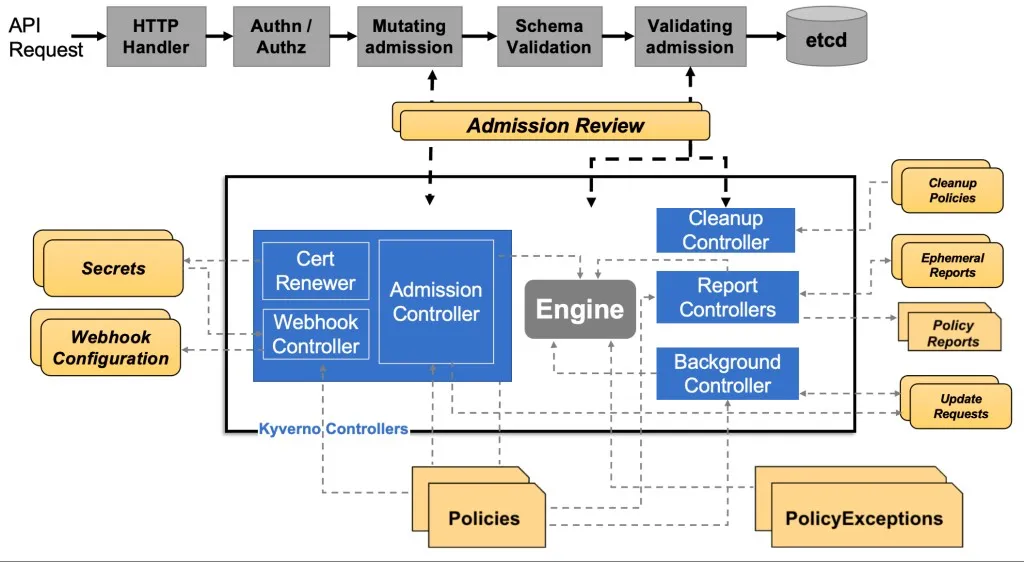
The architecture of Kyverno concisely includes,
- Kyverno Admission Controller run as a dynamic admission controller, that will receive admission webhook HTTP callback from Kubenetes API Server and applies matching policies to return results that enforce admission policies or reject requests.
- These Policies will dynamically configured by WebHook Controller which watches the installed policies and modifies the webhooks to request only the resources matched by those policies.
- The Cert Renewer is responsible for watching and renewing the certificates, stored as Kubernetes Secrets, needed by the webhook.
- The Background Controller handles all generate and mutate-existing policies by reconciling UpdateRequests, an intermediary resource
- Policy enforcement is captured using Kubernetes events. You can also use Policy Reports in the Cluster for detail reporting by Kyverno Report Controller
Beside the core, Kyverno also support serval features, and sub-project, including
- Run Kyverno Controller as High Availability Architecture
- Kyverno Metrics is the metrics route exposed by admission controller to show information about Kyverno Policies
- Kyverno CLI to pefrom apply Kyverno Policies to clusters or resource file, with purpose validate and test policy behavior, and also it can used in CI/CD Pipelines as validation assistant and available use binary or integrate into
kubectl. - Kyverno Authz Server as Application Authorization with Kyverno Policies. It suppports Envoy and HTTP payloads, and can be run as a central service or as a sidecar container.
- Kyverno Chainsaw is e2e testing tools of Kyverno Policies.
- Policy Reporter is web interface to visualization Policy Reports for Kyverno Policies.
- Kyverno SDK allows building and running Kyverno engines in your own application or service.
- Kyverno Playground is a playground to help you get familiar, test, and validate Kyverno Policies with Kubernetes resources, without Cluster
To explore more about Kyverno and resources, you can double-check these links below
- Kyverno Quick Start
- Kyverno Community & Adoption
- Kyverno Configuring Kyverno
- Kyverno Policy Types Overview
- Kyverno Sample Policies
- Kyverno Blog
Kyverno Playground with YAML and CEL
YAML (JMESPath) (Deprecated v1.20.X)
For the day old. Kyverno use YAML to define Kubernetes CRDs and these policies types, including ClusterPolicy, Policy, and CleanupPolicy. It defined depend on JMESPath as a fast and effecient JSON processing language.
With ClusterPolicy, you can define the rule by declare a match declaration, an optional exclude declaration, and one of a validate, mutate, generate, or verifyImages declaration. Each rule can contain only a single validate, mutate, generate, or verifyImages child declaration.
With Policy, this is actual ClusterPolicy but instead cluster-scoped, it defines for namespace-scoped.
In this syntax, you can also define Policy Exceptions and Cleanup Policies.
As my perspective, I apply a lot of concept in early version W’xOps IDP, I try to integrate Kyverno to handle couple of rules for
- Generate: This option I use most for defining
networkpolicies,resourcesquotas, andsecret-sync. Withsecret-sync, I think that pretty cool work to make me can easier replicate secrets for another namespace, e.g: Registry credentials, and it’s helping me reducing the complex when I can remove kubernetes-reflector out of my scope. - Validating: This option is handling a lot of validation also, I got several them for security to ensure priviledge in namespace, label for workload in any namespace, …
Let’s try to implementation one of them, but I don’t recommend you to following this syntax, you should migrate them into CEL, for long-term usage and stable. Explore more at Migrating to CEL Policies
But in v1.19.X, you can still try this concept before it’s hit to v1.20.X
So let’s try with one example by trying Generate resource across namespace, this is highly value function, and help you ensure your secrets only come from single of trust. In my situation, Secret is Private Registry from Vault to Kubernetes via ESO (External Secret Operator).
Kyverno called this mechanism, CloneSource, the generate policy will clone from the resource name and location defined in the rule to create the new resource. Use of the clone object implies no modification during the path from source to destination and Kyverno is not able to modify its contents (aside from metadata used for processing and tracking).
By default, Kyverno don’t have permission to touch into Kubernetes resources, e.g: Secrets, NetworkPolicies, or ResourceQuotas. To let Kyverno can worked with these resources, you should grant permission for it via aggregation with ClusterRole of Kyverno
# RBAC aggregation ClusterRoles for all Kyverno GeneratingPolicies.
# Each resource type managed by a GeneratingPolicy requires two ClusterRoles:
#   :view   — aggregated to background-controller, reports-controller, admission-controller
#             so Kyverno can read existing resources during evaluation and reporting.
#   :manage — aggregated to background-controller only
#             so Kyverno can create, update, and delete the generated resources.
#
# Kyverno picks these up automatically via label aggregation — no ClusterRoleBinding needed.

# =============================================================================
# Secrets  (sync-secrets.yaml)
# =============================================================================
apiVersion: rbac.authorization.k8s.io/v1
kind: ClusterRole
metadata:
  name: kyverno:secrets:view
  labels:
    rbac.kyverno.io/aggregate-to-background-controller: "true"
    rbac.kyverno.io/aggregate-to-reports-controller: "true"
    rbac.kyverno.io/aggregate-to-admission-controller: "true"
rules:
  - apiGroups:
      - ""
    resources:
      - secrets
    verbs:
      - get
      - list
      - watch
---
apiVersion: rbac.authorization.k8s.io/v1
kind: ClusterRole
metadata:
  name: kyverno:secrets:manage
  labels:
    rbac.kyverno.io/aggregate-to-background-controller: "true"
rules:
  - apiGroups:
      - ""
    resources:
      - secrets
    verbs:
      - create
      - update
      - delete
      - patch
# =============================================================================
# NetworkPolicy  (network-policies.yaml)
# =============================================================================
---
apiVersion: rbac.authorization.k8s.io/v1
kind: ClusterRole
metadata:
  name: kyverno:networkpolicies:view
  labels:
    rbac.kyverno.io/aggregate-to-background-controller: "true"
    rbac.kyverno.io/aggregate-to-reports-controller: "true"
    rbac.kyverno.io/aggregate-to-admission-controller: "true"
rules:
  - apiGroups:
      - networking.k8s.io
    resources:
      - networkpolicies
    verbs:
      - get
      - list
      - watch
---
apiVersion: rbac.authorization.k8s.io/v1
kind: ClusterRole
metadata:
  name: kyverno:networkpolicies:manage
  labels:
    rbac.kyverno.io/aggregate-to-background-controller: "true"
rules:
  - apiGroups:
      - networking.k8s.io
    resources:
      - networkpolicies
    verbs:
      - create
      - update
      - delete

# =============================================================================
# ResourceQuota + LimitRange  (resource-quota.yaml)
# =============================================================================
---
apiVersion: rbac.authorization.k8s.io/v1
kind: ClusterRole
metadata:
  name: kyverno:resourcequotas:view
  labels:
    rbac.kyverno.io/aggregate-to-background-controller: "true"
    rbac.kyverno.io/aggregate-to-reports-controller: "true"
    rbac.kyverno.io/aggregate-to-admission-controller: "true"
rules:
  - apiGroups:
      - ""
    resources:
      - resourcequotas
      - limitranges
    verbs:
      - get
      - list
      - watch
---
apiVersion: rbac.authorization.k8s.io/v1
kind: ClusterRole
metadata:
  name: kyverno:resourcequotas:manage
  labels:
    rbac.kyverno.io/aggregate-to-background-controller: "true"
rules:
  - apiGroups:
      - ""
    resources:
      - resourcequotas
      - limitranges
    verbs:
      - create
      - update
      - delete
After this worked, you can try to create Generating Policies to sync secrets between available namespace to another namespace. Explore more at Kyverno Sample - Sync Secrets
apiVersion: kyverno.io/v1
kind: ClusterPolicy
metadata:
  name: sync-secrets
  annotations:
    policies.kyverno.io/title: Sync Secrets
    policies.kyverno.io/category: Sample
    policies.kyverno.io/subject: Secret
    policies.kyverno.io/minversion: 1.6.0
spec:
  rules:
  - name: sync-image-pull-secret
    # ref: https://kyverno.io/docs/policy-types/cluster-policy/match-exclude/#match-statements
    match:
      any:
      - resources:
          kinds:
          - Namespace
          names:
            - "tenant-*"

    generate:
      apiVersion: v1
      kind: Secret
      name: regcred
      namespace: "{{request.object.metadata.name}}"
      synchronize: true
      # ref: https://kyverno.io/docs/policy-types/cluster-policy/generate/#clone-source
      # warning: for the clone source, kyverno will assign labels to sources for tracking, so make sure it should not remove by any controller or operator
      # that manages secrets in the source Namespace. Otherwise, the policy will not work as expected.
      clone:
        namespace: external-secrets
        icon-kyverno.pngname: regcred
      # generateExisting is required to ensure that the policy will update existing Secrets if the source Secret changes.
      # If this field is not set, the policy will only create new Secrets for new Namespaces, but will not update existing Secrets in already created Namespaces.
      generateExisting: true
YAML (CEL)
Now from Kyverno v1.19.X, you can use YAML (CEL) instead YAML (JMESPath) as stable version, and It supports entirely the old version features provided.
Common Expression Language (CEL)
The Common Expression Language (CEL) is used in the Kubernetes API to declare validation rules, policy rules, and other constraints or conditions.
CEL expressions are evaluated directly in the API server, making CEL a convenient alternative to out-of-process mechanisms, such as webhooks, for many extensibility use cases
Recently, CEL already integrate and support widely in the core of Kubernetes from v1.29+. Beside, Kyverno catchup and evolve with same of mechanism Kubernetes, it also create how to Kyverno connect with feature Validation Admission Policy and Mutating Admission Policy via binding method via Container Flag generateValidatingAdmissionPolicy (false by default), explore more at Kyverno - Generating Kubernetes ValidatingAdmissionPolicies from Kyverno Policies
Now take back and try to implement the GeneratingPolicy with same concepts above
apiVersion: policies.kyverno.io/v1
kind: GeneratingPolicy
metadata:
  name: sync-secrets
  annotations:
    policies.kyverno.io/title: Sync Image Pull Secret
    policies.kyverno.io/category: Multi-Tenancy
    policies.kyverno.io/subject: Secret
    policies.kyverno.io/minversion: 1.15.0
spec:
  evaluation:
    synchronize:
      enabled: true
    generateExisting:
      enabled: true
  matchConstraints:
    resourceRules:
      - apiGroups:
          - ""
        apiVersions:
          - v1
        operations:
          - CREATE
          - UPDATE
        resources:
          - namespaces
  matchConditions:
    - name: is-target-namespace
      expression: >-
        object.metadata.name.startsWith('tenant-')
  variables:
    - name: targetNs
      expression: object.metadata.name
    - name: regcred
      expression: resource.Get("v1", "secrets", "external-secrets", "regcred")
  generate:
    - expression: generator.Apply(variables.targetNs, [variables.regcred])
Conclusion
Success
That’s all for today. I think this covers plenty of material for you to discover regarding security, as well as where to focus and get involved in your Kubernetes ecosystem. Each phase in the Kubernetes authorization model looks interesting and continues to evolve every day, so I look forward to seeing what comes next.
Quote
After taking time to sit back and review everything I’ve worked on, investigated, and explored deeply within Kubernetes and security, I’ve gained numerous ideas, concepts, and updates on the latest Kubernetes versions for managing the entire system. I hope you had a great time researching and learning alongside me. Stay healthy, keep up the momentum, and I will see you in the next post. Bye and good luck!!