Continuous of Kubewekend Session Extra 6, I think I would try to release also the blog I already made but don’t complete after a long time ago, today we will delve deeper into GitOps with Cloud Native, and discovery ArgoCD with Ecosystem that supported for user. Now let’s finish with Kubewekend.
Before diving into GitOps for Kubernetes, I already dedicated a previous session to exploring the core GitOps methodology with hands-on examples focused on Infrastructure as Code (IaC) outside of a Kubernetes environment. If you are curious about how to apply GitOps to IaC tools like Terraform, check out Atlantis with ECS for automatic provisioning.
GitOps Today and in Cloud Native
GitOps Glossary and Cloud Native with GitOps
GitOps Glossary
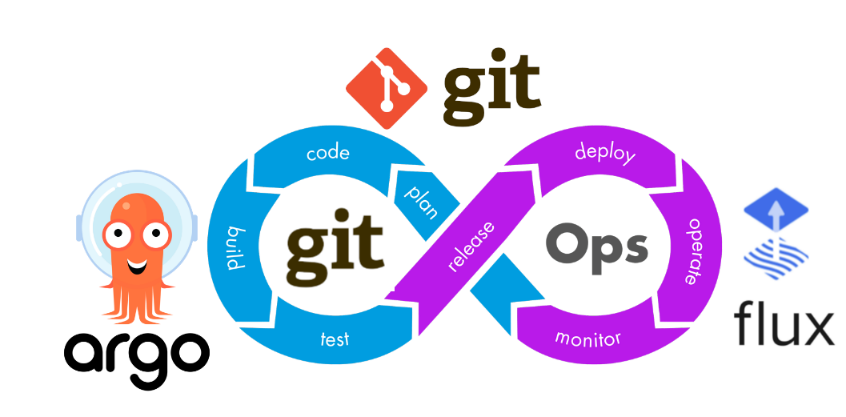
Following GItOps Glossary of CNCF, GitOps is a set of practices for managing software applications and infrastructure by continuously evaluating and reconciling their desired states as defined in a version control system such as Git against their actual state. Reconciling states includes changing the resources to match the defined state via deployment or updates.
To restructure operations and eliminate the recurring pitfalls of legacy workflows, such as configuration drift, failed deployments, environment inconsistencies, painful rollbacks, and poor change traceability, GitOps shifts infrastructure and application management from an imperative process into an operational philosophy rather than just a specific toolset. Built on four foundational OpenGitOps principles, Declarative state, Versioned and Immutable storage, Automated Pull delivery, and Continuous Reconciliation, GitOps delivers deterministic reliability out of the box when teams and organizations adopt it properly.
After returning from KubeCon Japan last July 2026 and catching up on KubeCon NA last week, it is clear that GitOps adoption continues to accelerate. The methodology powers massive production systems worldwide, anchored by two CNCF Graduated projects, Argo CD and Flux, which continue to earn recognition across enterprise case studies for enabling Cloud Native teams to distribute massive workloads and scale effortlessly, including:
FluxCon 2026 NA - Session playlist from FluxCon North America 2026.
Across these case studies and community sessions, organizations consistently highlight tangible operational gains from adopting GitOps:
Decoupling Infrastructure and Application Delivery: Transitioning application deployments out of monolithic Terraform runs into Argo CD resolves state-drift issues and provides continuous, real-time application health verification.
Git as the Single Source of Truth: Version-controlled repositories serve as an auditable compliance boundary for every infrastructure and application change.
Multi-Cluster Scalability: Seamlessly distributing and synchronizing applications across large fleets of Kubernetes clusters using Argo CD.
Faster Deployments and Troubleshooting: Accelerating release velocity from hours to minutes while cutting down mean time to resolution (MTTR) with Argo CD’s live diffing and sync visibility.
Reliable Rollouts and Rollbacks: Ensuring predictable deployments and instant, deterministic rollbacks to previous Git commits.
Beyond CNCF end-user recognition, the GitOps methodology continues to establish itself as a hardened industry standard for deployment strategies, delivering greater operational efficiency and significantly reducing configuration drift and deployment failures compared to traditional push-based CI/CD pipelines or manual operations. You can explore further architectural patterns and real-world implementations through the blogs and articles below
GitHub - gitops-bridge: a community project that aims to showcase best practices and patterns for bridging the process of creating a Kubernetes cluster to subsequently managing everything through GitOps. It focuses on using ArgoCD or FluxCD, both of which are CNCF-graduated projects.
GitOps Landscape and New Opportunities
Landscape
In 2026, GitOps remains a dominant standard with a proven track record across Cloud Native ecosystems. Looking across the CNCF Landscape, the CD Foundation, and The Linux Foundation, Argo CD and Flux remain the two premier choices for Kubernetes GitOps—each offering a distinct architectural model and ecosystem. Argo CD ships with a centralized web UI, built-in multi-tenant RBAC, and its own API server, whereas Flux operates as a set of composable, Kubernetes-native CRD controllers driven primarily via CLI and declarative manifests.
Beyond Argo CD and Flux, several other tools support Git-driven continuous delivery across Kubernetes and hybrid environments:
Jenkins X: Automated CI/CD for Kubernetes with built-in GitOps promotion workflows.
PipeCD: Continuous delivery for declarative Kubernetes, serverless, and multi-cloud infrastructure applications.
Spinnaker: An open-source, multi-cloud continuous delivery platform designed for complex, multi-stage release pipelines at enterprise scale.
When navigating the GitOps landscape, the foundational architectural decision starts with Push vs. Pull:
Pull-based GitOps is the model popularized by tools like Argo CD and Flux. An in-cluster operator continuously watches your Git repository (or OCI registry) for changes and pulls updates into the cluster while correcting any live configuration drift.
Push-based CD resembles a traditional CI/CD flow, where an external pipeline (such as Jenkins, GitHub Actions, or GitLab CI) pushes manifests directly into the cluster as part of a pipeline execution.
In short:
Pull = declarative, autonomous clusters with continuous drift remediation.
In practice, many teams adopt a Hybrid workflow, combining Push-based CI triggers with Pull-based GitOps reconciliation to get immediate deployment speed without sacrificing drift protection:
CI Stage (Push): When code is merged, your CI pipeline builds the artifact, updates the target image tag or manifest in your GitOps repository, and immediately fires a Webhook event to notify the CD controller that a new desired state is ready.
CD Stage (Pull & Reconcile): Instead of waiting for the default polling interval (typically 3 minutes), the GitOps controller immediately pulls the updated Git state upon receiving the webhook, compares it against the live cluster, and reconciles the diff. Meanwhile, background polling remains active as a fallback safety net to catch and self-heal any manual out-of-band configuration drift.
However, this hybrid pattern introduces two operational trade-offs you need to plan for:
Network Exposure & Security: To receive webhooks from an external Git provider (such as GitHub or GitLab), a private cluster must expose an inbound endpoint for the webhook receiver, requiring strict IP allowlisting, TLS termination, and webhook secret validation.
Tooling Maintenance Overhead: You must maintain both CI pipeline logic (to mutate manifests and dispatch triggers) and the in-cluster GitOps operator configurations.
To explore the broader GitOps landscape, compare tooling architectures, and learn proven production patterns, check out the resources below
awesome-gitops: A curated list for awesome GitOps resources
GitHub - awesome-argo: A curated list of awesome projects and resources related to Argo (a CNCF graduated project)
GitHub - awesome-flux-infra: This repository contains infrastructure applications and add-ons installed in Kubernetes via FluxCD v2.
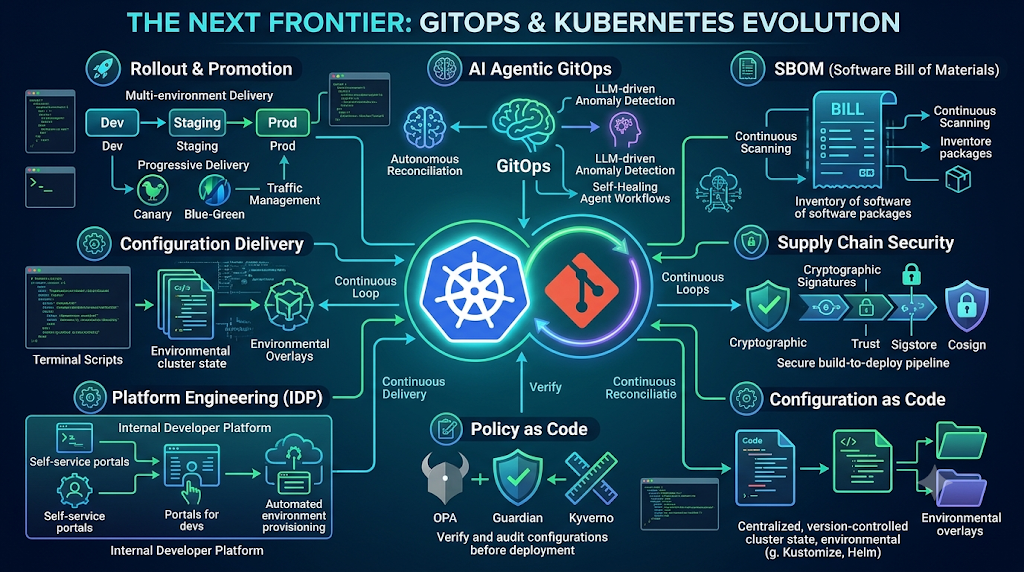
With the rapid growth of AI workloads and Cloud Native platforms, operating Kubernetes at scale introduces new complexities—directly reshaping how we design and control deployments through GitOps strategies. Rather than just being an operational hurdle for adopters, this shift presents a major opportunity to make your centralized Cloud Native architecture more reliable, more secure, and ready for agentic AI integration. That is why it is worth diving deeper into two advanced GitOps pillars:
First, let’s look at Progressive Rollouts. If you have explored deployment strategies in Kubernetes, such as those documented in GitHub - k8s-deployment-strategies—you know that standard Kubernetes Deployment objects only provide basic RollingUpdate or Recreate strategies. Pairing GitOps with a progressive delivery controller (like Argo Rollouts or Flagger) unlocks fine-grained traffic shifting and automated verification:
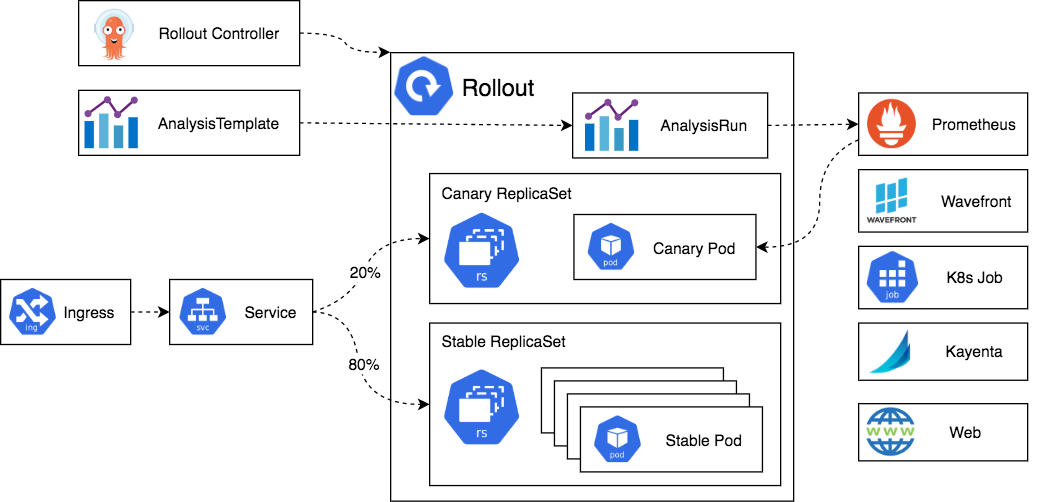
How it works right: You commit a new container image tag to Git, and Argo CD or Flux syncs the Rollout CRD. The rollout controller then takes over—spinning up the canary ReplicaSet, instructing your ingress controller or service mesh (Gateway API, Traefik, Istio, or Cilium) to shift traffic incrementally (5% → 25% → 50% → 100%), and continuously evaluating AnalysisRuns against Prometheus or Grafana metrics to trigger automatic rollbacks if error rates spike.
The anti-pattern to avoid: Never have a CI pipeline commit intermediate traffic weights (such as weight: 20) back into Git. Git should declare the static strategy (steps: [setWeight: 20, pause: {duration: 5m}]), while the rollout controller manages the ephemeral step progression in cluster memory.
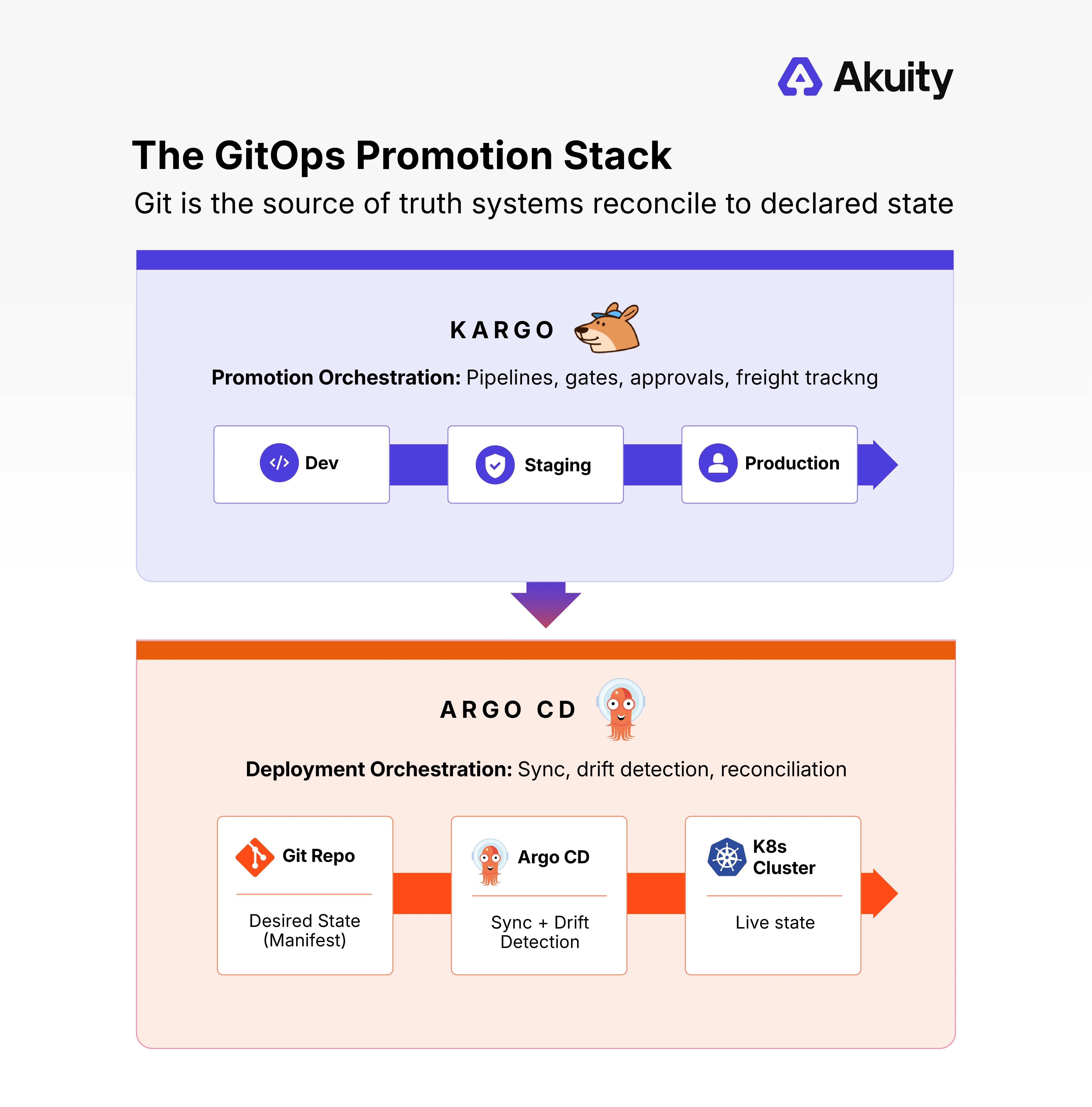
Second, let’s examine Environment Promotion. Out of the box, core GitOps engines like Argo CD and Flux focus on synchronizing a single target state—they do not natively orchestrate how artifacts move across environments. Historically, teams tried to solve this using long-lived Git branches (dev → staging → prod), which inevitably leads to merge conflicts and configuration drift. Purpose-built GitOps promotion mechanisms directly solve this pain point:
How it works right: Adopt a directory/overlay-per-environment layout on a single main branch (or non-merging stage branches), paired with a dedicated promotion controller such as Kargo (or Flux Image Update Automation and Argo GitOps Promoter). Kargo introduces first-class Warehouse (artifact watcher), Freight (an immutable bundle of container images, Helm charts, and manifests), and Stage (Dev → Staging → Prod) resources. It runs automated verification checks in Staging before opening a PR or committing the Freight promotion to Prod.
Key advantage: Environment promotion becomes declarative, auditable, and observable directly inside the cluster, eliminating fragile, bespoke bash scripts glued into CI pipelines.
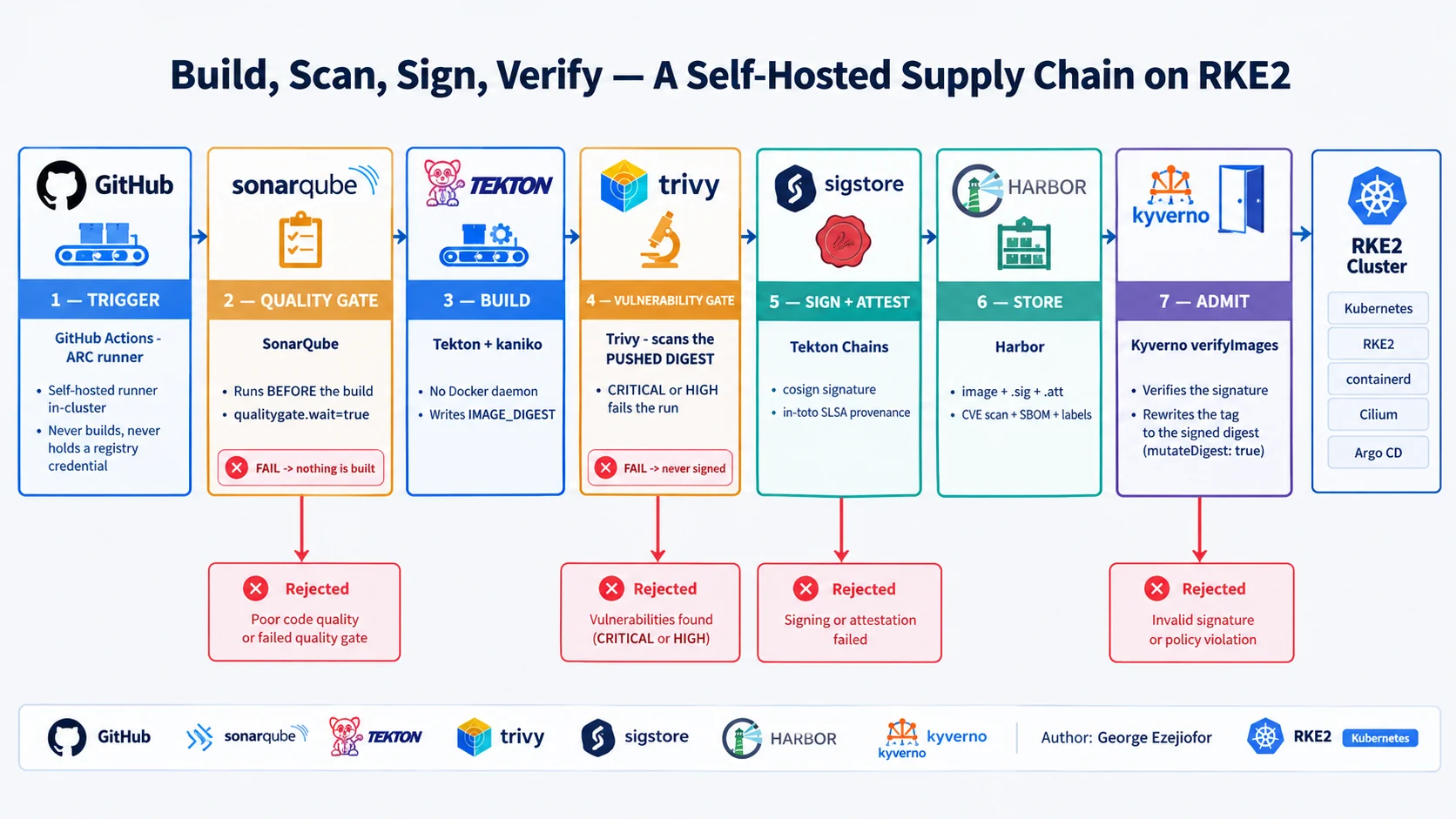
Tekton, Cosign, Kyverno: A Signed CI/CD Supply Chain on RKE2 by George Ezejiofor
Third, let’s address Software Supply Chain Security. In traditional CI/CD, security checks happen solely at build time, meaning anyone with write access to the cluster or Git repository can bypass CI and deploy an unverified image. GitOps closes this gap by shifting verification to reconciliation and admission time, enforcing end-to-end provenance through SBOM (Software Bill of Materials) and SLSA (Supply-chain Levels for Software Artifacts) standards
How it works right:
CI (Produce & Sign): Build the container image, generate an SBOM (with Syft) and vulnerability report (with Trivy or Grype), and sign both the image digest and SLSA provenance attestations into your OCI registry using Sigstore Cosign.
GitOps Sync (Verify Artifacts): If using Flux, OCIRepository resources natively verify Cosign signatures on packaged Kubernetes manifests before applying them to the cluster.
Admission Controller (Enforce):Kyverno (ImageValidatingPolicy rules) intercepts every Pod creation synced by Argo CD or Flux, validating that the image digest matches a trusted Cosign signature, carries a valid SBOM attestation, and has zero critical CVEs, while mutating mutable tags into immutable @sha256:... digests.
Fourth, Policy as Code is one of the strongest native fits for GitOps because policies are declarative YAML and CEL manifests that follow the exact same PR review and sync lifecycle as application code.
How it works right: Store Kyverno policies or native Kubernetes ValidatingAdmissionPolicies (CEL) in a dedicated platform Git repository synced by your GitOps agent. This gives you a dual-gate defense:
Shift-Left (CI): Run kyverno apply or chainsaw tests on Pull Requests to block misconfigurations before they ever merge.
Shift-Right (Runtime): The cluster admission controller enforces those exact same policies continuously, blocking manual kubectl edit drift and generating PolicyReport CRDs for compliance dashboards.
Fifth, modern GitOps extends well beyond stateless Kubernetes Deployments to cover full-stack cloud infrastructure and dynamic secrets through Configuration as Code:
Infrastructure via Crossplane: Instead of running Terraform imperatively in CI (where state locks and drift go unnoticed until the next pipeline run), Crossplane brings databases, DNS records, object storage, and VPCs into Kubernetes as Composite Resources (XRs). Argo CD or Flux reconciles the XR, and Crossplane continuously corrects infrastructure drift 24/7.
Secrets without Plaintext in Git: Never commit raw secrets to Git. Store ExternalSecret manifests in Git that reference secret paths in OpenBao or HashiCorp Vault. The External Secrets Operator (ESO) reconciles those manifests and injects native Kubernetes Secrets dynamically at runtime.
Integrating all five pillars unlocks a major architectural shift: developers no longer interact with Kubernetes, Helm, or underlying infrastructure tooling directly. It establishes
GitOps Pillar
Without AI Agents (Deterministic)
With AI Agents (Autonomous & Context-Aware)
Configuration & Scaffolding
Developers manually fill out IDP forms or copy-paste YAML claims
Intent-to-Claim Agent: Reads IDP schemas via MCP, scaffolds zero-drift Crossplane XRs, OpenBao secret mappings, and app manifests from a prompt
Policy & Supply Chain
CI fails with cryptic Kyverno/Trivy error logs; devs wait for platform help
Remediation Agent: Intercepts policy or SBOM/Cosign failures, explains the violation, and opens a fix PR with patched base images or compliant specs
Deployment Strategy
Rollouts rely on static threshold rules (e.g., error rate greater than 2%)
Canary Analysis Agent: Correlates logs, traces, and subtle latency anomalies during an Argo Rollout to explain why a canary is degrading before triggering rollback
Environment Promotion
Kargo promotes based on pass/fail checks; humans manually review diffs
Release Advisor Agent: Summarizes commits, scores blast radius from historical stage data, and attaches risk context to Kargo Freight promotions
Day-2 Operations & Drift
Alerts fire to Slack; on-call engineers manually correlate Git commits with pods
Autonomous SRE Agent: Correlates degraded workloads directly to the exact Git commit or Kargo promotion, runs read-only diagnostics, and opens a rollback/hotfix PR
Without an IDP, AI agents fail in enterprise environments because infrastructure context is scattered across wikis, tribal shell scripts, and undocumented Helm charts. An IDP gives AI agents the structured map, tools, and guardrails they need to operate safely:
The IDP Portal & Service Catalog = The Agent’s Context GraphAn IDP aggregates ownership, dependencies, OpenAPI/event schemas, and live cluster state into a single graph. Whether a human clicks a button in the portal UI or an AI agent calls the IDP via MCP, both consume the exact same Golden Path templates.
Git + Crossplane + OpenBao = The Safe Mutation Boundary Agents operate under inherited RBAC—they never hold more permissions than the user or service account invoking them. Rather than mutating live clusters, agents commit declarative claims (XRs, ExternalSecrets, Rollouts) to Git.
Kyverno + Cosign + ArgoCD = The Deterministic Safety Net Even if an LLM hallucinates a misconfigured resource limit, an unverified container image, or an overly permissive network policy, Policy as Code and Supply Chain gates reject it at PR time and admission time. The agent is allowed to make mistakes because the platform boundary makes those mistakes harmless.
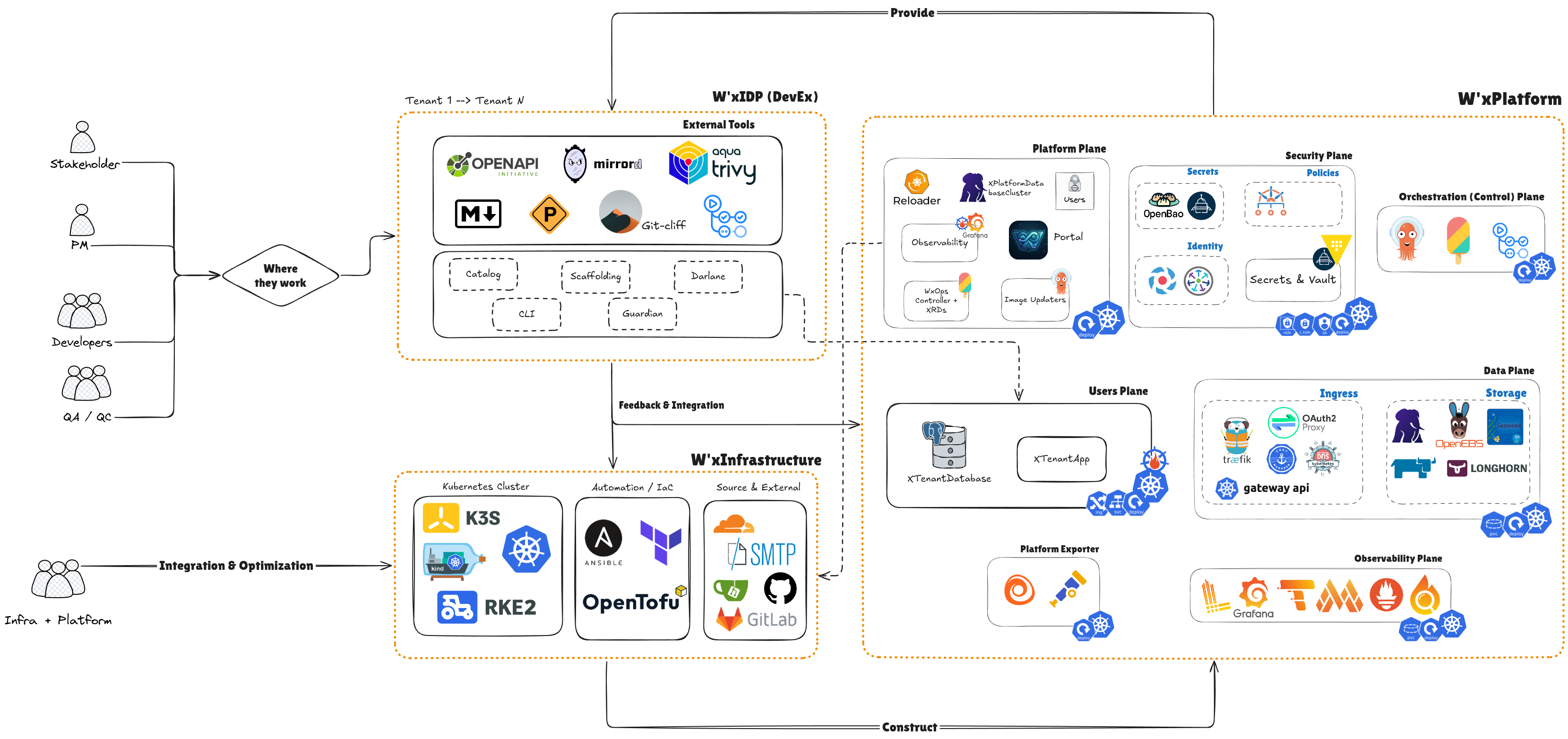
Promotion for W'xOps IDP
With the design above that maching exactly the concept where W’xOps IDP live on, my project try to delivery the concept starting from Git (SCM) with watching anychange from your source code and applying into infrastructure with hardened policy, and promotion across multi-cluster, and environment.
If you are architecting or evolving an IDP to support both human developers and AI agents as first-class consumers, three design principles separate toy demos from production systems:
Never give agents raw kubectl write access: Split agent permissions cleanly. Give diagnostic/SRE agents read-only cluster RBAC (get, list, watch on pods, events, logs, and observability APIs), and restrict all state mutations to Git Pull Requests or scoped IDP workflow triggers.
Treat agent configs as GitOps artifacts: System prompts, tool schemas, model routing, and RBAC bindings for your platform agents should live in Git and be reconciled by ArgoCD/Flux—giving you full auditability (git log) and instant rollback if an agent’s behavior regresses.
Keep orchestration deterministic, keep reasoning agentic: Let LLMs handle unstructured synthesis (correlating logs with recent commits, drafting Crossplane claims from natural language, summarizing Kargo release diffs), while keeping the actual execution loop strictly deterministic inside Kubernetes controllers.
Explore more about IDP and AI Agentic Opportunity topics
However, GitOps is not a silver bullet, which is why I emphasized earlier that it is an operational discipline rather than a plug-and-play toolset. You cannot adopt it overnight; instead, it requires incremental execution and day-by-day refinement before maturing within an engineering organization. When teams adopt GitOps blindly or over-engineer their workflows, it introduces serious operational friction, as highlighted in the articles below:
When GitOps spirals out of control or is applied to the wrong problem space, five common pitfalls emerge:
Too Much Complexity for Small Gains: Smaller teams with straightforward deployment needs often do not benefit from full GitOps machinery. Managing multi-environment overlays, repository structures, and reconciliation loops can slow down rapid iteration rather than accelerate it.
Debugging Can Be a Pain: GitOps introduces an asynchronous indirection layer between a commit and live cluster state. When a sync fails, troubleshooting requires digging through controller logs, diffing states, and tracing webhooks across multiple ecosystem tools instead of inspecting a direct deployment output.
Secrets Management Is a Hassle: Because Git repositories must never store plaintext credentials, adopting GitOps forces you to introduce and maintain an external secrets lifecycle, integrating tools like HashiCorp Vault, OpenBao, SOPS, or Sealed Secrets alongside your reconciliation controllers.
Git Isn’t Always the Complete Source of Truth: While this might sound contradictory to core GitOps principles, it is an important practical reality. Git works well for static desired-state manifests, but if you fail to properly isolate stateful workloads (such as live database schemas, dynamic autoscaling states, or runtime Kubernetes status), treating Git as the sole source of truth breaks down, leaving critical gaps between what Git declares and what actually runs in production.
Confusing GitOps with Kubernetes-Only Tooling: A common misconception is treating GitOps as strictly synonymous with Kubernetes controllers like Argo CD or Flux. In reality, GitOps is an architectural pattern that applies across infrastructure and traditional CI/CD workflows, forcing Kubernetes-centric GitOps tooling onto non-Kubernetes workloads often creates unnecessary complexity.
My Thoughts on GitOps
No matter whether you choose GitOps or traditional CI/CD, you need to carefully align the pattern you adopt with your actual expectations—so your architecture reflects real operational demands rather than over-engineering. Today, tools like kro (Kube Resource Orchestrator) and Crossplane allow you to build higher-level abstraction layers that control both Kubernetes objects and external resources (such as databases, cloud services, or custom infrastructure). Making these external dependencies transparent and declarative through GitOps bridges the biggest gap in infrastructure management. It transforms Kubernetes from being merely an application runtime into a unified control plane—allowing your cluster state to accurately reflect Git as the Single Source of Truth. Everything shared here reflects my personal perspective and hands-on experience; take these insights as a reference to calibrate GitOps principles against your own real-world expectations.
ArgoCD is a masterpiece
When you ask anything about GitOps and Kubernetes, Argo CD is almost always the first tool introduced. Rather than spending time hyping up how popular Argo CD has become across DevOps, Cloud Native, and Kubernetes communities, it is more useful to look at why it continues to evolve into one of the strongest Day-1 foundations for any Kubernetes cluster. While plenty of solid alternatives exist, its adherence to declarative principles, massive community ecosystem, deep tooling integrations, and extensibility make Argo CD a standout choice for automating cluster state from A to Z. So, what actually is Argo CD under the hood?
ArgoCD and Features
What is ArgoCD?
Argo CD is a declarative, GitOps continuous delivery tool for Kubernetes.
ArgoCD help you to opeate GitOps from Git resource and ship your declare for any application definition, configuration, and envrionment automtically and easy to understand.
ArgoCD support various Kubernetes manifests definied, such as
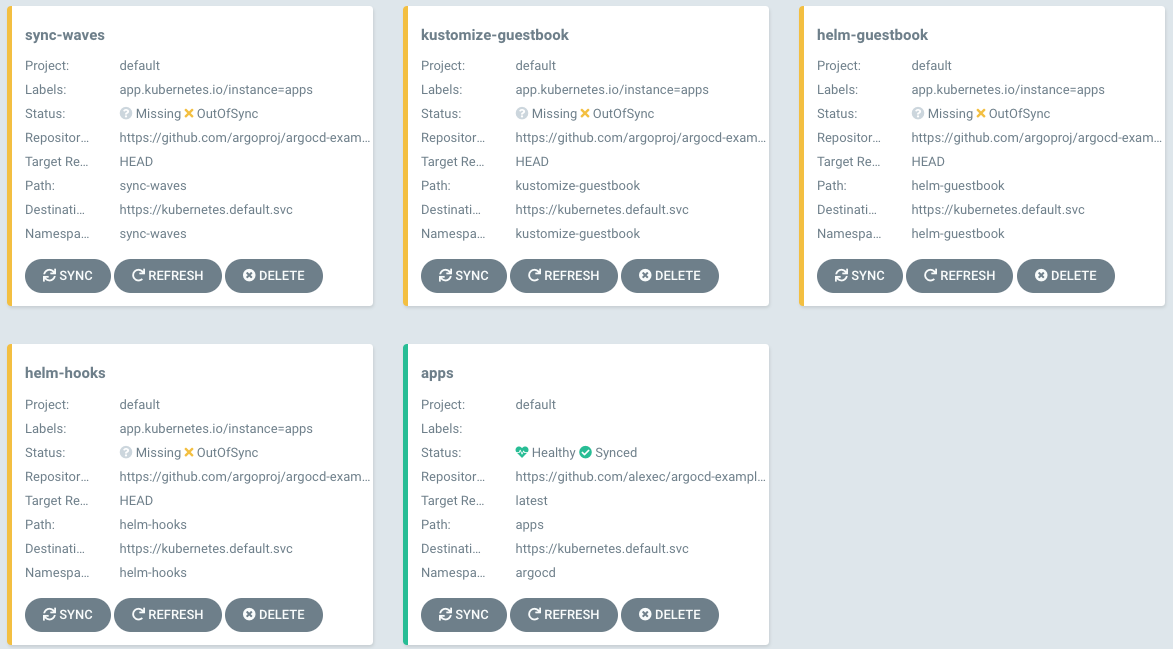
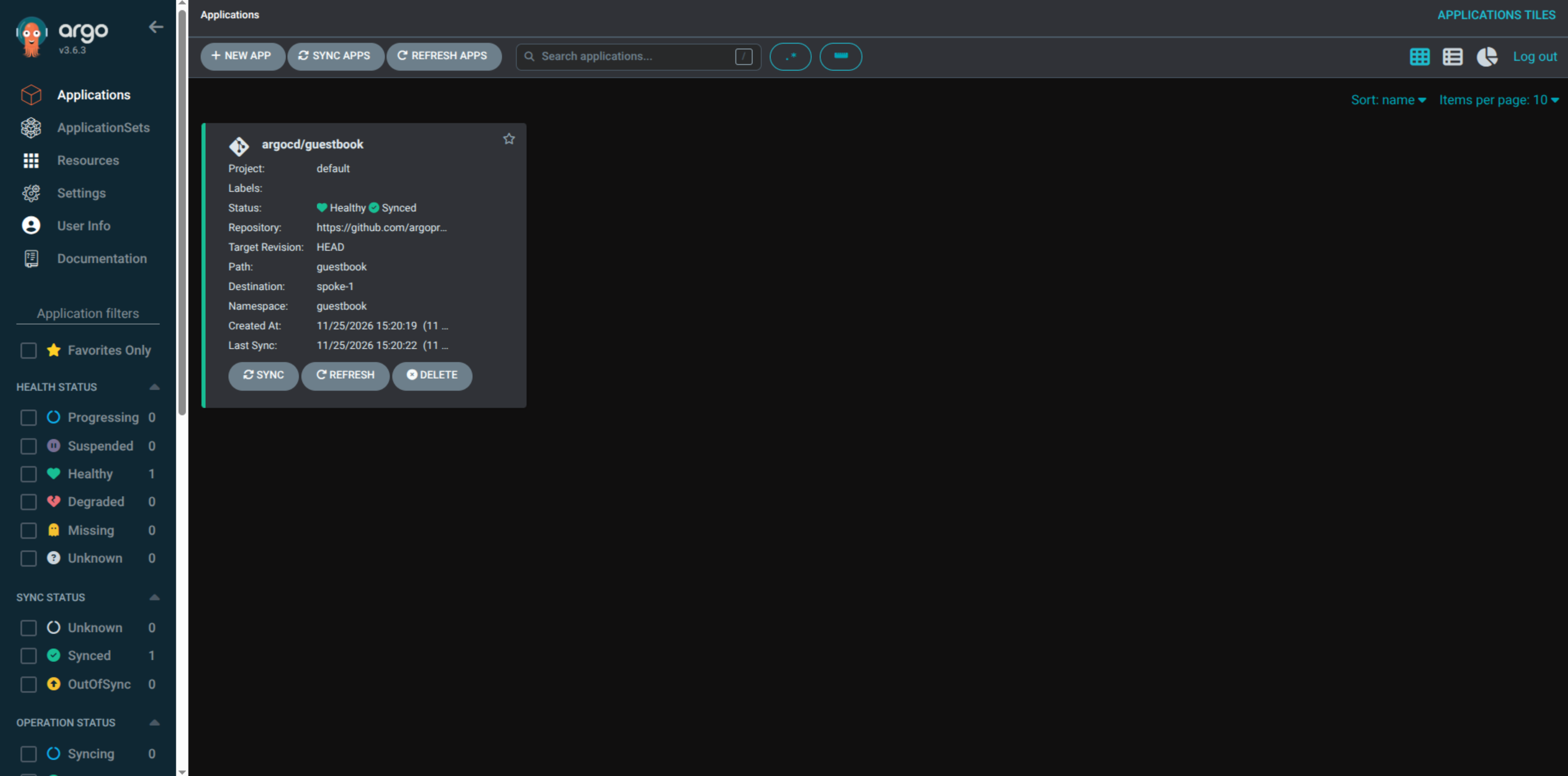
The mechanism of ArgoCD show via activity for continuing monitor running application and compare the current state in Kubernetes cluster with desired target state (as specified in Git Repo), with driff and not mached, that will mark status of application by OutOfSync. In the user behavior, ArgoCD allow you can check the status via rich and powerful UI, Sync again desired to synchronize your running application drift compare with desired, or you can turn it on for automation for let ArgoCD applying instead of you.
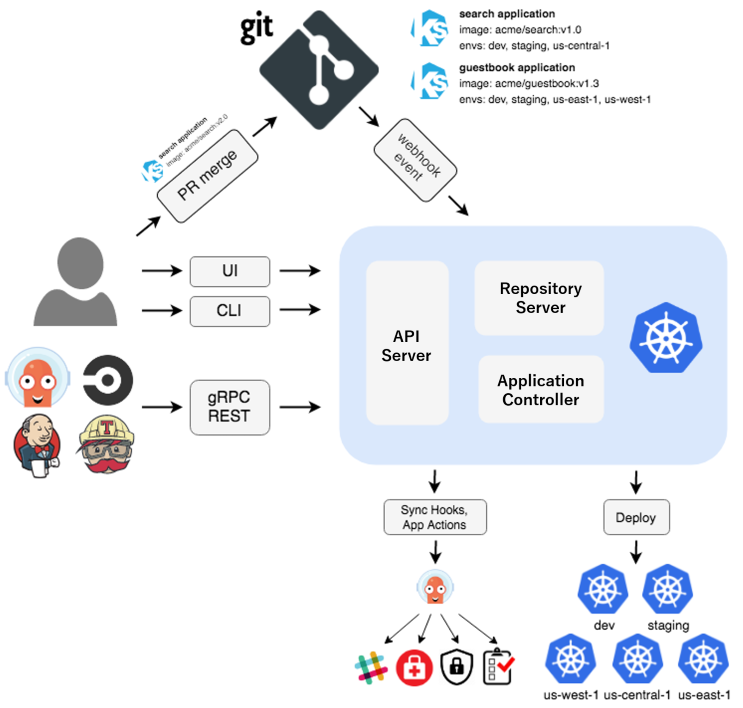
For Architecture, ArgoCD is built to several components with different purpose on each, like
Application Controller: Continuously monitors running applications and compares the current, live state against the desired target state
Repository Server: An internal service which maintains a local cache of the Git repository holding the application manifests.
API Server: API server is a gRPC/REST server which exposes the API consumed by the Web UI, CLI, and CI/CD systems.
Beside the core, to make more effienciency when operating ArgoCD and reduce the request to both KubeAPI Server and Git Provider, ArgoCD also deployed Redis Server as component. Depend on your setup and decision for ArgoCD operating, your Architecture will provide more components, that will take repsonsibility for Authentication, Notification, …
ArgoCD provides several features to let you operate your GitOps Principle like
Automated deployment of applications to specified target environments
Support for multiple config management/templating tools (Kustomize, Helm, Jsonnet, plain-YAML)
Rollback/Roll-anywhere to any application configuration committed in Git repository
Health status analysis of application resources
Automated configuration drift detection and visualization
Automated or manual syncing of applications to its desired state
Web UI which provides real-time view of application activity
CLI for automation and CI integration
Webhook integration (GitHub, BitBucket, GitLab)
Access tokens for automation
PreSync, Sync, PostSync hooks to support complex application rollouts (e.g. blue/green & canary upgrades)
Audit trails for application events and API calls
Prometheus metrics
Parameter overrides for overriding helm parameters in Git
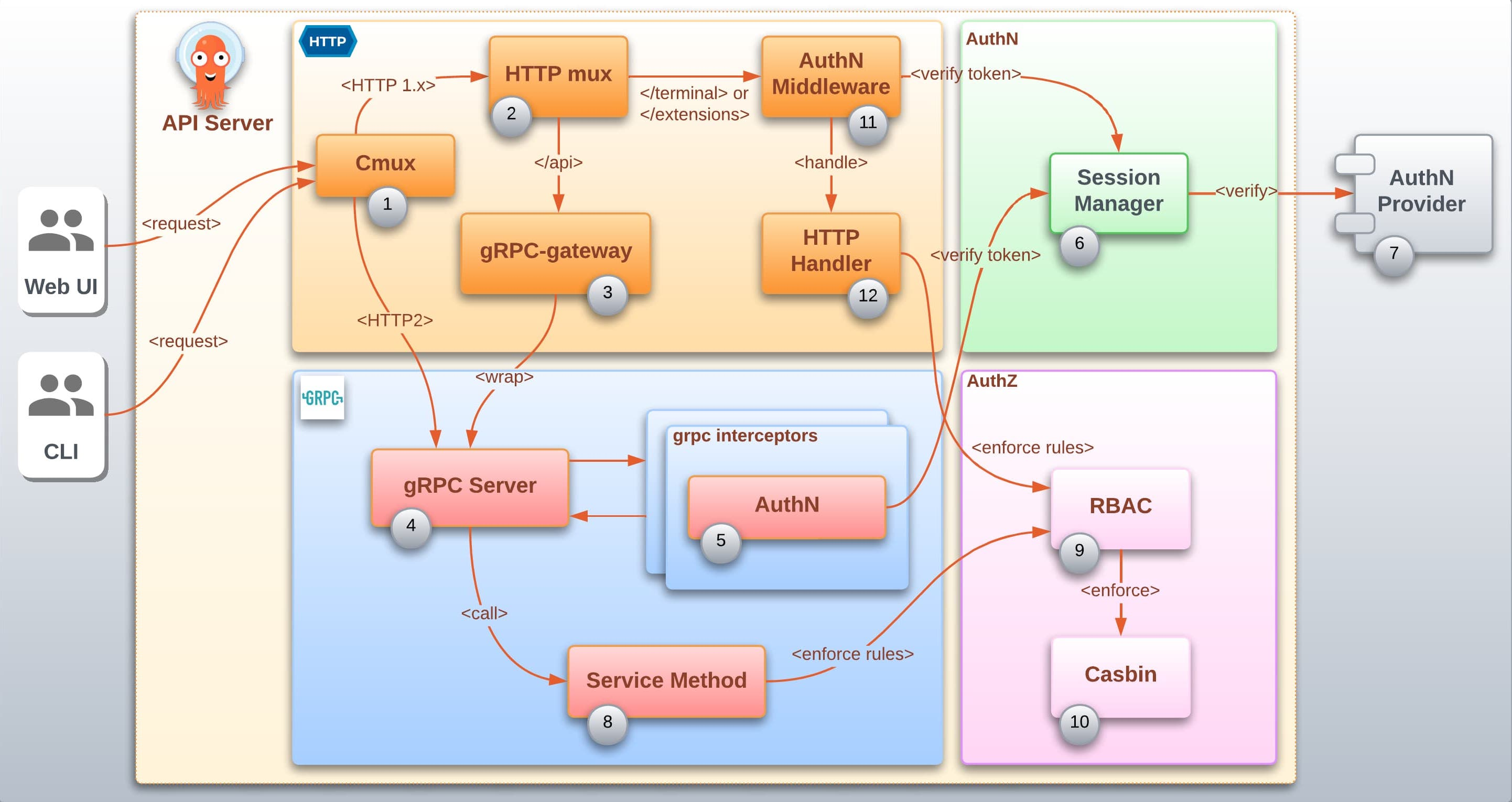
The Auth Model of ArgoCD is the essential part to help you control your ArgoCD easier than the default concepts. It devide to 4 parts, which control logical elements via two protocol HTTP and gRPC, and applied AuthZ and AuthN layer reponsible.
HTTP: It is responsible for serving a unified REST API to the web UI exposing all gRPC and non-gRPC services.
gRPC: The internal gRPC Server responsible for handling gRPC requests, almost logical of API Server.
AuthN: Is responsible for invoking the authentication logic. It is registered as a gRPC interceptor which will automatically trigger for every gRPC request. ArgoCD embeds DexiDP as part of installation, for the purpose of delegating authentication to an external identity provider, such as GitHub, Gitea, … DexiDP will work like AuthN Provider
AuthZ: Is reposible for define and enforce rules of ArgoCD actions with RBAC rules, and ArgoCD use Casbin library to enforce it.
ArgoCD API definied in Kubernetes as Custom Resource Definitions (CRDs) under the argoproj.io API group, including
AppProject: Groups applications logically and enforces boundaries such as allowed source repositories, destination clusters/namespaces, permitted resource kinds, RBAC roles, and sync windows.
Application: Defines a GitOps application, linking a source repository/revision/path to a target Kubernetes cluster and namespace along with sync and health settings.
ApplicationSet: Automates generating and managing multiple Application resources from templates and generators (such as Git directories/files or cluster lists).
Explore API Schema
You can explore about the API Schema for declaring at docs.crd.dev
Beside, it also design the ArgoCDExtension, which help you register UI extensions for Argo CD, which I will talk more about ArgoCD Extensions part.
To explore more about ArgoCD, I recommend you to spend to read whole of documentations, and features that provided to easier configuration, setup, and install manifest for setup GitOps
Following ArgoCD - Cluster Bootstrapping, to start setup GitOps strategies with ArgoCD beside configuration, you need to choose bootstrap pattern to decide how ArgoCD operate and worked to delivery your application to specific Cluster, you can choose on three options below
App of Apps Pattern: This pattern lets you define a RootApplication that does not contain any workload definitions (like Deployment or Service). Instead, its sole purpose is to group and manage multiple child Application manifests, allowing you to organize tightly coupled or nested applications in a hierarchical structure.
ApplicationSet Pattern: This is the recommended approach by Argo CD. It introduces an ApplicationSet controller that uses Generators (such as Git directories, cluster labels, or lists) and Go templates to dynamically generate and manage multiple Application resources from a single manifest, removing the need for external templating tools like Helm.
Hybrid App of Apps and ApplicationSet: This approach combines both patterns for large-scale multi-cluster environments. A Root App of Apps manages core platform bootstrapping and deploys multiple ApplicationSet manifests, while each ApplicationSet dynamically fans out workload or add-on Applications across target clusters and environments.
Pattern
Best for
Strengths
Limitations
App of Apps
Small to medium clusters; explicit control over every application
1. Native sync-wave dependency ordering for heterogeneous stacks.
2. Full per-app customization (bespoke Helm values, ignoreDifferences, sync options).
3. Explicit, transparent 1-to-1 mapping between Git files and live Applications.
1. High YAML boilerplate and copy-paste drift as clusters or services grow.
2. Manual Git commits required to onboard every new cluster or environment.
3. Risk of accidental fleet-wide deletion if cascade finalizers are set on the root app.
ApplicationSet
Large fleets; dynamic generation from Git structure, cluster lists, or SCM providers
1. Zero-touch onboarding via generators (Clusters, Git, Matrix, PullRequest).
2. Eliminates repetitive manifests with a single parameterized template.
3. Supports RollingSync progressive updates across staged cluster labels.
1. Rigid templating makes per-app exceptions and custom overrides messy.
2. Poor fit for ordered foundation bootstrapping where CRDs and operators depend on each other.
3. High blast radius—a single template or generator bug affects all generated Applications simultaneously.
Hybrid
Inherit the ability of both pattern for purpose operating multiple child Application in large fleets
1. Combines strict sync-wave ordering for Hub foundation components with automated ApplicationSet fan-out for spoke clusters and tenant workloads.
2. Clean RBAC (AppProject) isolation between control-plane infrastructure and application teams.
3. Scales from a single cluster to 100+ clusters without restructuring the repository.
1. Higher upfront architectural and directory design complexity.
2. Longer debugging path when tracing ownership (Root App to Launcher App to ApplicationSet to Generated App).
3. Requires strict governance over cluster secret labels and generator selectors to prevent unintended fan-out.
Not only cluster bootstrap, nowadays, ArgoCD offer you several extensions to integrate into ArgoCD, that let you enhance your ArgoCD deployment strategy with new concept
Multi-Environment & Config Promotion Concept: You can integrate ArgoCD with Kargo or Argo GitOps Promoter to let you define concept how an immutable release artifact advances from Dev→Staging→Prod without configuration drift. This pattern will avoid branch-per-environment (which causes endless merge conflicts). Instead, use directory/overlay-per-environment on a single main branch (envs/dev, envs/staging, envs/prod), driven by an ApplicationSet Git generator or Kargo.
Progressive Delivery Concept: Bootstraping Argo Rollouts alongside a Gateway API controller or Service Mesh (Cilium, Istio, Traefik) allows Rollout resources to split live traffic between Stable and Canary ReplicaSets while continuously evaluatingAnalysisTemplates against observability metrics. Beside, ArgoCD introduce Beta mechanism for Rollout for ApplicationSet at ArgoCD - ApplicationSet Progressive Rollout Strategy and ArgoCD - Progressive Sync (Beta Feature Since v3.3.0)
Here is the matrix to show purpose of each concepts and patterns, from that describe what target you will get for bootstraping ArgoCD cluster
Dimension
App of Apps (Pattern)
ApplicationSet (Pattern)
Multi-Env & Config Promotion (Concept)
Progressive Delivery (Concept)
Architectural Layer
Bootstrap & Dependency Orchestration
Dynamic Fleet & Tenant Generation
Cross-Stage Release Lifecycle
In-Cluster Runtime Traffic & Risk Control
Core Mechanism
A parent Application points to a Git directory/Helm chart containing child Application YAML files
An ApplicationSet controller uses Generators (git, clusters, matrix) to stamp out Application CRDs from a template
Overlay/directory separation (base + env values) paired with PR workflows or Kargo (Warehouse→Freight→Stage)
Heterogeneous tree (each child app can have a completely different chart, repo, and sync wave)
Homogeneous fan-out (1 template generates N identical apps across clusters, directories, or PRs)
Linear or DAG stage pipeline across environments
Incremental traffic ramp (5% -> 25% -> 100%) inside a single environment
Ordering & Dependencies
Native via argocd.argoproj.io/sync-wave annotations on child Application manifests
Flat by default (all generated Applications reconcile concurrently unless syncPolicy progressive syncs are configured)
Gate-driven (environment N must pass verification/health checks before environment N+1 updates)
Metric-driven (AnalysisRun queries Prometheus/LGTM before advancing to the next rollout step)
Blast Radius
Deleting the parent with a cascade finalizer can delete every child app in the cluster
Editing the ApplicationSet template simultaneously updates all N generated Applications
Scoped to one stage at a time (e.g., bad config stops in Staging before reaching Prod)
Scoped to a small percentage of live requests (e.g., 5% canary traffic) with instant auto-rollback
Learning
When designing a complete GitOps platform from zero, the four pieces assemble into a clear four-stage pipeline:
Seed Bootstrap (App of Apps): A single root Application reconciles core cluster add-ons in ordered Sync Waves—installing Cilium/Gateway API, Kyverno, OpenBao + ESO, Argo Rollouts, and Kargo.
Fleet & Workload Generation (ApplicationSet): Once the foundation wave is healthy, an ApplicationSet (Matrix of Clusters x Environments) automatically generates the Applications for every microservice across dev, staging, and prod.
Cross-Stage Movement (Multi-Env Promotion): When CI pushes a signed image, Kargo bundles it into Freight, promotes it to staging, runs smoke tests, and opens a promotion PR (or auto-syncs) to update the prod overlay in Git.
Safe Traffic Cutover (Progressive Delivery): ArgoCD syncs the updated prod overlay, triggering Argo Rollouts to shift production traffic 5% -> 25% -> 50% -> 100% via Gateway API while verifying error rates and latency before finalizing the release.
App of Apps Pattern
You can try to use App of Apps Pattern following repository structure below
To bootstrap pattern, you only need to manually apply app_of_apps.yaml once to bootstrap the root Application. From there, it continuously watches the apps/ directory and automatically spawns child Application resources mapped to their corresponding AppProject boundaries. You can skip creating custom AppProject resources if you do not need strict isolation or resource restrictions, since Argo CD automatically provisions a default project upon installation. In production environments, however, defining dedicated AppProject resources is strongly recommended so you can enforce granular access control tied to your team’s SSO groups.
app_of_apps.yaml
apiVersion: argoproj.io/v1alpha1kind: Applicationmetadata: name: app-of-apps namespace: argocd # Omit resources-finalizer.argocd.argoproj.io on root-app in prod # to prevent accidental deletion of all child apps if root-app is removed.spec: project: default source: repoURL: https://github.com/your-org/gitops-platform.git targetRevision: main path: apps # Recursive: https://argo-cd.readthedocs.io/en/stable/user-guide/directory/ directory: recurse: true destination: server: https://kubernetes.default.svc namespace: argocd syncPolicy: automated: prune: true selfHeal: true syncOptions: - CreateNamespace=true
Next, you will define ParentApplication which define the actual child Appication following specific groups, e.g: app, infra, or bootstrap. You can skip this if you don’t want to, and starting define ChildApplication to help you define application Kubernetes manifest by serveral format, e.g: Kustomization, Helm, YAML, Jsonet, …
app-parent.yaml
apiVersion: argoproj.io/v1alpha1kind: Applicationmetadata: name: app-parent namespace: argocd finalizers: - resources-finalizer.argocd.argoproj.iospec: project: default # Need to be project have permission to create Application source: repoURL: https://github.com/your-org/gitops-platform.git targetRevision: HEAD path: apps-app destination: server: https://kubernetes.default.svc namespace: argocd syncPolicy: automated: prune: true selfHeal: true
Use argocd.argoproj.io/sync-wave annotations to control the deployment order within a sync. Lower wave number = applied first. This is critical for infrastructure that has CRD-to-resource dependencies. Explore detail at How sync waves work
Application Set Pattern
In alternative, you want to setup ApplicationSet Pattern, you can consider to use repository structure below
gitops-repo/├── applicationsets/ # Managed by Platform/DevOps team│ ├── tenants-appset.yaml└── tenants-apps/ # Managed by Product/App teams ├── payment-service/ │ ├── base/ # Shared Kustomize base or Helm chart │ └── overlays/ │ ├── dev/ │ ├── staging/ │ └── prod/ └── order-service/ ├── base/ └── overlays/ ├── dev/ └── prod/
With ApplicationSet, you just being apply one time for each appset, it will automatically generate Application resource using generator strategies. This removes the need to manually write one YAML file per application.
With tenants-appset.yaml above, it will create two ApplicationSet for once automatical sync when application on dev environment, and other for manual sync when application on staging and prod required more strictly when application rollout for more careful.
In recent version of ArgoCD, ApplicationSet support more than 10 generator, and you can pick any option to operate your strategy, e.g: example above use Git generator.
Hybrid Pattern
My Thoughts on Production Best Practices
Do not choose one pattern over the other - nest them. Use a root App of Apps to bootstrap foundational cluster add-ons in strict Sync Waves, and configure its final wave to deploy ApplicationSets that dynamically generate tenant workloads and multi-cluster fleet configurations.
The Hybrid Pattern combines App of Apps and ApplicationSet by dividing cluster lifecycle responsibilities along a clear architectural boundary:
App of Apps: Bootstraps the Hub (Management) Cluster in deterministic Sync Waves, where each component is unique and initialization order matters (CRDs → Secrets & Policy → Identity & Crossplane → ApplicationSet definitions).
ApplicationSets: Launched by the final wave of the App of Apps to dynamically stamp out Application resources across Spoke Clusters (fleet-wide add-ons) and Tenant Workloads (microservices deployed across environments).
This gives you deterministic startup ordering on the hub without duplicating YAML manifests every time you onboard a new cluster or microservice. You can explore the Hybrid Pattern repository layouts below, starting with a concise overview and followed by a production-grade directory structure:
You begin in bootstrap/ by applying root-app.yaml once to initialize the entire GitOps hierarchy. From there, the root application triggers the App of Apps layer to provision core Hub infrastructure sequentially via sync-wave, and finally hands off to the ApplicationSet layer to dynamically stamp out spoke add-ons and tenant workloads from configs/.
This provides a solid, production-ready foundation to explore and adapt to your own platform architecture. You can dive deeper into these patterns at:
Beyond bootstrap patterns and repository layouts, choosing the right Argo CD deployment architecture is critical to scaling your GitOps control plane and distributing workloads reliably across a multi-cluster fleet.
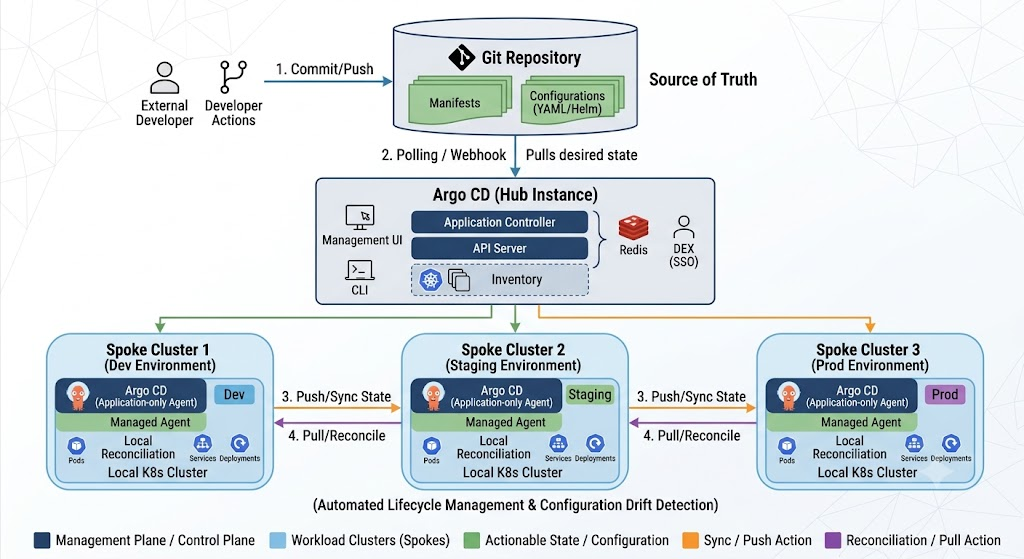
Single Instance (Hub & Spoke): A single centralized Argo CD instance runs on a dedicated Hub (Management) cluster and pushes manifests to multiple Spoke clusters over the network using registered cluster credentials (such as ServiceAccount Bearer Tokens, OIDC, or cloud IAM roles). This provides a unified pane of glass, though it requires exposing each Spoke’s Kubernetes API server (:6443) to the Hub and introduces a single point of failure.
Per Cluster (Decentralized): Every Kubernetes cluster runs its own independent, self-contained Argo CD instance. This maximizes isolation and eliminates cross-cluster network dependencies or central blast radius, at the cost of higher operational overhead and fragmented UI visibility across clusters.
Per Organization / Team (Multi-Instance Sharding): Multiple Argo CD instances are deployed, either on a shared management cluster or dedicated regional hubs, where each instance manages a specific subset of clusters aligned to a business unit, region, or tenant organization. This balances centralized management with strict RBAC and blast-radius isolation.
Hierarchical (Argo CD Managing Argo CDs): A central parent Argo CD instance bootstraps and manages the lifecycle, configurations, and upgrades of child Argo CD instances running inside remote clusters, combining centralized governance with local cluster execution.
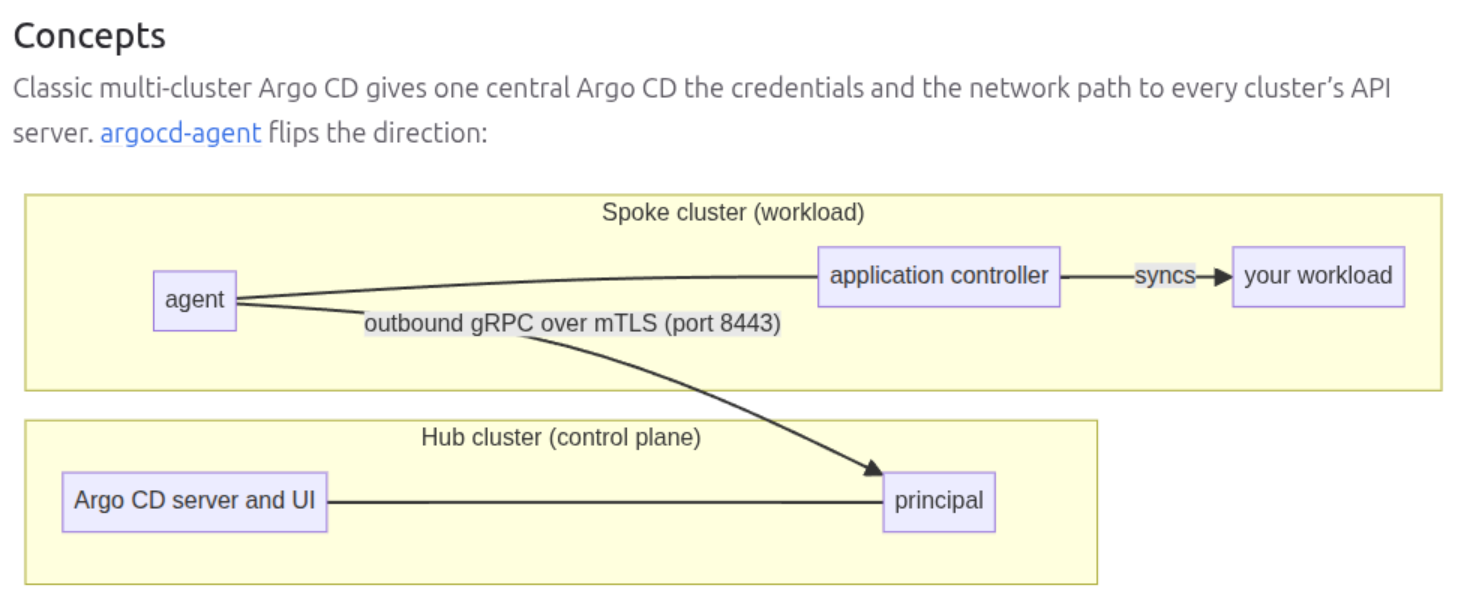
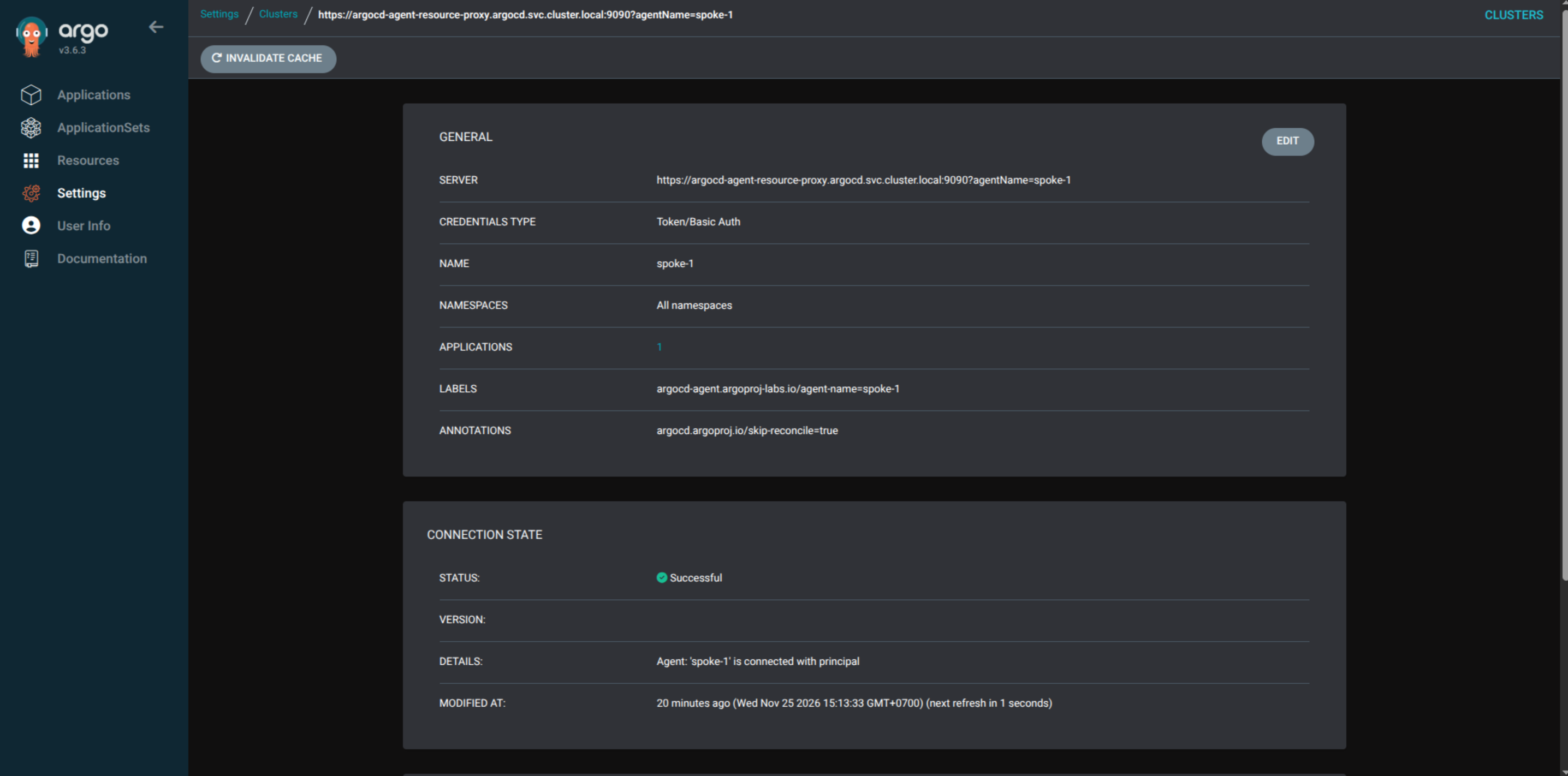
Agent Mode (Outbound Pull / argocd-agent): A modern distributed model where lightweight agents run inside each remote Spoke cluster and establish outbound gRPC/mTLS connections back to a central Hub control plane to pull desired state—eliminating the need to expose Spoke Kubernetes API servers (:6443) or store privileged cluster-admin credentials on the Hub.
Architecture Topology
Operational Scale
Network & Auth Model
Advantages
Trade-Offs & Limitations
Best-Fit Scenario
Single Instance (Hub & Spoke)
2 – 50 clusters (~1,500 apps without tuning)
Inbound Push (Hub -> Spoke :6443) using Bearer tokens, OIDC, or cloud IAM roles
1. Single unified UI, RBAC, and SSO configuration across the entire fleet.
2. Lowest resource footprint on Spoke clusters (zero Argo CD pods required on spokes).
3. Simplest initial setup for ApplicationSets (Clusters / Matrix generators).
1. Requires exposing every Spoke’s Kube API (:6443) to the Hub network.
2. Hub stores privileged credentials for all Spokes (high-value target if compromised).
3. Single point of failure and controller bottleneck (repo-server / application-controller CPU/RAM) at large scale.
Small-to-medium fleets (less than 20 clusters) inside a trusted private VPC/VPN with centralized platform ownership.
3. Combines a unified Hub UI/control plane with lightweight, distributed local execution on Spokes.
1. Newer architectural model with stricter mTLS certificate and reverse-proxy/gateway lifecycle requirements.
2. Spoke clusters still run a lightweight agent footprint and local state cache.
3. Requires careful mode selection (managed vs. autonomous) depending on whether Git state lives on the Hub or Spoke.
Zero-trust multi-cloud, hybrid on-prem/cloud, and edge/IoT fleets where Spoke Kube APIs (:6443) must remain completely hidden.
There are some key drivers that dictate your choice
Network & Security Topology: Standard Hub-and-Spoke breaks down in regulated or edge environments where target clusters sit behind firewalls and forbid inbound traffic from a central hub. In these scenarios, Standalone or Agent-based (pull) models are required regardless of cluster count.
Resource & Object Churn: Scalability is rarely limited by cluster count alone; it is driven by the total number of Kubernetes resources watched and how frequently they change. High-churn clusters require Application Controller Sharding (distributing clusters across multiple controller replicas) or splitting into Hybrid instances.
Blast Radius & Isolation: Putting every cluster on one hub centralizes risk, a misconfiguration, secret leak, or hub outage impacts the entire fleet. Separating clusters by Argo CD Projects helps logically, while hybrid or per-cluster patterns enforce hard infrastructure isolation.
Developer Experience: If developers need a single dashboard to inspect logs, diffs, and sync statuses across environments, hub-and-spoke vs. pull-mode keeps visibility centralized, whereas standalone instances force teams to switch contexts per cluster.
If you want to explore more about this topics, you can double-check these links below
Argo CD is in continuous active development, so it is no surprise how massive its ecosystem and extension landscape have become. If you take a look at awesome-argo curated by Akuity, or the main Argo Project organization, you will find four core pillars—Argo CD, Argo Workflows, Argo Rollouts, and Argo Events. Together, they form an end-to-end, Kubernetes-native delivery suite that covers the entire software lifecycle—from event-driven CI pipelines and container builds to GitOps reconciliation and progressive delivery.
Today, the Argo ecosystem also continues to pioneer multi-cluster control plane scalability with projects like argocd-agent, which enables remote clusters to pull state securely over outbound connections rather than relying on centralized push models. Alongside the core projects, you can discover many of these experimental and specialized add-ons under Argo Project Labs.
It is well worth exploring these extensions—here are several standout tools and UI plugins from the Argo ecosystem that elevate day-to-day GitOps operations:
Argo CD Notifications: Built directly into core Argo CD, this controller continuously monitors application state changes and triggers alerts or webhooks across Slack, Microsoft Teams, email, GitHub commit statuses, and custom endpoints.
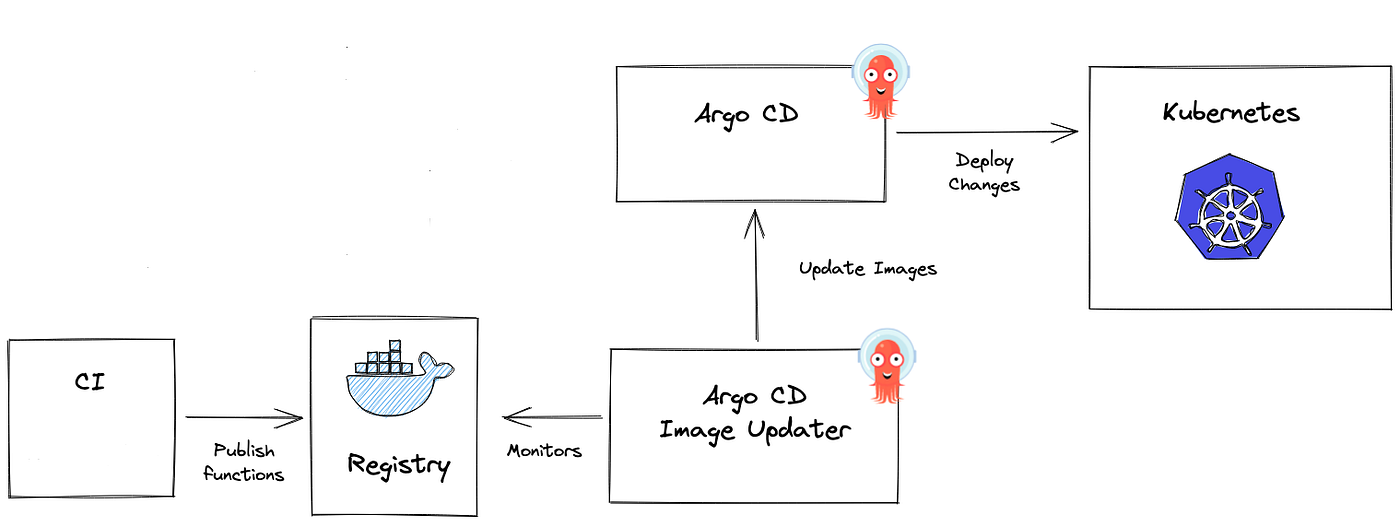
Argo CD Image Updater: A controller that watches container registries for new image tags or digests and automatically updates Kubernetes workloads managed by Argo CD—either via imperative parameter overrides or by committing updated tags directly back to your Git repository.
Argo Rollouts UI Extension: A native Argo CD web UI extension that embeds interactive progressive delivery visualizations—showing canary step progression, traffic weights, and AnalysisRun statuses directly inside the Argo CD resource tree.
Argo CD Metrics Extension: A UI extension that surfaces real-time Prometheus metrics and golden signals (latency, error rate, traffic, saturation) right alongside your deployed resources in the Argo CD dashboard.
ArgoCD Agent: Redefining the multi cluster story of Argo CD
Explore more of the Argo ecosystem through the links below:
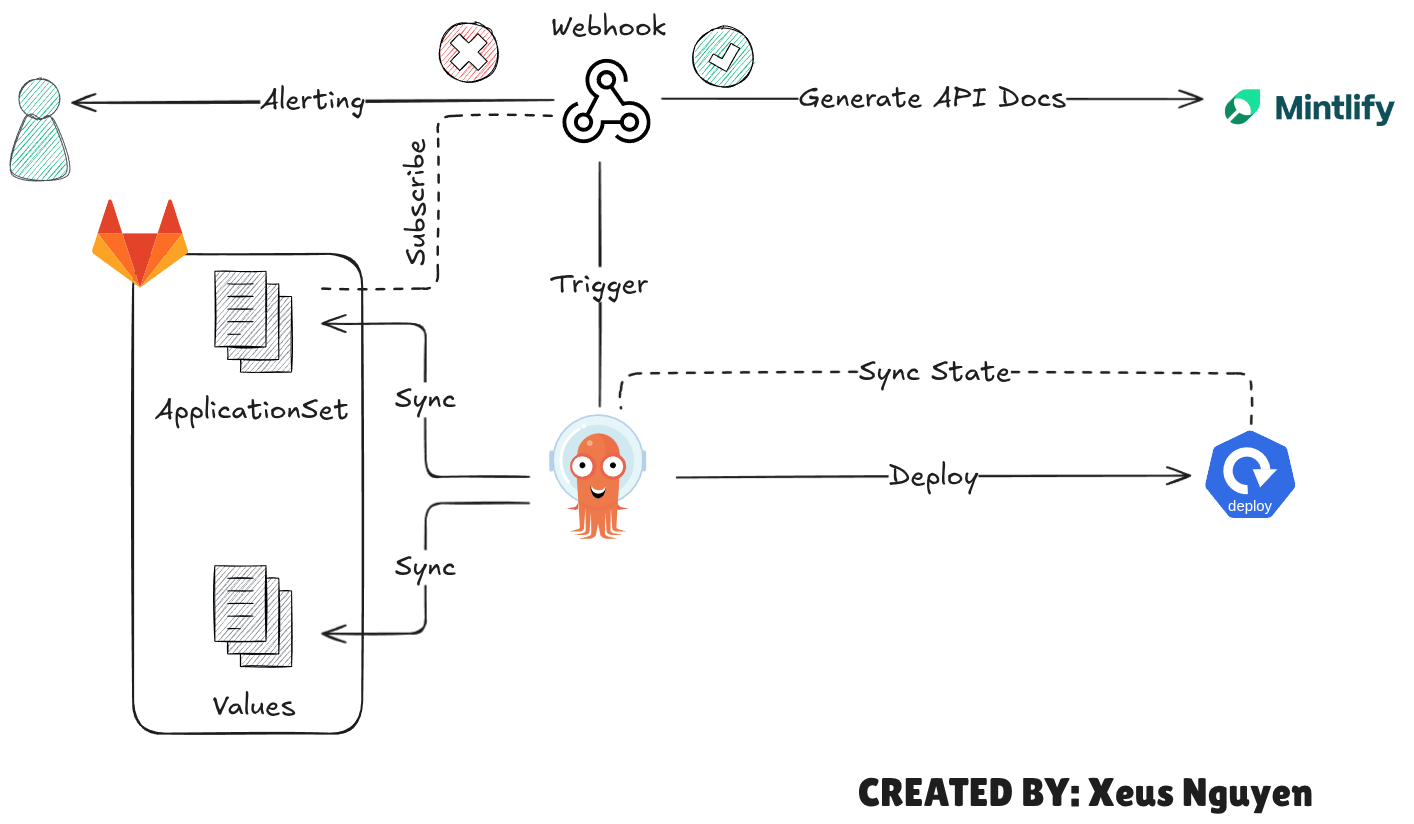
Before diving into the hands-on Kubewekend setup for Argo CD, I have a small project I built previously that uses Argo CD as the core engine alongside the notification-controller to:
Observe CD (Sync) status whenever a new application version or platform tool is deployed.
Connect the Argo CD Notification Controller with webhooks in a large cluster to dispatch alerts and trigger automated API documentation generation.
Question
Depending on our purpose, I should integrate our alerting into Google Chat to centralize our notifications and alerts sync-status in one place. Therefore, you should consider using Argo CD’s Google Chat Service. This service provides the ability to send messages to Google Chat channels via webhook integration and offers card message templates to build advanced notifications with Argo CD.
Now we will take a walkthrough into the why, the resources, and a couple of previews of the setup and demo I built previously, hopefully sparking some new ideas for your own workflows.
Why
Info
All products are operated via Argo CD. However, a challenge arises when applications sync without a clear indication of whether the deployment actually succeeded or stabilized. This is why we should implement Argo CD Notifications, a built-in feature natively supported by Argo CD.
Implementing Argo CD Notifications enhances day-to-day operations in three key ways:
Real-time Deployment Awareness: Provides immediate updates on application deployment progress and current health states.
Proactive Issue Resolution: Enables rapid identification and troubleshooting of problems occurring during Argo CD application deployments or synchronization loops.
Timely Error Announcements: Delivers instant alerts for any synchronization failures or degradation originating from Argo CD.
At a minimum, Argo CD should emit notifications for the following core application lifecycle states:
Synced and Healthy (on-deployed): Indicates that the application synchronized cleanly and all resources are operating as expected.
Health Degraded (on-health-degraded): Alerts the team when an application that was previously stable transitions into an unhealthy or degraded state.
Resources
Leveraging Argo CD’s native notification engine, originally developed under the argocd-notifications project—we can easily set up and deliver deployment state notifications to various chat platforms, such as Slack, PagerDuty, or Google Chat.
To achieve this, consult the instructions provided by the Argo CD maintainers in the Argo CD Documentation - Notifications Overview. Notifications function as a continuous monitoring mechanism for the Argo CD system, pairing triggers (which evaluate state conditions) with templates (which format the payload) inside the argocd-notifications-cm ConfigMap. This flexible approach allows you to customize notifications based on specific conditions, application states, desired channels, and payload formats.
Note
There are several predefined catalogs available for general purposes—including ready-to-use on-deployed, on-sync-failed, and on-health-degraded triggers—eliminating the need to reinvent them from scratch.
Externally, you can also refer to these practical walkthroughs and tutorials on building out a notification system:
This setup requires notification-controller to be enabled in your Argo CD deployment. You can enable it through whichever method you use to deploy Argo CD. In my case, I use helm (where notifications.enabled defaults to true in recent chart versions).
Next, create a Kubernetes Secret (by default, the controller looks for argocd-notifications-secret in the argocd namespace) to store your webhook URLs and API tokens so notification-controller can reference them safely without exposing credentials in ConfigMaps
Beyond declaring the webhook service, this same ConfigMap centralizes your template, service.webhook, and trigger definitions before any Application subscribes via annotations. Here is the complete configuration combining Google Chat alerts and automated API documentation webhooks
apiVersion: v1kind: ConfigMapmetadata: name: argocd-notifications-cmdata: # Notifying to google-chat service.googlechat: | webhooks: spaceName: $space-webhook-url # Submitting new documentation service.webhook.example-docs: | url: https://webhook-docs.example.com/projects headers: - name: Authorization value: Bearer $docs-sk - name: Content-Type value: application/json retryWaitMin: 120s retryWaitMax: 120s retryMax: 3 # Notifying about the state of apps template.app-deployed: | message: | 🚀 *The app has successfully deployed!* 🚀 - *Application*: {{ .app.metadata.name }} - *Project*: {{ .app.spec.project }} - *Namespace*: {{ .app.spec.destination.namespace }} - *Status*: {{ .app.status.sync.status }} - *Health*: {{ .app.status.health.status }} - *View in ArgoCD*: {{ .context.argocdUrl }}/applications/{{ .app.metadata.name }} - *Deployed At*: {{ .app.status.operationState.finishedAt | default "N/A" }} template.app-health-degraded: | message: | 🚨 *The app has degraded!* 🚨 - *Application*: {{ .app.metadata.name }} - *Project*: {{ .app.spec.project }} - *Namespace*: {{ .app.spec.destination.namespace }} - *Status*: {{ .app.status.sync.status }} - *Health*: {{ .app.status.health.status }} - *View in ArgoCD*: {{ .context.argocdUrl }}/applications/{{ .app.metadata.name }} - *Last Sync Message*: {{ .app.status.operationState.message | default "No message" }} - *Degraded Since*: {{ .app.status.health.status | default "N/A" }} # Submitting documentation of apps template.example-docs-submitted: | webhook: example-docs: method: POST body: | { "openapiUrl": "https://api.example.com/openapi.json", "projectName": "Example API" } # The trigger of state of apps notification trigger.on-deployed: | - description: Application is synced and healthy. Triggered once per commit. oncePer: app.status.operationState.syncResult.revision send: - app-deployed when: app.status.operationState.phase in ['Succeeded'] and app.status.health.status == 'Healthy' trigger.on-health-degraded: | - description: Application has degraded send: - app-health-degraded when: app.status.health.status == 'Degraded' # The trigger of documentation submmited trigger.example-docs-on-submitted: | - when: app.status.operationState.phase in ['Succeeded'] and app.status.health.status == 'Healthy' oncePer: app.status.operationState.syncResult.revision send: - example-docs-submitted
With the triggers, templates, and services wired up, you simply subscribe your Application via metadata annotations. Once you sync the application, the controller automatically executes the pipeline step-by-step (subscription → trigger → template + service)
apiVersion: argoproj.io/v1alpha1kind: Applicationmetadata: name: example-app namespace: argocd annotations: # Annotation use for notification-cd # format: notifications.argoproj.io/subscribe.<trigger>.<noti-service>: <recipient> notifications.argoproj.io/subscribe.on-deployed.googlechat: spaceName notifications.argoproj.io/subscribe.on-health-degraded.googlechat: spaceName # Annotation use for submit-documentation # format: notifications.argoproj.io/subscribe.<trigger>.<webhook-service>: "" notifications.argoproj.io/subscribe.example-docs-on-submitted.example-docs: ""
ArgoCD with Kubewekend
Alright, we are officially jumping into the Kubewekend hands-on lab. After covering the architectural foundations, patterns, and ecosystem extensions above, you are ready to bootstrap Argo CD for your own HomeLab GitOps setup, or build the foundation to drive a GitOps transition in your workplace.
This lab focuses on a complete, end-to-end deployment walkthrough covering four practical stages:
Cluster Bootstrap & Multi-Tenancy: Bootstrapping the cluster with the App of Apps Pattern and enforcing isolation with dedicated AppProject boundaries for each application group.
Hybrid Fan-Out (Application & ApplicationSet): Combining standalone Application manifests with ApplicationSet generators inside the Hyrbid App of Apps + ApplicationSet Pattern.
Automated Image Lifecycle (argocd-image-updater): Configuring argocd-image-updater to automatically track and update container images across both Helm and Kustomize workloads.
Outbound Multi-Cluster Fleet (argocd-agent): Setting up a lightweight multi-cluster case study using argocd-agent, allowing remote spoke clusters to pull desired state securely over outbound connections without exposing their Kubernetes API servers.
Before diving into the lab details, you need to prepare your experimental environment with Kubewekend. With Kubewekend, you can easily provision a Kubernetes cluster using any of three supported distributions, K3s, RKE2, or KinD, and automatically deploy Argo CD with argocd-image-updater enabled. But I will help you deploy ArgoCD manually with helm
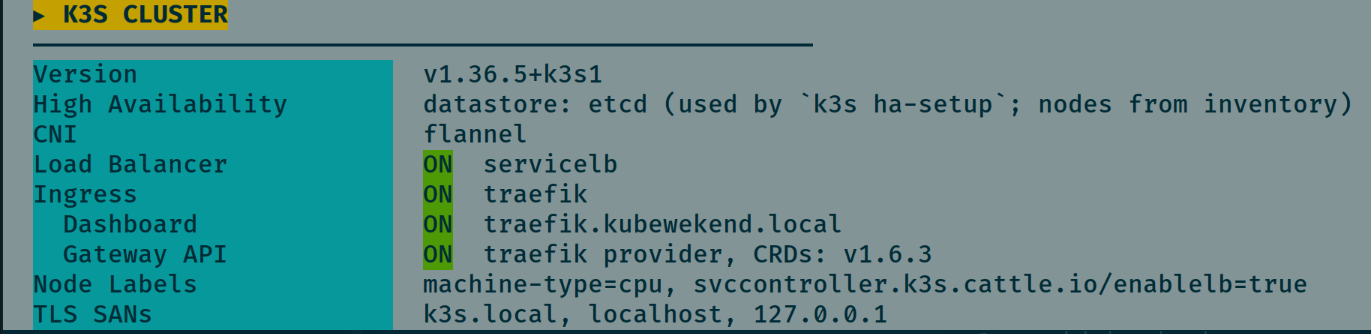
Let’s spin up a single-node K3s cluster on a VM, VPS, or cloud host of your choice using kubewekend from GitHub - Kubewekend
git clone https://github.com/Xeus-Territory/kubewekend.gitcd kubewekendpip install -r requirements.txt./scripts/setup.sh config show
VPS Specifications
My experimental VPS machine is provisioned with: 2 vCPUs – 8 GB RAM – Ubuntu 24.04 LTS.
Next, configure your Ansible inventory with your target VPS IP address and SSH credentials, then verify connectivity
# Setup inventory with your SSH and IP of VPS./scripts/setup.sh inventory set-remote# Test connectivity before setup./scripts/setup.sh inventory ping standalone-masters
After status return successful, you can run command to setup k3s cluster, this will install install_common with various opensource, and tool to help you workaroud with kubernetes inside host, and setup_k3s to setup K3s Cluster with configuration.
You can execute kubectl directly on the VPS, or you can get kubeconfig to your host for practicing with K3s Cluster Provision from remote-vps
  ssh <master> 'sudo -S cat /etc/rancher/k3s/k3s.yaml' > ~/.kube/config
  # Then replace 127.0.0.1 with the master node IP in the kubeconfig
  sed -i 's/127.0.0.1/<master_ip>/g' ~/.kube/config
kubectl get pods -A
Bootstrap ArgoCD in Cluster
You can apply ArgoCD with many way, but I would recommend you to install ArgoCD with helm for easier modification via values.yaml when applied. Explore more at ArgoCD - Installation and Helm Chart
This command will help you add argo helm-chart repository to your local, and install argocd via helm with configuration
Enable and set global.domain which let you redirect anything inside ArgoCD with specfic host
Enable Ingress to help you easier to ArgoCD, but you can skip it if not need UI
Setup insecure for TLS configuration to prevent error when you use ArgoCD with Traefik o prevent redirect loops from HTTP to HTTPS. But this feature require enable when you run in production when TLS inject into your application, it can self-signed, but you can use cert-manager to manipulate it. Explore more at Ingress Disable internal TLS, TLS configuration.
Disable Dex for authentication for reduce complex. We will explore Dex on another session about enable more complex Authentication in ArgoCD for align them with SSO.
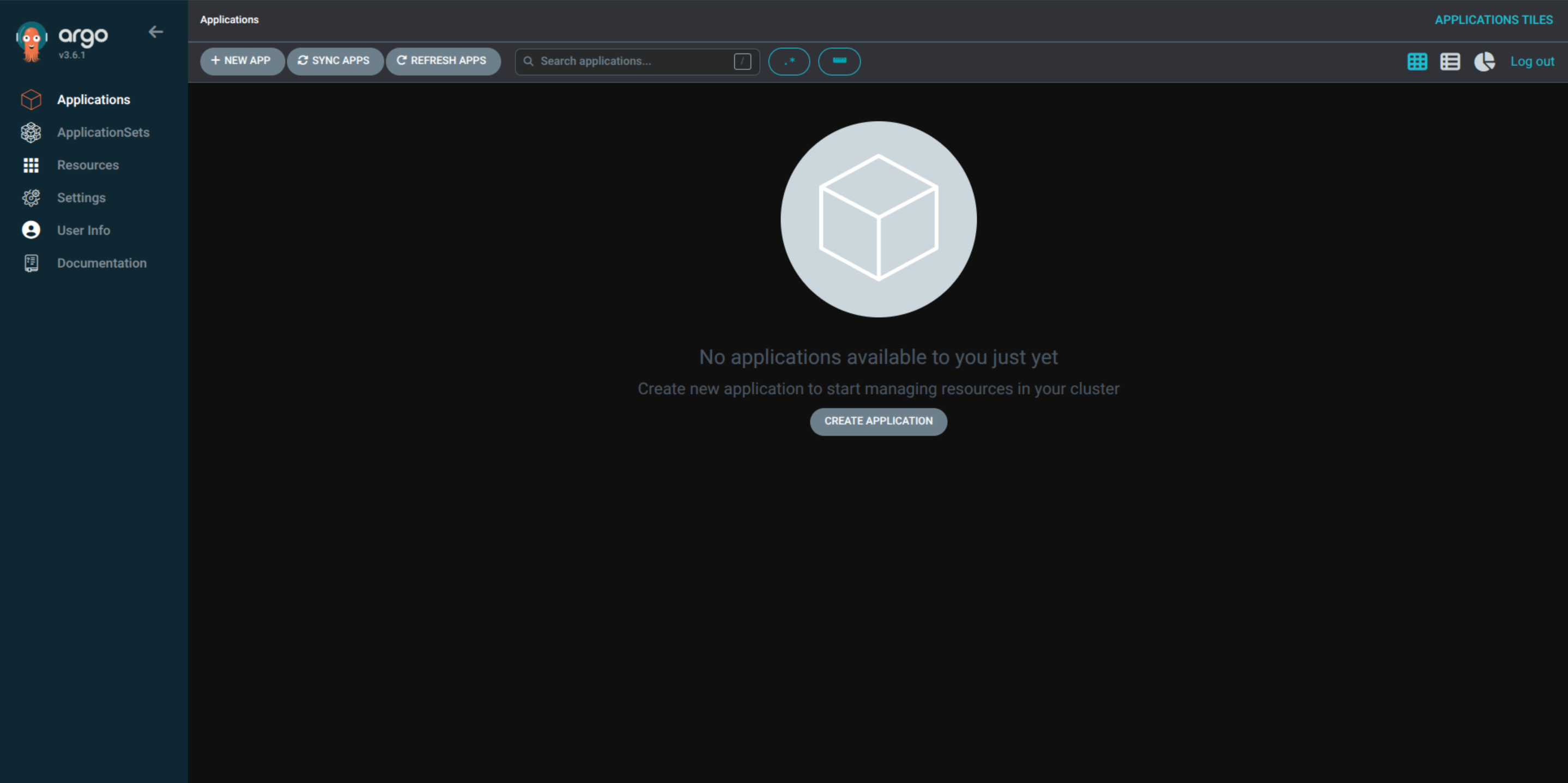
To access ArgoCD, you can modify /etc/hosts and add x.y.z.t argocd-address and openbrowser to connect ArgoCD UI. Now get password of admin user via secret in argocd namespace with user=admin
If you require to setup private private repository, I recommend you read carefully these articles to configuration SSH information and authenticate to let ArgoCD can discovery your GitOps repository
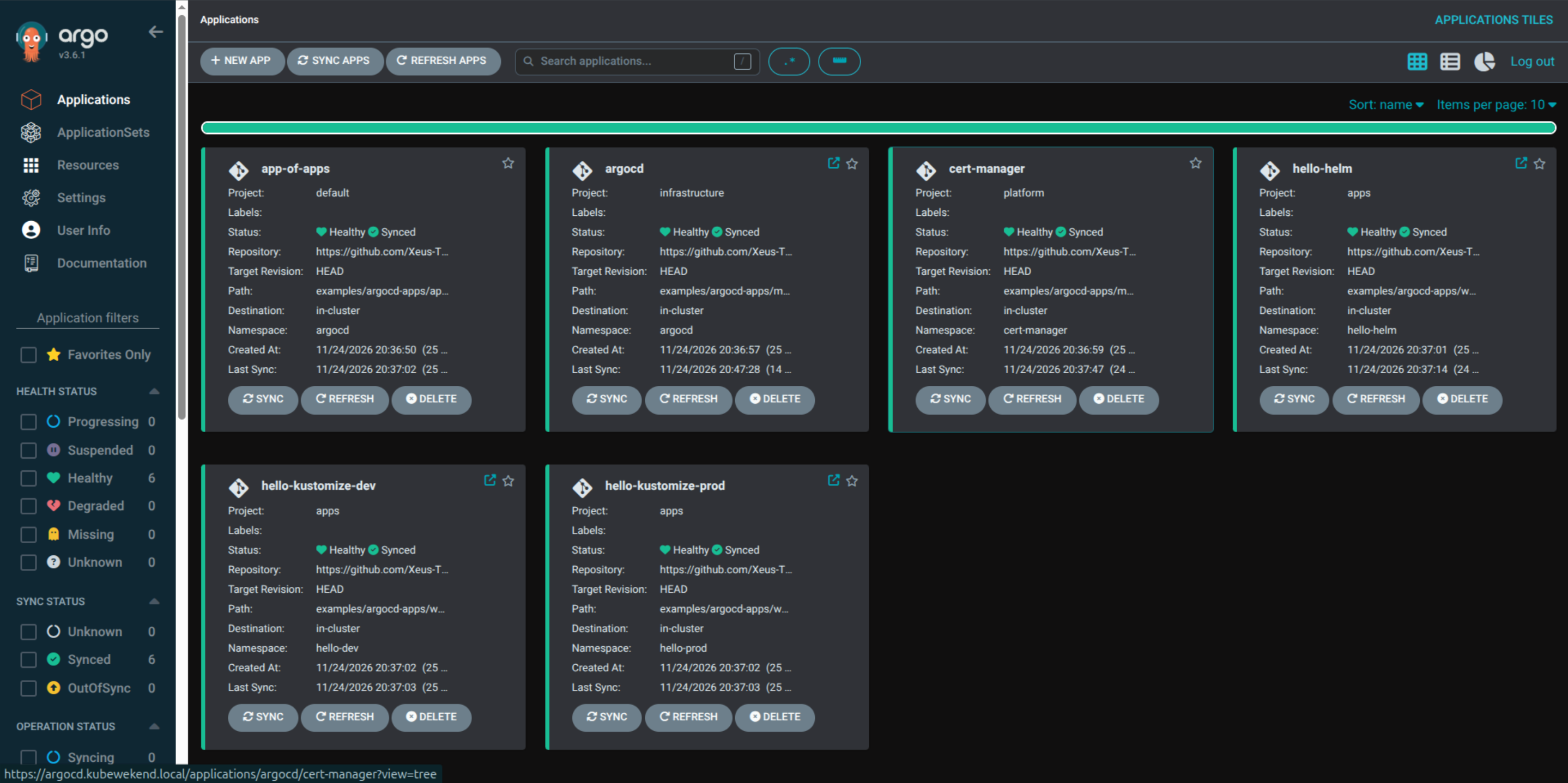
app-of-apps: For managing entire application, app-project, and applicationset. It shows entirely concept and manging application following groups to isolate range user can reach in ArgoCD
argocd: Sync again ArgoCD with more configuration, you find out them in values.yaml to enable new user, exec, resource custom health, enable rbac for user with policy.csv, …
hello-kustomize-*: Kustomize application built on Kustomize and ApplicationSet using Git generator for multiple environment
Image Updater - The Right Hand of ArgoCD (Optional)
With ArgoCD, you can declare your strategy update image by manually in CI/CD pipeline, or integrate 3rd party, ArgoCD Image Updater. In my opinon, you can choose one of them to let declare clearly your image update strategy, don’t mix them together because it’s bad idea and cause your manifest encounter trouble. Let’s discovery
Dimension
CI/CD Git Push
Argo CD Image Updater
How it works
CI builds the image, updates the tag in your manifest repo (e.g., via yq, kustomize edit, or PR), and pushes. Argo CD pulls and syncs.
A controller inside Kubernetes polls container registries for new tags and writes changes back to Git or the Argo CD API.
Security & Blast Radius
Safer. Your cluster only needs read-only access to Git; CI already holds write/deploy permissions.
Higher risk. Requires giving a cluster component write credentials (PATs/SSH keys/GitHub App) to push to your manifest repo.
Determinism & Traceability
High. Every deployment maps 1-to-1 to a specific CI build commit with clear commit authors and PR checks.
Moderate. Relies on tag matching rules (semver, latest, digest), which can unexpectedly deploy if someone pushes a matching tag manually.
Maintenance & Complexity
Requires adding a manifest-update step (and handling concurrent Git push conflicts) in your CI pipeline.
Zero CI changes needed; configured via Kubernetes annotations or ImageUpdater CRDs, though you must manage another controller.
Registry API Limits
Low. No continuous polling against Docker Hub, ECR, or GHCR.
Higher. Frequent registry polling can trigger rate limits if you track many images.
That why you should consider to choose ArgoCD follow what path, it’s essential step and it should declare from scratch, before hit to complex system with many Application and Image. You can choose which when
Go with CI/CD Git Push
You own the application source code and already run a CI pipeline (GitHub Actions, GitLab CI, Jenkins, etc.) to build the container.
You enforce strict branch protection, PR approvals, or compliance audits in production.
You want your Kubernetes cluster to remain strictly read-only toward Git.
Go with Argo CD Image Updater
You deploy third-party vendor images or shared base images built outside your CI pipelines and want automatic patch updates (e.g., ~1.4.0).
You manage dozens of microservices and want centralized tag-tracking rules without duplicating Git-commit logic across every repo.
You use an imperative setup (argocd write-back method) for ephemeral/dev environments where Git history isn’t needed.
Perspective
With me, I usually choose Image Updater because our repository should declare same tag format for which environment, that will be quite fit if you got them easier to promotion for higher version. But the tricky when you use Image Updater can let you become confuse, but belive me, if you can control it, I think Image Updater can become a right hand of ArgoCD to reduce workload when bootstrap CI/CD Pipeline, which hard to control and managing than Platform with Image Updater
Let’s try with kubwekend if you want to test image-updater fit with your setup at example. But you need to ensure what version you got for Image Updater because this project is unstable, with changing after minor version, like
If you use version <= 1.0.0, Image Updater will work for setup via annotation, you can setup them in Application to let controller can discovery and mapping their image to right possition. Explore more at ArgoCD Image Updater v0.19
If you use version >= 1.0.0, Image Updater will support CRDs instead annotation to let you declare image update for your Application with easier to manage across environment of once app, than Application annotation format. Explore more at ArgoCD Image Update from v1.0
When you sync the bootstrap of argocd application, it already include chart image-updater.enable=true, and it will install version v1.0.1, or you can use helm install
Now you can explore the API scheme imageupdater with command
kubectl explain imageupdater.spec
It will include 4 part to configuration
applicationRefs (Required): ApplicationRefs indicates the set of applications to be managed. ApplicationRefs is a list of rules to select Argo CD Applications within the ImageUpdater CR’s namespace (not spec.namespace - deprecated v1.2.x).
commonUpdateSettings: CommonUpdateSettings provides global default settings for update strategies, tag filtering, pull secrets, etc., for all applications matched by this CR. These can be overridden at the ApplicationRef or ImageConfig level.
writeBackConfig: WriteBackConfig provides global default settings for how and where to write back image updates. This can be overridden at the ApplicationRef level.
imagesVerification: ImagesVerification defines the global default image signature verification policy. When set, every image update is subject to cryptographic verification before being committed to Git or applied to an Argo CD Application.
Now we will implement following the example, and I will explain each parameter we configure
imageupdater.yaml
# Lab 3: Argo CD Image Updater (v1.x) with an `ImageUpdater` custom resource (no annotations on the Applications).## What it does, every few minutes:# 1. looks up the tags of xeusnguyen/kubewekend-todo in the registry# 2. picks the newest semver tag (v1.0.0 -> v1.1.0)# 3. commits the new tag to Git (the `git` write-back method), so Git stays the source of truth# 4. Argo CD sees the new commit and rolls the Deployment out## Two applications are tracked, one per tool; `hello-kustomize-prod` is deliberately NOT tracked:# hello-helm -> writes common.image.tag in workloads/hello-helm/values.yaml# hello-kustomize-dev -> writes the `images:` block of overlays/dev/kustomization.yamlapiVersion: argocd-image-updater.argoproj.io/v1alpha1kind: ImageUpdatermetadata: name: hello namespace: argocdspec: # `git:secret:<namespace>/<name>` reads `username` and `password` from that Secret (see the lab for the command) writeBackConfig: method: git:secret:argocd/git-creds gitConfig: branch: main # Use the URL of YOUR fork: the commit is pushed there repository: https://github.com/Xeus-Territory/kubewekend commonUpdateSettings: updateStrategy: semver ignoreTags: - latest applicationRefs: - namePattern: hello-helm writeBackConfig: method: git:secret:argocd/git-creds gitConfig: branch: main repository: https://github.com/Xeus-Territory/kubewekend # # NOTE: use the default write with newfile `.argocd-source-<appName>.yaml` # # Helm: write the tag into the chart's values file (path relative to the Application's source path) # writeBackTarget: helmvalues:values.yaml images: - alias: todo imageName: xeusnguyen/kubewekend-todo manifestTargets: helm: # Value paths in values.yaml. The `common` chart is a dependency, hence the `common.` prefix name: common.image.repository tag: common.image.tag - namePattern: hello-kustomize-dev writeBackConfig: method: git:secret:argocd/git-creds gitConfig: branch: main repository: https://github.com/Xeus-Territory/kubewekend # # NOTE: use the default write with newfile `.argocd-source-<appName>.yaml` # # Kustomize: edit the `images:` block of the kustomization.yaml in the Application's source path # writeBackTarget: kustomization images: - alias: todo imageName: xeusnguyen/kubewekend-todo manifestTargets: kustomize: # The image name exactly as written in `images:` (overlays/dev/kustomization.yaml) name: xeusnguyen/kubewekend-todo
This file declares the core configuration for argocd-image-updater (using its CRD-based ImageUpdater specification):
Target Applications (applicationRefs[].namePattern): Selects the two Argo CD Application resources managed by the updater—hello-helm and hello-kustomize-dev—via explicit name matching or wildcard patterns.
Git Write-Back & Authentication (writeBackConfig.method): Configures git as the write-back method so the controller persists image updates directly back to your GitOps repository instead of applying ephemeral parameter overrides. You must configure a git-creds Secret with write permissions to the repository—using either an SSH private key, a password, or a Personal Access Token (PAT).
Repository URL & Credential Alignment: Ensure your Git credential type matches the repository URL scheme declared in Argo CD—use a PAT or username/password for https:// URLs, and an SSH private key for git@ URLs.
Manifest Target Mapping (manifestTargets): Defines how updated image tags are written into each packaging format:
Helm (manifestTargets.helm): Specifies the exact values.yaml key paths for the image repository and tag (for example, common.image.repository and common.image.tag).
Kustomize (manifestTargets.kustomize): Maps the name entry under the images transformer block in kustomization.yaml. Note that Kustomize’s built-in image transformer only targets standard workload fields (such as Deployment or StatefulSetcontainers[].image) by default—if you manage custom resources like Crossplane XRs, you must define a custom ImageTagTransformer configuration to target those custom field paths. Explore more at Kustomize - ImageTagTransformer and StackOverflow.
Global Update Strategy & Tag Filtering (commonUpdateSettings): Sets shared defaults (updateStrategy and ignoreTags) across all referenced applications unless overridden per applicationRef. Using semver instructs the updater to automatically track and bump to the newest minor or patch version whenever a new vX.Y.Z or X.Y.Z tag is published to the registry. Explore more at Semver - Semantic Versions.
Pull Request Workflow (writeBackConfig.gitConfig.pullRequest): Starting in v1.2.0, argocd-image-updater supports opening a Pull Request for image tag updates rather than committing directly to your target branch. This enforces branch protection and peer review—allowing CI checks and human reviewers to validate or reject an automated version bump before it ever triggers an Argo CD sync. Explore more at Git Pull Request
Recommendation
I recommend forking the kubewekend repository to your own GitHub account first so you can practice Git write-backs and Pull Requests safely without permission issues.
First, create the git-creds Secret in the argocd namespace using your GitHub username and Personal Access Token (PAT) so argocd-image-updater has permission to push branches and open Pull Requests against your GitOps repository
Next, apply the ImageUpdater custom resource to watch the applications and detect available image bumps. Because tag v1.1.0 already exists in the container registry, the controller will immediately detect the newer semantic version and trigger a Git write-back
Inspect the ImageUpdater custom resource definition and tail the argocd-image-updater-controller logs to observe the reconciliation loop in real time
# check imageupdater configurationkubectl get imageupdater -n argocd hello# check log of image updaterkubectl logs -n argocd deployments/argocd-image-updater-controller argocd-image-updater-controller
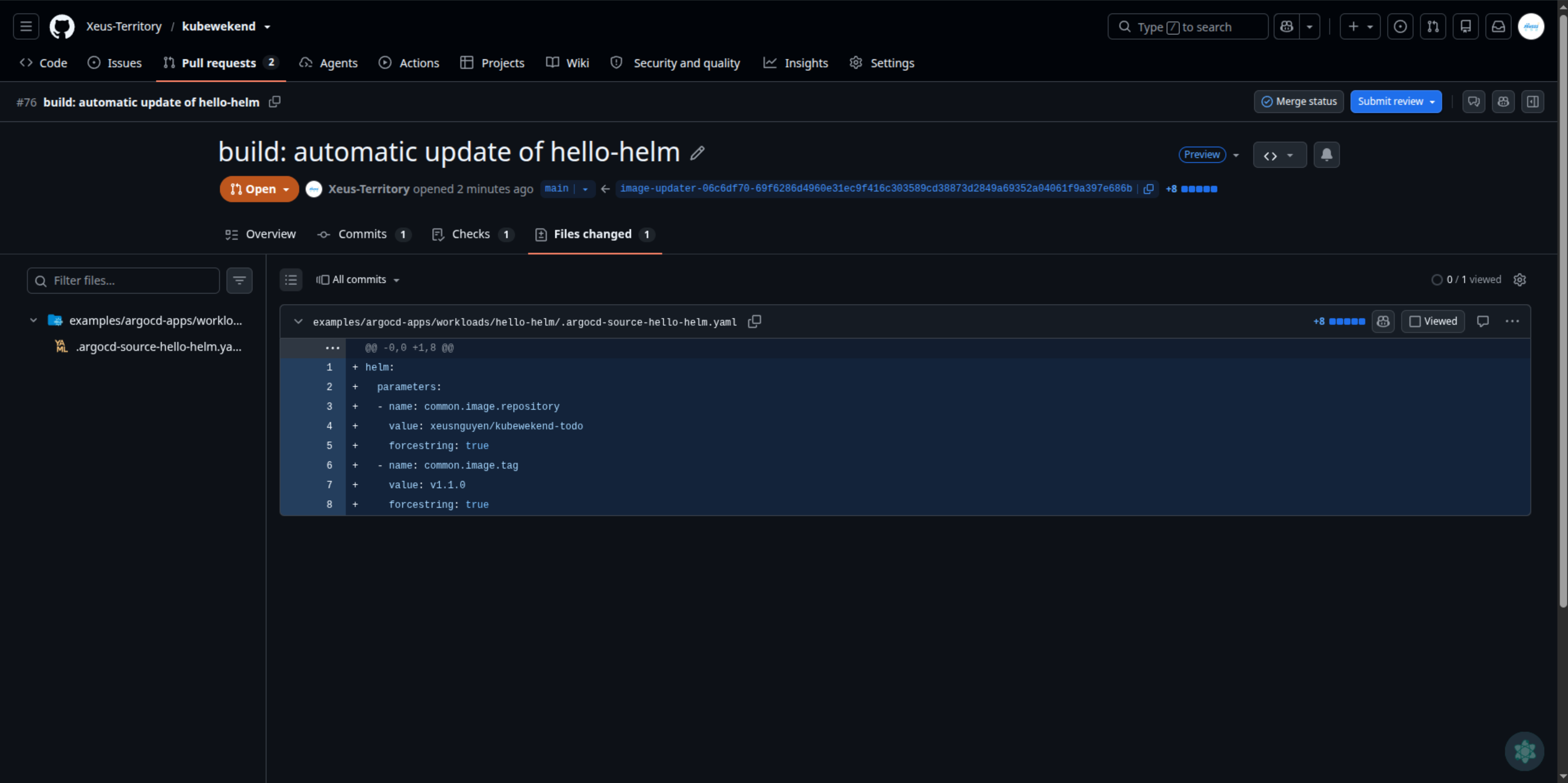
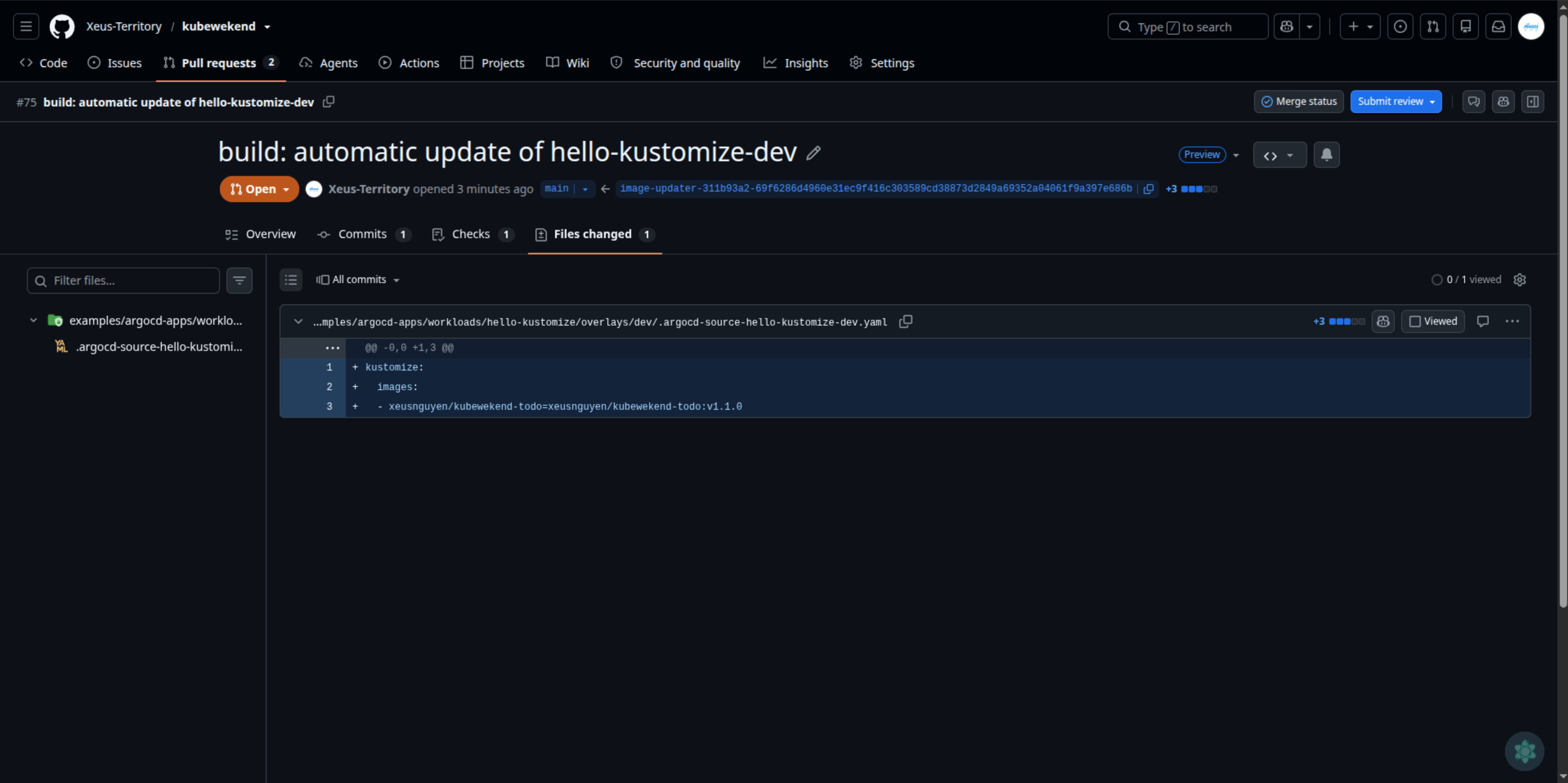
Once detected, argocd-image-updater automatically opens Pull Requests targeting main for both hello-helm and hello-kustomize-dev. Instead of mutating your base values.yaml or deployment.yaml directly, each PR generates a .argocd-source-<appName>.yaml override file inside the manifest directory watched by Argo CD. You can merge the PR to let Argo CD sync the new v1.1.0 image into Kubernetes, or close/reject it to block the rollout.
Finally, verify the active container image revisions directly from the Argo CD UI or by querying the application manifests via the argocd CLI
argocd app get argocd/hello-helm --output yaml | grep -e "xeusnguyen/kubewekend-todo"argocd app get argocd/hello-kustomize-dev --output yaml | grep -e "xeusnguyen/kubewekend-todo"
Argo CD Image Updater Complete
That covers the core workflow for argocd-image-updater. As noted earlier, adopting it depends on your team’s operational expectations—since it adds an external controller layer that can feel less deterministic than explicit CI-driven manifest commits. Give it a try in your lab to see how it fits your workflow, and explore further configuration options in the Argo CD Image Updater Official Documentation.
ArgoCD Multi-Cluster with Brand New Strategy
In the last lab, I think I will bring something new cool stuff to try with ArgoCD Multi-Cluster with ArgoCD Agent, a brand new method to get your GitOps into your workspace.
What is ArgoCD Agent?
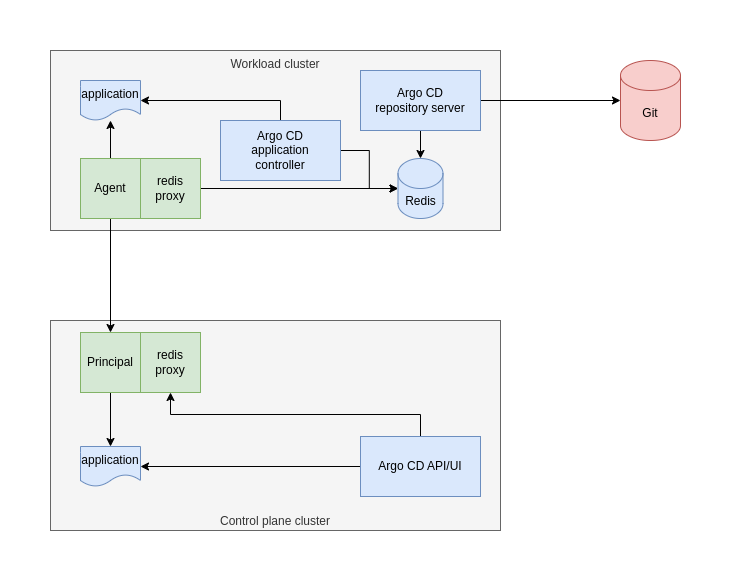
argocd-agent introduces a pull-based architecture where agents on workload clusters initiate connections to a central control plane. This inversion eliminates most traditional multi-cluster pain points while preserving the familiar Argo CD experience.
Key Principles:
Agents Connect Inward: No outbound connections from the control plane
Local Reconciliation: Application controllers run where workloads live
Unified Observability: Single pane of glass for all clusters and applications
Standard Argo CD: Works with vanilla Argo CD installations
Let’s try it, but instead use the cluster we provision, I recommend you to create two Kind cluster by using Kubewekend, or define the own with kind-config.yaml. Following lab Getting Started with Kind, you will setup
Two Individual K8s Cluster will run in different network configuration, to show them can connect and provision application each others. Especially, ensure the connectivity between two individual K8s Cluster
Setup one node as Hub cluster to install ArgoCD for only for centralize, but don’t operate workload, and one node as Spoke cluster to install ArgoCD Agent and workload operation.
PKI and certificate authority to let hub and agent secure connect each other via mTLS, and deploy Principal to open NetworkPolicy for agent traffic.
PKI and mTLS
Before we go directly to use and setup ArgoCD Agent, because I want to show and learn the about core concept with PKI and mTLS, that will help you go cleanly with concept of ArgoCD Agent apply to create the connection between each cluster via mTLS and gRPC.
What is PKI ?
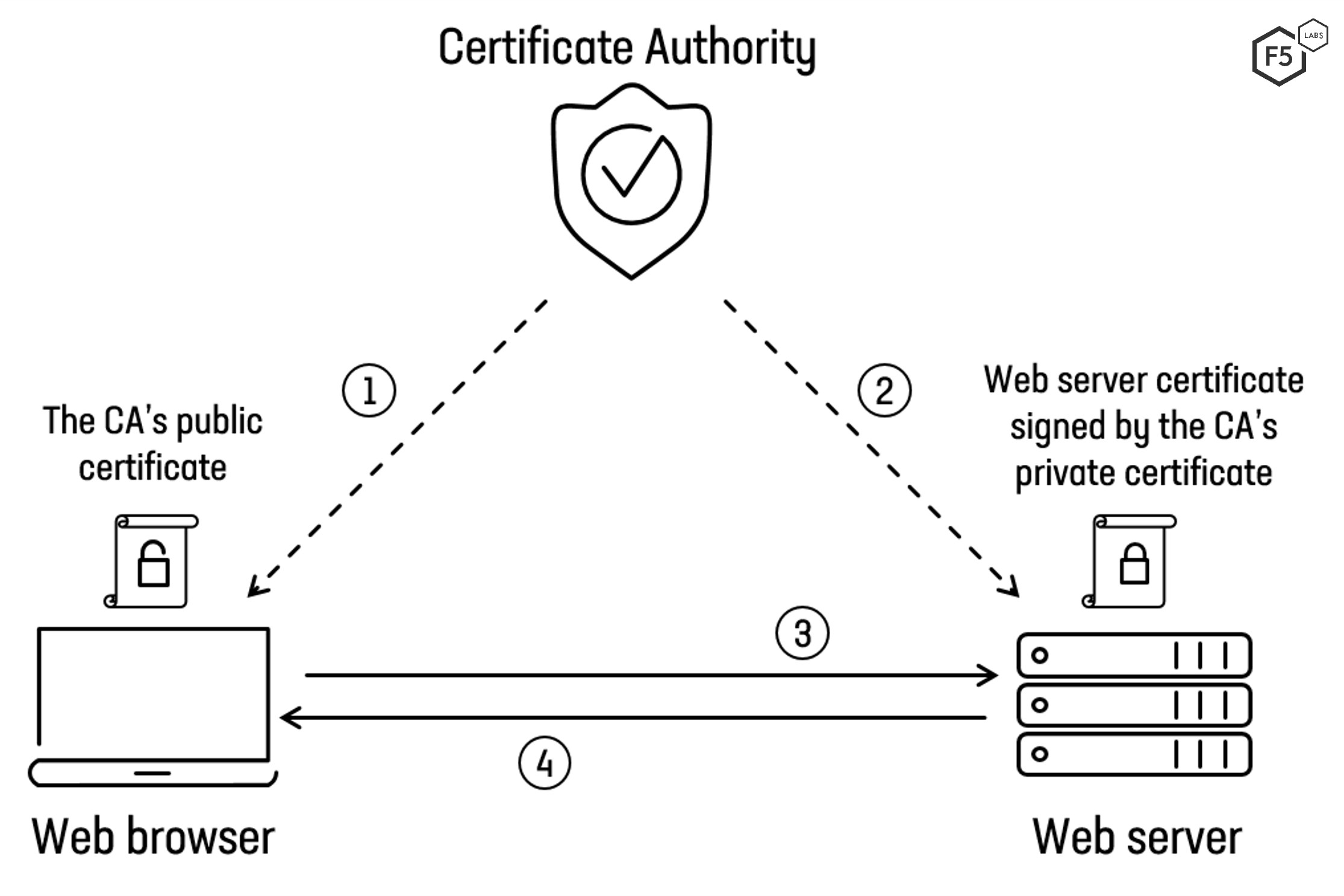
Public Key Infrastructure (PKI) is a framework of cryptographic technologies, policies, and procedures that secures and authenticates digital communications. It relies on asymmetric encryption — using paired public and private keys — and digital certificates issued by trusted Certificate Authorities (CAs) to verify identities online.
PKI underpins everyday internet security, from HTTPS web browsing to email encryption, document signing, and IoT device communication.
What is mTLS?
Mutual Transport Layer Security (mTLS) is a security method where both the client and server verify each other’s identity using digital certificates before exchanging encrypted data. Unlike standard TLS, where only the server proves its identity, mTLS enforces two-way authentication.
The linked between PKI and TLS showed via PKI provide trust and identity system (digital certificates and CA) that TLS uses to authenticate parties and encrypt live connection across a supply chain. In a supply chain—spanning vendors, APIs, logistics systems, CI/CD pipelines, and connected devices—PKI answers “who can be trusted?” while TLS answers “how do we secure this session in transit?”
How they work together
Identity & Trust (PKI): Certificate Authorities (CAs) issue, validate, renew, and revoke X.509 certificates that bind public keys to verified supply chain entities (servers, services, gateways, or devices).
Session Security (TLS): During the TLS handshake, endpoints exchange certificates, verify the trust chain and revocation status, prove possession of the private key, and negotiate symmetric session keys (such as AES) to encrypt data and verify integrity.
Mutual TLS (mTLS): Both client and server present PKI-issued certificates and verify each other. This is widely used for machine-to-machine supply chain traffic (e.g., partner APIs, microservices, and edge/IoT nodes) so neither side can be spoofed.
Open-source public key infrastructure is publicly available. Examples of open-source PKI include the following:
A lightweight, developer-friendly open-source private CA and ACME server that makes practicing mTLS between laptops, Docker containers, or IoT/edge nodes very fast.
You can practice mTLS + PKI with Opensource and CNCF project, you can reference these collaboration
Automated K8s certificate lifecycle & transparent pod mTLS
Low–Medium
step-ca + Nginx/Go/Python
Localhost / Docker
Understanding raw X.509 chains, CSRs, and mTLS handshakes
Low
OpenBao + cert-manager + Istio
Kubernetes
Enterprise external CA integration & dynamic certificate rotation
High
Source: F5 Lab
To easier practice, we will try with openssl to create PKI, and validate connection between Server Key and Client Key to create chain of mTLS, that will reflect machanism when you use argocd-agentctl to generate PKI and setup mTLS to let agent authenticate with principle used gRPC/mTLS.
First we will create private CA who take responsibility to issue both certificate for Client and Server
# Gen key with RSA Algo, or DSA with specific bitsopenssl genrsa -out ca.key 2048# Gen crt with key created aboveopenssl req -x509 -new -nodes -key ca.key -sha256 -days 3650 -out ca.crt \-subj "/CN=Local-Testing-CA"
Next create server-certificate and issue with private CA
# gen server-keyopenssl genrsa -out server.key 2048# gen csr (Certificate Signing Request) from server.keyopenssl req -new -key server.key -subj "/CN=localhost" -out server.csr# Create a config file for the SAN (Subject Alternative Name) extensionecho "subjectAltName=DNS:localhost,IP:127.0.0.1" > server_ext.cnf# Sign the server CSR using your Private CAopenssl x509 -req -in server.csr -CA ca.crt -CAkey ca.key -CAcreateserial -out server.crt -days 365 -sha256 -extfile server_ext.cnf
Next create client-certificate and issue with private CA
# gen client-keyopenssl genrsa -out client.key 2048# gen csr (Certificate Signing Request) from client.keyopenssl req -new -key client.key -subj "/CN=LabClient01" -out client.csr# Sign the client CSR using the same Private CAopenssl x509 -req -in client.csr -CA ca.crt -CAkey ca.key -CAcreateserial -out client.crt -days 365 -sha256
With OpenSSL, it provide built-in s_server and s_client utilities across two separate terminal windows to inspect the handshake live.
Terminal 1: Start the mTLS Server
The -Verify 1 flag (capital V) forces the server to request a client certificate and reject the connection if none is provided or if it isn’t signed by ca.crt
Check the output in both terminals to confirm mutual authentication succeeded:
Check Location
What to Look For
Meaning
Client Terminal
Verify return code: 0 (ok)
Client successfully verified the server’s certificate against ca.crt.
Client Terminal
Acceptable client certificate CA names showing /CN=MyPrivateCA
Server actively requested a client certificate signed by your CA.
Server Terminal
depth=1 CN = MyPrivateCA followed by depth=0 CN = LabClient01
Server received and validated the client’s certificate chain.
Both Terminals
Typing text in one window echoes it in the other
Encrypted application data channel is active.
Negative Test (Optional)
To verify that unauthorized clients are blocked, run openssl s_client -connect localhost:8443 -CAfile ca.crtwithout the -cert and -key flags. The server terminal will immediately reject the handshake with peer did not return a certificate.
Now back a bit about ArgoCD Agent - TLS & Certificate, you can read this documenation to catch up how to setup and manage the PKI for argocd-agent. You can handle to create PKI and setup certificate for Server and Client following many ways
In argocd-agent, the agent (client) always initiates an outbound bi-directional gRPC connection to the principal (server), and mTLS is the mechanism that lets both sides cryptographically validate each other before any state or application traffic is exchanged
Shared Root of Trust (CA)
Both the principal (hub cluster) and every agent (workload/spoke cluster) hold the same public Root CA certificate (argocd-agent-ca secret).
The principal has a server certificate signed by that CA (argocd-agent-principal-tls) with SANs matching its gRPC endpoint DNS/IP.
Each agent has its own unique client certificate signed by that same CA, where the certificate’s Subject Common Name (CN) identifies the agent’s name (e.g., CN=agent-spoke-1).
Outbound Handshake (Agent → Principal)
The agent dials out to the principal over gRPC (agent.creds: "mtls:"), avoiding the need to expose inbound firewall ports on workload clusters.
Server Verification: The agent checks the principal’s server certificate against its trusted Root CA and verifies the server’s DNS/IP SAN to prevent Man-in-the-Middle (MITM) attacks.
Client Verification: Because principal.tls.client-cert.require: "true" is enforced, the principal demands the agent’s client certificate and validates it against the same Root CA.
Identity Extraction & Traffic Authorization
Once the mTLS handshake succeeds, the principal doesn’t just trust the connection—it extracts the agent’s identity directly from the validated X.509 certificate using a regex rule such as principal.auth: "mtls:CN=([^,]+)".
That extracted identity (agent-spoke-1) maps directly to the agent’s namespace and permissions on the hub cluster, ensuring an agent can only sync Applications and events belonging to its own identity.
Over this single authenticated HTTP/2 gRPC stream, the principal and agent multiplex bi-directional synchronization (Applications, AppProjects, and resource proxy requests)
You can follow step by step to setup full two cluster and use argocd-agentctl to bootstrap PKI and setup connection between ArgoCD Hub and ArgoCD Agent
Tools and names
Install kind, kubectl and argocd-agentctl, the project’s command line tool for certificates and agents. Pick the download for your system from the releases page:
Different pod and service ranges keep the two clusters from overlapping. Both Kind nodes join the same Docker network,
which is how the spoke will reach the hub.
The project ships a kustomization that installs Argo CD without the application controller and the ApplicationSet controller. Server-side apply is required because the manifests are large.
:luc_x: argocd-application-controller (runs on workload clusters only)
argocd-applicationset-controller (optional)
Note
The kustomization takes Argo CD from its stable release, so the Argo CD version is whatever stable is today. In the test run it was v3.6.2 (agent v0.11 supports the Argo CD 3.6 stream).
Two settings on the hub’s Argo CD:
kubectl patch configmap argocd-cmd-params-cm -n $NS --context kind-$HUB \ --patch '{"data":{"application.namespaces":"*","redis.server":"argocd-agent-redis-proxy:6379"}}'kubectl rollout restart deployment argocd-server -n $NS --context kind-$HUBfor d in argocd-server argocd-repo-server argocd-redis; do kubectl rollout status deploy/$d -n $NS --context kind-$HUB --timeout=240sdone
application.namespaces: "*" lets Applications live in any namespace.
redis.server makes the API server read live data (resource trees) through the principal’s Redis proxy, which fetches it from the spoke on demand. Without it the hub shows an app’s sync status but fails to show its resources with cache: key is missing.
The principal listens on port 8443. A NetworkPolicy installed with it blocks traffic from outside the hub, so allow the agent’s connection. Then bind to all interfaces, turn on destination-based mapping (an Application names its agent with destination.name) and expose the principal as a NodePort:
The principal’s server certificate must name the address the agent will use: the hub node’s address on the Docker network and the NodePort. The resource proxy (how the hub’s Argo CD reaches the spoke’s live data) gets its own
'admin:login' logged in successfullyContext 'localhost:8080' updatedSERVER NAME VERSION STATUS MESSAGE PROJECThttps://argocd-agent-resource-proxy.argocd.svc.cluster.local:9090?agentName=spoke-1 spoke-1 Successful Agent: 'spoke-1' is connected with principal https://kubernetes.default.svc in-cluster 1.36.4 Successful
The hub’s default AppProject was also pushed to the spoke automatically
kubectl get appprojects -n $NS --context kind-$SPOKE
6. Deploy from the hub to the spoke.
guestbook.yaml is an ordinary Application. The only unusual part is the destination: the agent’s name, not a cluster address.
echo "hub destination: $(kubectl get application guestbook -n $NS --context kind-$HUB -o jsonpath='{.spec.destination}')"echo "spoke destination: $(kubectl get application guestbook -n $NS --context kind-$SPOKE -o jsonpath='{.spec.destination}')"kubectl get pods -n guestbook --context kind-$SPOKE! kubectl get namespace guestbook --context kind-$HUB
hub destination: {"name":"spoke-1","namespace":"guestbook"}spoke destination: {"name":"in-cluster","namespace":"guestbook"}NAME READY STATUS RESTARTS AGEguestbook-ui-5d6468fd55-kc4x6 1/1 Running 0 75sError from server (NotFound): namespaces "guestbook" not found
The hub keeps spoke-1 as the destination: it is how it routes the Application.
The spoke received the same Application with the destination rewritten to in-cluster: for the spoke’s own controller it is simply a local deployment.
The pods exist only on the spoke. The hub never ran them and has no guestbook namespace.
7. The hub can see into the spoke.
The hub’s Argo CD shows live data that lives on the spoke. It asks the spoke through the connection the agent opened, so the spoke’s API server stays private.
argocd app get guestbook
$ argocd app get guestbookName: argocd/guestbookProject: defaultServer: spoke-1Namespace: guestbookURL: https://localhost:8080/applications/guestbookSource:- Repo: https://github.com/argoproj/argocd-example-apps Target: HEAD Path: guestbookSyncWindow: Sync AllowedSync Policy: Automated (Prune)Sync Status: Synced to HEAD (8088f4c)Health Status: HealthyGROUP KIND NAMESPACE NAME STATUS HEALTH HOOK MESSAGE Service guestbook guestbook-ui Synced Healthy service/guestbook-ui unchangedapps Deployment guestbook guestbook-ui Synced Healthy deployment.apps/guestbook-ui unchanged
Get pod logs via argocd
Pod logs are different: they need one more permission, because the agent’s default role cannot read pods/log. Without it the principal logs pods "..." is forbidden: User "system:serviceaccount:argocd:argocd-agent-agent" cannot get resource "pods/log". Grant exactly that on the spoke:
kubectl patch clusterrole argocd-agent-agent --context kind-$SPOKE --type=json \ -p='[{"op":"add","path":"/rules/-","value":{"apiGroups":[""],"resources":["pods/log"],"verbs":["get"]}}]'POD=$(kubectl get pod -n guestbook --context kind-$SPOKE -l app=guestbook-ui -o jsonpath='{.items[0].metadata.name}')argocd app logs guestbook --kind Pod --name $POD --tail 3
After patch the clusterrole in kind-$SPOKE with more pods/log, not it’s available to get log from Hub, instead access into spoke.
Let’s try to use open ArgoCD UI for see what inside at https://localhost:8080 and login with $PW
Info
For inspection and debugging, you will rely more heavily on the argocd CLI (or the Hub UI’s resource proxy) than direct kubectl commands on the Hub, because the actual workloads are not running on the Hub cluster—pod logs and live resource manifests are streamed back from the Spoke over the outbound gRPC/mTLS connection handled by the Principal’s resource proxy.
To wrap up the lab, remember to terminate any background port-forward process running against the Argo CD Hub and delete both KinD clusters to clean up local resources
For a complete overview of the lab and to explore more Argo CD and argocd-agent configurations, check out the full repository at GitHub - Kubewekend.
Conclusion
Conclusion
That wraps up everything I wanted to share in this Argo CD session. With an estimated reading time of well over an hour, this is one of the largest deep-dive posts I have put together—I hope it gives you practical clarity and concrete evidence when choosing patterns and architectures for Argo CD. If any rough edges or typos slipped through, I will refine them in future updates.
A few words of thanks
After spending 3–4 days since last weekend distilling my hands-on experience with GitOps and Argo CD, it is clear how much room there is to grow with GitOps—backed by a massive community and flexible patterns across both Argo CD and Flux. Stay healthy and keep building! Alongside this post, I am also releasing Kubewekend Session Extra 6 covering Istio if you want to explore service mesh networking further. This may be my final standalone technology deep-dive on the channel for this year 2026, as I am shifting 100% of my focus toward refactoring W’xOps IDP and introducing upcoming projects. Thanks for reading, and see you in the next post!